
ibihgblnfolhldgjbikghldfhkgknlpa
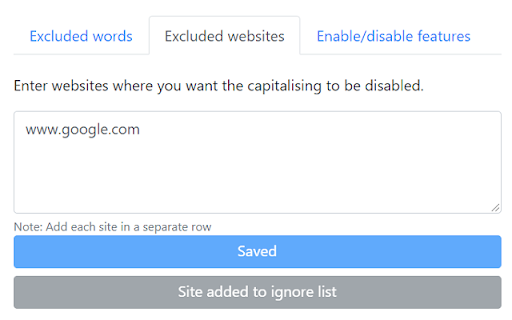
Chromium browser add-on/extension to automatically capitalise the first letter of a sentence in text fields while typing. Browser extension to automatically capitalise the first letter of a sentence in text fields while typing. It also capitalises some words (proper nouns) and has some goodies. Certain sites reset the text change so this extension will not work on them. You can view the list here - https://github.com/hrai/auto-capitalise-sentence?tab=readme-ov-file#exceptions

Read Aloud
Use Read Aloud Chrome Extension for fast text to speech as your screen narrator and voice reader on any webpage 🗣️ Read Aloud Chrome Extension is a powerful text-to-speech tool designed to transform any webpage into clear, natural audio. With this chrome extension read aloud solution, users can enjoy articles, documents, or long pages while multitasking or resting their eyes. This read aloud extension chrome helps improve accessibility and reading comfort for millions of users worldwide. 💡 The read aloud extension for chrome is easy to use and turns any paragraph into spoken content instantly. Whether you need a chrome read aloud extension for studying, working, or entertainment, the tool adapts to your needs. Many people choose the free read aloud chrome extension because it works quickly, smoothly, and without limitations. 📍 chrome extensions read aloud tools are becoming essential for productivity. This google chrome read aloud extension stands out due to its clean interface, stable operation, and compatibility with many websites. It also supports naturalreader text to speech and voice reader modes for enhanced clarity. read aloud a text to speech voice reader chrome extension gives you the flexibility to listen to articles at your own pace. Use this read aloud text to speech chrome extension to turn blogs, research, PDFs, and even emails into audio you can follow effortlessly. 📲 Key benefits of using this chrome extension that will read aloud any webpage text: ➤ smooth text-to-speech generation ➤ clear voice aloud reader mode ➤ support for multiple speeds and voices ➤ ability to read my text from various content sources ➤ compatibility with pdf voice reader features 🌟 Why users choose this read aloud chrome extension Simple interface Natural and stable text-to-speech Support for long reading sessions Works with articles, blogs, PDFs Helps boost productivity 🎧 Extra features included in this read aloud extension for chrome • integration with natural reader text to speech engines • speech to text free tools for added flexibility • support for google speech to text and speech speech to text workflows • automatic detection of text reader content • useful for pdf document reader voice tasks 📘 Many users call it the best read aloud extension for chrome because it merges accessibility and convenience. Others appreciate that it’s also a best free read aloud chrome extension alternative, helping convert text into audio with minimal effort. With this chrome extension read aloud setup, your online reading becomes easier and more enjoyable. 📌 Use cases for the read aloud text to speech chrome extension 1️⃣ studying and note-taking 2️⃣ reading digital books 3️⃣ multitasking while listening 4️⃣ improving focus 5️⃣ learning languages with natural voices ▸ It works great as a voice reader for long documents ▸ Helps transform articles into free text to speech ai audio ▸ Acts as a speech to text app companion for people who switch between reading and dictation 📄 Many users also rely on the google chrome read aloud extension for accessibility needs, especially when dealing with long research documents. Combined with voice aloud reader features, this chrome extension that will read aloud any text becomes an essential tool. 🧩 The read aloud a text to speech voice reader chrome extension integrates seamlessly into your workflow. Whether you use naturalreader text to speech daily or just need a quick text reader for a PDF, this tool handles it with ease. enhances productivity for students and professionals 🧠 This chrome read aloud extension is built for anyone who wants to make digital reading more comfortable. By using chrome extensions read aloud features, your browser becomes a complete audio reading assistant. 📌 What can the read aloud chrome extension do? ➤ It converts any webpage into spoken audio using advanced text-to-speech technology. 📌 Can it read PDFs? ➤ Yes, it works as a pdf voice reader and pdf document reader voice tool. 📌 Does it support natural voices? ➤ Yes, it integrates with natural reader text to speech and naturalreader text to speech engines. 📌 Can it help with eye strain? ➤ Absolutely, the read aloud extension chrome lets you listen instead of reading. 📌 Is it free? ➤ Yes, it works as a free read aloud chrome extension with no hidden fees.

Grammarly: AI Writing Assistant and Grammar Checker App
Grammarly for Chrome helps you write with confidence. Get AI support for grammar, clarity, and tone, from first draft to final edit. Grammarly for Chrome is your always-on AI partner for clearer, more compelling communication. From brainstorming ideas to final edits, Grammarly’s advanced AI helps you write faster and with more confidence. It works across everything you write, whether it’s an email, a school paper, or a business proposal. Advanced AI support you can count on: • Generate one-click drafts to help you start faster • Build outlines to organize ideas clearly • Rewrite sentences for flow, clarity, and engagement • Adjust tone and word choice for any audience • Check originality with built-in plagiarism detection and AI content safeguards And now, with Superhuman Go, you can go beyond writing. Go works alongside you in Chrome to streamline tasks and minimize interruptions—combining Grammarly’s trusted AI writing support with tools that help you stay focused and productive. Currently available as an opt-in beta, Go can be enabled directly from your Chrome extension settings. ➤ How it works Grammarly integrates directly into your browser, offering real-time suggestions as you type in Gmail, Google Docs, LinkedIn, and across 500,000+ other sites. • See corrections and improvements instantly • Expand edits to learn the “why” and strengthen your skills • Stay focused with Go, the AI assistant that understands what you’re working on and offers proactive support Free – Essential tools for confident writing: • Grammar, spelling, and punctuation corrections • Suggestions to improve clarity and tone • Auto-citations in APA, MLA, and Chicago style • AI help to brainstorm, draft, and rewrite • Sentence rewrites for clarity, flow, and engagement • Tone, formality, and word choice enhancements • Audience insights to guide how your message is received • Feedback tailored for academic, technical, or professional work • Plagiarism detection and AI content checks • Team features like style guides and tone profiles (for business users) “Grammarly rightfully touts itself as more than a simple spell checker ... Grammarly has a generative AI tool that helps you build outlines, brainstorm ideas, and even generate text.” —CNET “Grammarly’s advanced AI suggestions go beyond simply flagging grammatical mistakes to offer intelligent suggestions for improving clarity, tone, and conciseness for whatever you’re writing.” —Tom’s Guide “The beauty of this tool is that it uses AI to exemplify how your work can be enhanced rather than doing it for you.” —ZDNet • Desktop app: Use Grammarly in Word, Outlook, Slack, and more by downloading Grammarly on your desktop → www.grammarly.com/desktop • Docs: Grammarly’s dedicated writing space for deep focus and strategic insights → www.grammarly.com/docs ➤ Privacy and security you can trust Your data privacy and security are at the core of everything we do. Learn more about our user-first approach to trust and safety: www.grammarly.com/trust California residents, please see the California Privacy Notice: https://www.grammarly.com/privacy-policy#sectionSingleColumn_47y4NWiOf89wt12wcc6a74 By installing the extension, you agree to and acknowledge:

Protect text
Use Protect Text — a Chrome extension to store secure notes and passwords. Encrypt text in the notepad directly in the browser! Introducing Protect text — a powerful Chrome extension designed to give you absolute control over your private notes, confidential information and passwords. If you’ve ever needed a secure way to keep sensitive notes safe and encrypted, this is the tool for you. Say goodbye to standard notes on your PC, insecure notepads, and outdated methods of securing your files. With Protect text, you can protect and encrypt directly in your browser with ease. 🛡️ What is Protect text? Protect text is a versatile Chrome extension that combines the simplicity of a digital notepad with the security of a password vault. It’s the most secure notepad, allowing you to create, store, and manage secure notes that are encrypted locally on your device. Whether you’re writing personal notes, sensitive information, or drafting confidential business plans, you can rely on this tool to keep your data safe. 📄 Why Choose Protect text? This isn’t just another notepad offline tool. It’s built to safeguard your data using text encryption AES (Advanced Encryption Standard), one of the most trusted encryption methods in the world. Whether you’re jotting down quick reminders, login credentials, or securing sensitive documents, this extension provides unmatched text protection on your gadgets. Top Features of Protect text: ◉ Best Encryption: The extension uses AES encryption to ensure that all your notes are protected. ◉ Local Storage: All data stays on your device. No third-party access to your encrypted notes or password txt files. ◉ WebCrypto API: The extension uses the browser’s built-in cryptography for seamless, faster performance without external libraries. ◉ Key Size: The tool uses AES encryption with 256-bit keys, allowing you to choose your desired level of security. ◉ Easy to Use: You don’t have to be a tech expert to use protect text. Its intuitive interface makes encrypting/decrypting notes a breeze. ⚙️ How It Works: Protect text is as simple as it is secure. Here’s a step-by-step guide on how to get started: • Install the extension from the Chrome Web Store. • Open the extension and create your first secure note. • Enter your note and click the encrypt button. • Your note will immediately be encrypted, stored locally with AES protection. • Whenever you need access to a protected.text file, simply enter your password to unlock it. Who Will Benefit from Protect text? 🔸 Freelancers: If you work on confidential projects, protective text helps you store your sensitive information safely. 🔸 Students: Organize your notes and assignments with encrypted notes. Store your notes and ensure that only you can access them. 🔸 Professionals: If you’re in an industry that deals with confidential client information, it guarantees your notes are stored well. 🔸 Everyday Users: Whether you want to store login details, make quick protected notes protect notes, or this extension has you covered. 🔒 Why Security Matters Encryption has been adopted worldwide because of its ability to provide robust security, and protect text leverages this to offer unmatched security for your encrypted note files. ➡ AES Encryption: AES is recognized as a gold standard in encryption. Once your note is encrypted, it stays that way unless you unlock it. ➡ No Cloud Storage: Since protect text relies on local storage, your encrypted notes stay on your machine, away from online vulnerabilities. ➡ Safety Browser with Protected Extension: You can save encrypt text file directly in the browser. ➡ Credential Manager: Use Protect Text as the secure storage for your important data. Frequently Asked Questions: 📌 Q1: How do I protect a note with a passcode? • Simply write your note, set your desired password. Your note will be converted into an encrypted text file that only you can unlock. 📌 Q2: Can I use this tool offline? • Yes! Protect text is a notepad offline tool that stores everything locally, so no internet connection is needed. 📌 Q3: Is it free? • Yes, protecte text is free to use, offering all its powerful encryption features without any cost. 📌 Q4: Does it work on Mac? • Absolutely - protcted text is a Chrome extension. it works across all platforms, including Mac. This extension works on any system running Chrome. 📜 Conclusion Protect text is more than just a text notes tool. It’s your personal secure text vault, offering high-level security without compromising ease of use. Whether you need to write down a quick note, store sensitive passwords, or ensure your important data remains private, this extension is your go-to solution.With its easy-to-use interface, local storage, and robust encryption, proceted text provides the perfect balance between functionality and security. Download protectted text today! Make secure notes, encrypted credentials, and protected text.

Auto Clicker Free Chrome Extension
Powerful auto clicker & form filler for web tasks & games like Travian. Schedule clicks, fill forms, and automate your strategy. Easy right-click setup. Tired of repetitive web tasks? Need to manage your empire in games like *Travian* while you're away? Meet the Auto Clicker Free Chrome Extension, your personal web automation powerhouse designed to save you time and supercharge your productivity. This is more than just an auto clicker; it's a smart, flexible tool that lets you schedule any sequence of actions on any website. From automatically clicking buttons at a specific time to filling out complex forms and refreshing pages, our extension handles the boring stuff so you can focus on what matters. --- Why Choose Us? The Power of Simplicity Unlike other automation tools, we are built for everyone. Our revolutionary right-click menu makes creating tasks incredibly simple. Just right-click on any element—a button, a link, or an input field—and tell the extension when to act. No coding required! * 🤖 Advanced Task Scheduler: Don't just click, automate! Schedule tasks to run at a specific time of day (HH:MM:SS) or at regular intervals (e.g., every 5 minutes). Perfect for automatically refreshing a page or checking resources. * 🖱️ Multi-Action Support: Go beyond simple clicks. Create rules that can Click, Fill forms, or Refresh the page. * ✨ Simple Right-Click Setup: The easiest way to create automation rules. Right-click any element on a page and select "Set as 'Click' Target" or "Set as 'Fill' Target" to instantly capture it. * 📂 Organize with Groups: Keep your tasks tidy with collapsible groups. Create groups for different websites or workflows (e.g., "Work Reports," "Game Villages," "Social Media"). * 🔄 Smart Tab Management: Is the target page closed? No problem. If the extension can't find a matching tab, it will automatically open the page for you before running the task. * 📤 Import & Export per Group: Back up your precious workflows or share them with friends. You can export and import individual groups as .json files, making it easy to transfer your setups. * 📊 Detailed Logging: Wondering if a rule ran? The built-in log viewer shows you the exact time of every execution, its status (success/error), and detailed error messages to help you troubleshoot. * 💪 Full Management: Rename groups, delete rules, and enable/disable any task with a single click. You are in full control. Perfect For: * ⚔️ Strategy Gamers: Players of browser games like Travian, OGame, and similar titles who need to schedule resource collection, troop movements, or construction queues while away from the computer. * 💼 Professionals who fill out the same web forms and reports daily. * 🕵️ QA Testers who need to run repetitive test cases on web applications. * 📈 Data Entry specialists who want to reduce manual input and errors. * Anyone who wants to save time and avoid boring, repetitive tasks on the web. Your Privacy is Our Priority. All your rules and data are stored locally on your browser and are never transmitted to any server. Install the Auto Clicker Free Chrome Extension today and automate your world! ## History ## ----------------------------------------- Version:1.0.1 - Random intervals have been added. Repeats will occur at random minutes. - When interval or random interval is selected, a new task will be added immediately after the first task is added. - Labels have been added to rules. Rule tracking has been made easier. - Dark and light theme options have been added. These are available on the Options page. - Design fixes have been made.
