
iapdhjddhilcdflnlpaklgohgmcaennf
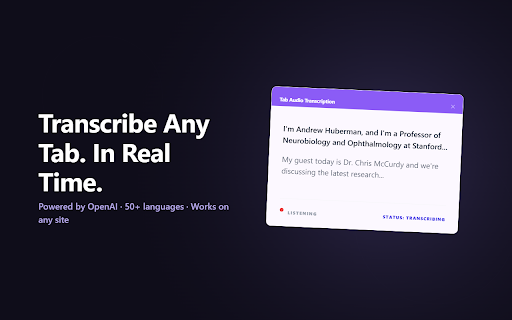


Real-time transcription of any browser tab audio — meetings, videos, podcasts, and lectures to text TranscribeAudio is a Chrome extension that captures audio from any browser tab and transcribes it to text in real-time. A floating overlay displays the transcription on your screen while you continue working. TranscribeAudio is compatible with any website with audio in Chrome. TranscribeAudio works with any language that is spoken clearly in the audio. --- How to Use TranscribeAudio? 1. 📥 Install TranscribeAudio from the Chrome Web Store 2. 📌 Click the puzzle piece icon in Chrome and pin TranscribeAudio to your toolbar 3. 👤 Create a free account at transcribe-audio.com 4. 🔑 Click the TranscribeAudio icon and log in 5. ▶️ Press "Start Transcription" on any tab with audio 6. 📝 A floating overlay appears with live text as audio plays 7. ⏹️ Click "Stop" or close the overlay when you are done --- Use TranscribeAudio For: ★ 📄 Taking notes during remote meetings on Zoom, Google Meet, or Teams ★ 🎓 Transcribing online classes, lectures, and webinars ★ 🎥 Getting text from YouTube videos, Twitch streams, or podcasts ★ 🌍 Reading along while watching foreign films, anime, or videos with no subtitles ★ ♿ Adding real-time captions to any audio content for accessibility ★ 🎙️ Transcribing interviews, presentations, or research recordings --- 🔒 Privacy & Security TranscribeAudio does not record or store your audio. Your conversations stay private and are never saved on our servers. --- ▶️ How to Transcribe a Meeting with TranscribeAudio - Join your Zoom, Google Meet, or Microsoft Teams meeting in Chrome - Click the TranscribeAudio icon in your toolbar and press "Start Transcription" - A floating overlay will appear on your screen showing the live transcription - You can drag the overlay anywhere on your screen or resize it - When the meeting ends, click "Stop" or close the overlay - No bot or extra participant joins your meeting --- 🎥 How to Transcribe Videos and Podcasts with TranscribeAudio - Open YouTube, Twitch, Coursera, or any website with audio or video - Click the TranscribeAudio icon and press "Start Transcription" - Play the video or audio — text appears in real-time on the floating overlay - Pause or stop the transcription whenever you want 🌍 How to Use TranscribeAudio for Language Learning - Open a movie, anime, TV show, or video in a foreign language in your browser - Click the TranscribeAudio icon and start transcription - Read along as the audio plays — the floating overlay shows what is being said - TranscribeAudio works even when videos have no subtitles or only auto-generated ones ❓ Why Transcribe Audio from Your Browser? Taking notes by hand during a meeting or lecture means you miss parts of what is being said. Rewinding a video to catch something you missed takes time. TranscribeAudio solves this by showing you the spoken words as text in real-time, so you can focus on listening and understanding instead of writing. 👥 Who Uses TranscribeAudio? TranscribeAudio is used by students who need notes from online lectures, remote workers who want a record of their meetings, language learners who watch foreign content without subtitles, content creators who transcribe interviews and podcasts, and anyone who needs real-time captions for accessibility. 📌 Key Features of TranscribeAudio ★ Real-time transcription of any browser tab audio ★ Floating overlay that stays on top of your screen while you work ★ Drag and resize the overlay to fit your workflow ★ Works with Zoom, Google Meet, Microsoft Teams, and any website ★ No bot or extra participant joins your meetings ★ One-click start and stop ★ No audio recordings stored

Audio Transcription & Live Interpreter
Real-time transcription, live translation, and speech-to-speech playback for browser audio. Includes Subtitle TTS for videos. Audio Transcription is a powerful extension that turns your browser into a real-time interpreter. It captures any audio playing in a tab (transcribing it via Whisper AI) or reads existing video subtitles, translates them live, and reads the results back to you via Text-to-Speech (TTS). 🌟 Designed with privacy and efficiency in mind, it is optimized to run smoothly on low-resource computers and operates as independently from cloud services as possible. Compatible with Linux, Windows, and macOS, this extension acts as a true Live Interpreter for any media stream. • 🎬 Subtitle TTS Mode: Read aloud and translate existing subtitles from YouTube, Twitch, or any HTML5 video without needing a local server. • 🌐 Source Language Control: Rely on smart auto-detection, or manually select the subtitle language for maximum accuracy. • 🗣️ Real-Time Speech-to-Speech: Listen to live translations with a natural, fluid voice that buffers complete sentences for a seamless experience. • 📝 Live Audio Transcription: Fast and accurate transcription from scratch using your local machine's processing power with OpenAI's Whisper AI (WhisperLive server required). • 🤖 Instant Translation: Translate live text using Google Translate (free) or the latest Google Gemini (Flash-Lite) & Gemma 4 AI models. • 🖼️ Flexible UI Modes: View transcripts in a floating overlay or a dedicated Standalone popup window. • 🛡️ Total Privacy: Local audio processing and transparent open-source code. The Subtitle TTS mode works completely out-of-the-box. However, to use the advanced "Live Audio Transcription" feature, you must run the local WhisperLive server on your computer. Get the server scripts and detailed setup instructions at: https://github.com/antor44/Audio-Transcription This is a free and open-source project distributed under the GNU General Public License v3.0 (GPL-3.0). For more details, visit the GitHub repository. --- 🆕 WHAT'S NEW IN VERSION 3.1.0: • 🎤 Smart TTS: The voice engine now intelligently waits for sentence boundaries (periods), creating a much more natural and less choppy listening experience. • ⭐ Language Selector: Added an optional 'Source Language' menu in Subtitle TTS mode to fix auto-detection edge cases. • 🤖 AI Update: Cleaned up deprecated models and added support for the new Gemma 4 generation. • 🐞 Bug Fixes: Fixed initial auto-detect hangs, stopped short phrases from being skipped, and fixed the "Stop" button state when tabs are closed.

ScreenApp - Record and take AI notes of meetings, videos, calls & lectures
Easily record your screen and audio with ScreenApp. Take AI Notes and summaries of any recording. ScreenApp. Transcribe audio and screen content right from your browser or any URL. Perfect for capturing notes and summaries from lectures, meetings, webinars, podcasts, and beyond. What it does: - Records and uploads to the cloud instantly - Turns audio and video into text. - Works seamlessly in your browser: no downloads needed. - Pulls in content from web links. - Simplifies note-taking from any source. - Creates concise summaries effortlessly. Why you’ll love it: - Saves time with instant transcription. - Keeps everything organized in one place. - Makes sharing a breeze. How it works: 1. Add ScreenApp to your browser. 2. Start Recording 3. Save and process with AI 4. Chat and Summarize

VocaScript
AI-powered transcription for audio and video. Convert speech to text with timestamps and speaker detection. • One-Click Transcription – Click the extension icon on any video page, and VocaScript handles the rest. No copy-pasting links. • Translate to Any Language – Get transcripts in English, Spanish, French, German, Japanese, Chinese, Arabic, and many other languages. •Smart Speaker Detection *Experimental* – Automatically identifies and labels multiple speakers (Speaker 1, Speaker 2, etc.). • Universal Access – Use your active browser session to seamlessly transcribe media from sources that require authentication, such as age-verified content or platforms you're logged into. • Export Options – Export transcripts as .TXT (with or without timestamps) or .SRT subtitle files for use in video editors. • 100% Private – No data is sent to third-party servers. The extension only communicates between your browser and the VocaScript app. 🌐 Works With all of the popular media hosting platforms and more. This includes : YouTube, TikTok, Spotify, SoundCloud and thousands more. 🎯 Perfect For: • Anyone that wants a quick way to understand any audio or video from their own or a foreign language • Students transcribing lectures • Researchers analyzing interviews • Content creators repurposing videos • Journalists documenting sources • Language learners studying media • Accessibility advocates creating captions 🔒 Privacy First: VocaScript does not collect, store, or transmit your personal data. Cookies are used only to securely authenticate media processing. They are never stored and are deleted immediately after use. See our Privacy Policy for details. 1. Install the extension. 2. Navigate to any video page. 3. Click the VocaScript icon. 4. Your transcript is ready in minutes.

Notta: AI Meeting Notetaker & Audio Transcription
Instantly capture and transcribe audio from any browser tab or Google Meet into accurate, actionable text with Notta. 1. Record and transcribe audio/meetings in 58 languages. 2. Record up to 5 web pages simultaneously. 3. Summarize YouTube videos with one click. 4. Timestamp and comment on key moments. 5. Create snippets to share essential information. 6. Share and export transcripts to CRM, Notion, Slack, and Zapier. 7. Centralized meeting notes depository. Join over 4 million users who have streamlined their virtual meetings with Notta. Say goodbye to tedious note-taking and embrace a more productive meeting experience! 🔒 Security & Privacy Notta adheres to international standards, ensuring user privacy and data protection, compliant with GDPR and SOC2 Type II certified. Want to learn more about the features? Visit our website at https://www.notta.ai/en Or email us at support@notta.ai for feedback.
