
iakofinpaidelmiljemlbnfijkdmeeaj
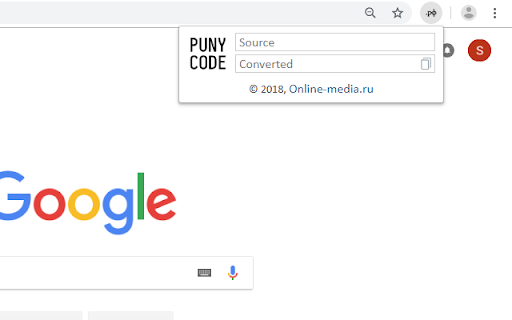

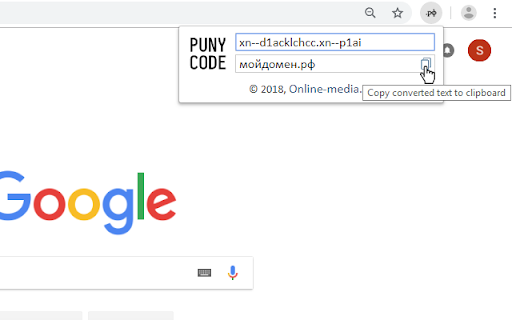
Helper for convert to/from PunyCode Little helper for quick convert text from/to PunyCode. Thanks for nice code: - https://github.com/bestiejs/punycode.js - https://clipboardjs.com/

SuprForms
Convert your Google Forms to interesting WhatsApp conversations Bringing your forms to life In today's fast-paced business world, collecting feedback is more important than ever. As customers increasingly turn to their smartphones for everything, it's essential for businesses to have a mobile-friendly way to collect feedback. This is where SuprForms comes in. SuprForms is a cutting-edge service that helps businesses convert their Google Forms into WhatsApp conversations, making it easy for customers to provide feedback quickly and easily. This innovative service offers a number of benefits over traditional Google Forms, including: 1. Increased user-friendliness: SuprForms makes it easy for customers to provide feedback, as they can simply message their thoughts and opinions directly on WhatsApp. This is a much more intuitive process than filling out a form on a website. 2. Increased mobile-friendliness: With SuprForms, businesses can collect feedback on the go, as customers can provide feedback directly from their smartphones. 3. Real-time communication: SuprForms allows businesses to respond to customer feedback in real-time, which can help to build trust and improve customer satisfaction. 4. Personalization and segmentation: SuprForms allows for easy personalization or segmentation of feedback, making it easier for businesses to analyze and act on the feedback they receive. 5. Analytics: SuprForms provides analytics on the feedback received, making it easier for businesses to track progress and make informed decisions. 6. Cost-effective: SuprForms is a cost-effective solution compared to developing a similar solution in-house. If you're looking to collect user feedback in a more user-friendly and mobile-friendly way, SuprForms is the perfect solution. With its many features and benefits, it's no wonder that more and more businesses are turning to SuprForms to collect customer feedback. Give it a try today and see the difference it can make for your business!

Recent Tabs Master
Switching to previous active tabs through the list of recent tabs, complementing the Recent Tabs Forward, Recent Tabs Fast Forward "Recent Tabs Master" is a Chrome extension designed to enhance your browsing experience by allowing you to seamlessly switch between the most recently opened tabs in a most recently used manner. This tool is perfect for users who frequently work with multiple tabs and need a more efficient way to navigate through them. Works together with "Recent Tabs Forward" and "Recent Tabs Fast Forward" extensions, install it to have backward and forward switching functionality from the browser's toolbar. Features: - Backward Navigation: Use this extension icon or a keyboard shortcut (Ctrl+Y) to switch to the previous tab. - Forward Navigation: Use a keyboard shortcut (Ctrl+Shift+Y) or appropriate context menu item to move forward in your tab history list. Install the "Recent Tabs Forward" extension to do it from the tool bar. This separate extension adds another icon to the Chrome toolbar for forward navigation, and can be activated with Ctrl+Shift+Y. - Fast Forward Navigation: Use a keyboard shortcut (Ctrl+Shift+F) or appropriate context menu item to move forward to the first tab that was active when you first used "Recent Tabs Master". Install the 'Recent Tabs Fast Forward' extension to do the fast forward switching from the tool bar. Installation 1. Click "Add to Chrome" for this extension. 2. Search for "Recent Tabs Forward" and "Recent Tabs Fast Forward". Or use direct links: - Recent Tabs Forward - https://chromewebstore.google.com/detail/recent-tabs-forward/dpnndineanlmfogoccoffnbljfcpebol - Recent Tabs Fast Forward - https://chromewebstore.google.com/detail/recent-tabs-fast-forward/kdiokjemgpcccpfemfcbkhfddjjmipfb 3. Click "Add to Chrome" for each extension. 4. Once installed, you will see their icons on your Chrome toolbar. Pin it , if needed to make it visible all time. Customization - You can customize the keyboard shortcuts via Chrome's extension settings if the default ones conflict with other shortcuts you use. Enjoy a more streamlined and efficient browsing experience with "Recent Tabs Master", "Recent Tabs Forward" and "Recent Tabs Fast Forward"!

EngagePro
A proven AI-enabled personal relationship building tool to help you grow trust, get referrals and increase your sales results. Imagine bringing the people you connect with in LinkedIn into a simple tool where you can easily turn them into trusted relationships, great new leads, clients, referrals and even team up in helping each other better achieve their goals. Welcome to EngagePro! We’re an easy to use application that’s built on the principle that people want to work with and do business with those who they know, like and trust. Today, we believe it’s time for what we call a “relationship reset” where we recognise that people in communities where the “bridge of trust” has been built will best achieve the results they want. Everywhere, professionals of all types repeatedly tell us how challenging it is to gain new clients. They say their ability to have meaningful conversations with the people who could use their services is being obstructed by increased online noise and digital marketing of all kinds. We make contact and immediately we are flooded by sales automation, bots, funnel marketers, and all kinds of unwanted messaging seeking to break into our space. It’s common that the people we could help the most have put up barriers from the noise, thus preventing us from reaching them. More we hear so much about the digital overwhelm people experience and the inefficiencies of traditional marketing that it’s now time to return to what has always worked. We believe the only sustainable solution to these issues comes by building highly engaged, focused, personal relationships with a small group of people who are committed to working together to help each other grow. We’ve proven that doing this, systematically and repeatedly, leads to many doors and opportunities opening that we’re previously closed. With this focus, you can break through the chatter and produce a continuous flow of new, high-quality introductions, referrals, and sales. This extension was created to do just that! It’s a simple software tool built on the timeless foundations that say when you approach relationship building by focusing first on creating a “bridge of trust,” then purposeful problem solving and needs focused conversations easily follow. More as you build these relationships with a few, you set yourself apart in your marketplace and become a scarce, attractive force, creating personal influence, and drawing people and opportunity towards you. With this app, it’s clear that by investing just 10-15 minutes a day doing the right things to attract people into close, committed, “engaged” personal relationships, they’ll respond and become clients, referrers, and powerful advocates for you. The process begins with selecting a few people to focus on from your networks or from people you connect with online. Then, it automates keeping in touch on a consistent schedule that builds “top of mind” awareness and starts the trust-building cycle. Important in this cycle is the commitment on making each contact one that concentrates on the other person’s goals, interests, hobbies, family, etc. The extension has a unique AI-enabled tool that serves up information on each person’s interests to use conversationally in a user’s communications. Showing you care about the person’s interests first, always leads to the doors of trust opening and more substantive discovery and collaboration then can happen. In bringing this Chrome extension to you, we’re helping you to bring the people you meet or follow in LinkedIn into the EngagePro tools where you can personalise your conversations, better schedule and automate staying on track with the engagement building steps and achieve the results you’re seeking. Just imagine never having to worry about where your next new client is going to come from. Or imagine, never letting the important people or clients you’ve already served slip away “through the cracks” of your busyness. Or think about how valuable it would be to now bring the people you’re connected with or following in LinkedIn into an easy to use relationship focused, success building tool. That’s EngagePro!

Comma Inserter for SOQL
Insert normal and inverted commas in salesforce SOQL IN clause with 1 click! Format your multiple items with inverted comma , normal comma for using in your salesforce SOQL query IN Clause. for example, below lines are the values you want to pass into your SOQL IN Clause.
