
iakbigamfigklghcfekpnibibcomlbof
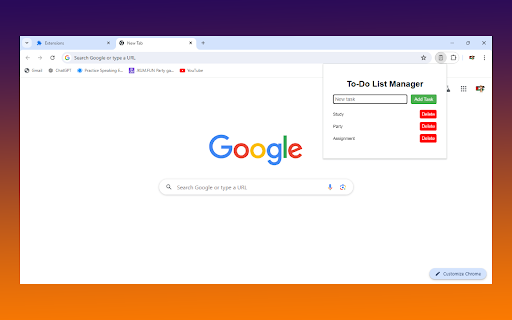
Stay organized and productive with the To-Do List Manager! ✅ Keep track of your tasks effortlessly with our simple and user-friendly Chrome extension. Perfect for daily tasks, project management, or just keeping your life in order! 🌟 Add Tasks Quickly: Type your task and hit "Add Task" to save it. 🚀 Simple Interface: Clean and intuitive design for a seamless experience. 🎨 Offline Support: Manage your tasks even when you’re offline. 🌐 Storage Sync: Your tasks are saved locally in your browser’s storage. 💾 Delete Tasks Easily: Remove completed or unwanted tasks with a single click. 🗑️ How to Use: Install the extension and click the To-Do List Manager icon in your toolbar. 📌 Type your task in the input box and click "Add Task." 🆕 View and manage your tasks in the list. 📋 Delete tasks by clicking the "Delete" button next to each task. ❌ Take control of your day and never miss a task again with To-Do List Manager! 🌟 Get Started Now! Download the To-Do List Manager and boost your productivity today! 💪

TaskDrift
TaskDrift — A beautifully simple task manager with smart capture, reminders, themes, history and backup support. 🚀 Organize Your Day, Stay Ahead & Get More Done! TaskDrift is your all-in-one productivity companion, beautifully designed for Chrome. Experience effortless task management, smart reminders, encrypted cloud sync, and a vibrant, customizable interface — all while keeping your data private and secure. 📝 Quick Task Entry — Add tasks with due dates, times, priorities, categories, and rich descriptions. Choose between compact or expanded input styles. 🧠 Smart Date Parsing — Just type naturally! "Meeting tomorrow at 10am" or "Lunch 14 Feb" and TaskDrift automatically sets the date and time. 🔄 Recurring Tasks — Set tasks to repeat Daily, Weekly, or Monthly. Completing one automatically schedules the next. 🏷️ Custom Categories — Create, rename, and manage your own categories. Filter tasks instantly with one-click category pills. ⏰ Smart Reminders — Get timely Chrome notifications with customizable lead time (1–120 minutes). Never miss a deadline! ☁️ Encrypted Cloud Sync — Optionally sign in to sync tasks across all your devices. Your data is protected with AES-256 end-to-end encryption — only you can read it. 🎨 7 Beautiful Themes — Light, Dark, Ocean, Sunset, Mint, Rose, and Night. Pick the one that fits your mood. 📊 Productivity Dashboard — Track your completion rate, current streak, tasks by priority, and a 7-day completion history chart. 📅 Task History — Review, restore, or permanently delete completed tasks. Full control over your data. 🔃 Backup & Restore — Export all tasks and history as CSV. Import them on any device to pick up where you left off. 🖥️ Full Page Mode — Expand to a spacious, distraction-free tab view for focused task planning. 🖱️ Right-Click Capture — Select any text on a webpage, right-click, and choose "Add to TaskDrift." 📐 3 Popup Sizes — Small, Medium, or Large — resize the extension popup to your preference. 🔗 Works with My Canned Notes Pro — Uses the same account for seamless cross-product productivity. • No ads, no tracking — your productivity is not a product. • Works fully offline — cloud sync is optional, not required. • Fast, intuitive, and visually engaging. • Perfect for students, professionals, and anyone who wants to stay organized. TaskDrift requests the following permissions — each is essential for a specific feature: • storage — Save your tasks, settings, and history locally on your device. • notifications — Show reminder alerts when a task is due. • alarms — Schedule reminders to fire at the right time, even when the popup is closed. • contextMenus — Add the "Add to TaskDrift" option in your right-click menu. • activeTab — Read selected text on the current page when you use the right-click or keyboard shortcut to capture a task. • scripting — Enable the keyboard shortcut (Ctrl+Shift+Y) to capture selected text from any page. • Host access (supabase.co) — Securely sync your encrypted tasks to the cloud when you choose to sign in. No data is sent without your explicit login. 🎁 Ready to Supercharge Your Productivity? Install TaskDrift now and experience a smarter, more colourful way to manage your day! [3.4.0] - 2026-04-05 • Cloud Sync — Encrypted cross-device task synchronization with merge/replace conflict handling. • Custom Categories — Add, rename, and delete your own categories with filter pills. • End-to-end AES-256-GCM encryption for all synced data (tasks, history, categories). • Shared authentication with My Canned Notes Pro. • FAQ page updated with sync, category, and encryption info. • Improved sync status UI with real error reporting. • Bug fixes: sync reliability, tombstone merge logic, session token refresh. [3.3.0] - 2026-03-15 • UI Style toggle — Choose between Compact and Expanded task input. • Productivity Dashboard with completion charts and streak tracking. • Category filter bar above task list. [3.2.0] - 2026-02-15 • Cross-product account integration with My Canned Notes Pro. • Profile panel with sync status and account details. • Merge/Replace conflict modal on first login sync. [3.1.0] - 2026-01-31 • Smart Date Parsing — Automatically detects dates and times in task text. • Recurring Tasks — Daily, Weekly, or Monthly repeat options. • Context Menu — Right-click to add selected text as a task. • Keyboard Shortcut — Ctrl+Shift+Y to quickly capture tasks. • Productivity Dashboard — Visual charts for completion history and priority distribution.

To-Do List
Organize effortlessly with our To-Do List. Edit tasks, set priorities and search instantly. Enjoy dark mode and features - for FREE! Transform your productivity with our advanced To-Do List Chrome extension – now even more powerful with the latest v1.1 update. What's New in v1.1: • Priority-Based Sorting – Tasks are now auto-sorted from High to Low priority for better focus. • Real-Time Search – Find tasks instantly as you type, no button press needed. • Confirmation Popups – Clean, consistent popups prevent accidental deletes or completions. • Dynamic Button States – Action buttons (Delete All, Complete All) auto-enable only when tasks exist. Core Features: • Task Management – Quickly add, edit, and delete tasks to stay organized. • Priority Levels – Set task priorities to stay focused on what matters most. • Progress Tracking – Visual indicators show how many tasks are complete. • Dark Mode – Seamless toggle for low-light environments. • Lightweight & Intuitive – Fast, minimal UI with no clutter. Designed for efficiency and simplicity, this extension helps you stay on top of your tasks without distractions. 👉 Download now and experience the upgraded productivity power of our To-Do List Chrome Extension!

Easy To-do
Easy To-do is a simple task management app that let's you add & manage tasks easily. This extension lets you manage your daily tasks and reminders quite efficiently, without having to worry about a lot of productivity apps stuck on your head. To get started, simply type in a task, choose a priority and click add. Done!

To-Do List for Google Chrome
The BEST To-do List Extension Organize Your Day with The Best To-Do List - A Simple, Intuitive Task Manager The Best To-Do List is your essential tool for organizing tasks, managing your time, and staying productive. With a sleek design and easy-to-use interface, this Chrome extension is perfect for tracking daily tasks, work projects, or personal goals – all in one place! ➤ Why Choose The Best To-Do List? - Simple & Intuitive: Quickly add, edit, and mark tasks as completed in a clean, user-friendly interface. - Quick Access: Access your to-do list right from the browser toolbar – no need to open a separate app. - Task Prioritization: Drag to sort tasks by priority to ensure you focus on the most important items. - Dark and Light Mode: Choose between dark and light themes for a comfortable viewing experience anytime, day or night. ➤ Key Features - Add & Organize Tasks: Easily add tasks, set deadlines, and categorize them to fit your workflow. - Flexible Task Management: Edit, rearrange, or delete tasks as your schedule changes. - Customizable Settings: Personalize the interface and settings to suit your productivity style. - Cross-Device Sync: With Chrome sync, your tasks are available on any device you use. Stay organized and productive with The Best To-Do List – your essential tool for a well-planned day! Add it to Chrome today and start managing your tasks with ease.
