
hpkajgafjlpfhpphfdcadmkkkbeebgpp
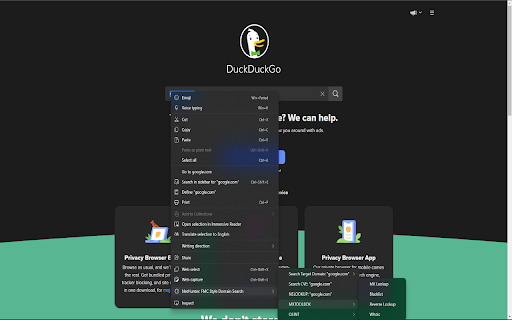
Leverage OSINT APIs Right From Your Context Menu Leverage OSINT APIs Right From Your Chrome Context Menu. Built By Security Researchers For Security Researchers, This Tool Is Designed To Speed Up Response & Research Times By Giving You Quick Access To Popular Security Tools. Directly Research Domains & IP Addresses On Cisco Talos Or Virus Total With A Right Click. Continue To Perform OSINT With Other Popular Tool Integrations, Each Update Adding More & More Functionality. This Tool Is Designed For Research Purposes Only.

FoxyRecon
A Firefox add-on for OSINT investigations FoxyRecon is a Firefox add-on that helps you carry out searching and investigation activities by using over 90 Open Source Intelligence (OSINT) web resources and an internal tool to create graphs supporting the STIX format. Main Features - You can research and analyse your indicators on more than 90 online OSINT resources, by using the popup or the context menu after selecting your indicator. FoxyRecon will detect the type of the indicator you submitted and suggest you the most suitable web resources. - You can harvest and collect all the indicators that are present on the web page you are visiting. FoxyRecon allows you also to download them in CSV file for future analysis. - You can add custom resources to FoxyRecon, for example local tools (e.g.: MISP, OpenCTI and so on) - You can create a graph from the data collected during your investigation analysis. Graphs are based on STIX format to ensure compatibility with other tools. Moreover, FoxyRecon is able to automatically create graphs on the basis of searches you perform via FoxyRecon Some web tools requires some user interactions, such as entering a query and clicking a button to submit it. To perform these actions faster, FoxyRecon will automatically fill input fields on these web pages, with the indicator you are looking for. Currently, FoxyRecon supports the following indicator types: FoxyRecon includes several OSINT web resources. The full list is available on the GitHub repository webpage. Disclaimer Data submitted using this add-on will be sent to external web resources that are not under control of FoxyRecon. For this reason the data submitted will be treated in accordance with the terms of service of the several web resources chosen for analysis. Please, be aware of the tools and resources you are using and do not submit any personal information.

WebInvestigator
Capture screenshots, PDFs, and document web pages for digital investigations with encrypted local storage. WebInvestigator is a professional evidence capture and case management tool for investigators, intelligence analysts, legal professionals, and OSINT researchers. Built for anyone who needs to prove something happened online. Courts reject plain screenshots every day — no timestamp, no source verification, no proof of integrity. WebInvestigator captures web evidence with automatic SHA-256 cryptographic hashing, chain of custody metadata, and full URL and device stamping from the moment of capture. Everything stays on your device. Nothing leaves your machine. ───────────────────────────── HOW IT WORKS ───────────────────────────── Enter a case reference to start your investigation Browse normally — WebInvestigator quietly logs every page you visit with precise timestamps Capture evidence with one click: screenshot, full-page PDF, annotations, or flag for review Add notes, redact sensitive content, and review your complete investigation timeline Generate a professional evidence report with chain of custody metadata — ready to submit or share ───────────────────────────── EVIDENCE CAPTURE ───────────────────────────── → One-click screenshots with automatic URL, timestamp, SHA-256 hash, and device metadata → Save complete web pages as full-length PDFs for offline access and legal archives → Full-page scroll capture — captures content below the fold automatically (Pro) → Screenshot annotations — highlight, blur, draw, and add text labels (Pro) → SHA-256 cryptographic hash generated for every captured file at the moment of capture → Automatic page visit logging throughout your investigation session ───────────────────────────── CASE MANAGEMENT ───────────────────────────── → Named cases with unique reference IDs — keep every investigation separate → Pause and resume cases across sessions — evidence is preserved throughout → Flag important pages for priority review → Per-page notes and case-wide investigation notes → Interactive investigation timeline with filtering and search (Pro) → Evidence redaction for sensitive or confidential content → All evidence organised by case from the moment of capture ───────────────────────────── REPORTING & EXPORT ───────────────────────────── → Professional HTML evidence reports generated automatically → Evidence grouped by domain, timeline, and case reference → Chain of custody metadata included in every export → Full JSON data export for integration with other investigation platforms → Print-ready formatting → One-click export directly from the investigation timeline ───────────────────────────── SECURITY & PRIVACY ───────────────────────────── → AES-GCM encryption for all stored investigation data → 100% local storage — no cloud, no servers, no syncing → No analytics on your investigation activity, no data collection → No third-party access to your cases or evidence — ever → Your investigations belong to you ───────────────────────────── PLANS ───────────────────────────── FREE — 5 investigations per month. Includes screenshots, PDFs, page logging, notes, flagging, and full HTML reports. No account required. No credit card. PRO — Unlimited investigations. Adds full-page scroll capture, screenshot annotations, interactive timeline view, enhanced chain of custody metadata, and priority support. $9.99/month or $99/year. ───────────────────────────── WHO USES WEBINVESTIGATOR ───────────────────────────── → Private investigators — background research, fraud cases, family law, insurance investigations → Intelligence analysts — open source intelligence collection, evidence documentation, source tracking → Law enforcement — OSINT research, preliminary web investigation, evidence preservation → OSINT and SOCMINT researchers — systematic evidence collection with full case organisation → Fraud investigators and analysts — documenting scams, collecting web evidence for reporting → Corporate security and compliance teams — vendor due diligence, internal investigations → Legal professionals — litigation research, web-based evidence for court submissions → HR and workplace investigators — employee misconduct documentation, digital evidence collection → Journalists and investigative reporters — source verification, investigation documentation → Digital forensics teams — chain of custody web evidence capture ───────────────────────────── PERMISSIONS ───────────────────────────── WebInvestigator requests only the permissions it needs to function. All data remains on your device. We have no access to your browsing activity or investigation files. Try it free — no account required, installs in seconds.

OSINT LIAR
Capture what you want, Keep what you need, Build your knowledge tree. Requires the OSINT LIAR app from https://osintliar.com Capture What You Want, Keep What You Need, Build Your Knowledge Tree. This product REQUIRES you to run a self-hosted version of the backend or use a cloud version of the API in order to archive your data. OSINT LIAR is an advanced digital archiving tool and archives the following facts from your digital captures: * Screenshot * MHTML * HTML * Captured on date * Title of the webpage * Url of the webpage * Who did the capture * Digital verification signature Once the capture has been sent to the backend API for storage, advanced algorithms are applied depending upon the origination of your capture. These algorithms can be customized to meet your needs. The algorithms are referred to as Discovery Plugins. The plugins can extract images, links, specific data from elements from the your digital capture. The plugins can also provide recommendations on "annotated" data. The annotations include the ability to identify critical keywords, phone numbers, email, addresses, etc.. and suggests websites that can provide further context to your annotated data pivots. To learn more about the product and how it can help with your digital archival needs visit our website, https://osintliar.com/ , or learn more about what the technical aspects about the product and how it can be integrated with other services or workflow providers go to: https://github.com/osint-liar/osint-liar-docs/wiki Other included features are: * Case Management * Dashboard data visualization * Custom reporting templates * 3rd Party rest integration * Full text search * Data import and export functionality * Imports zip files - it is a crude digital forensics tool, too * SQL API endpoint for writing custom data queries * Autoscroll captures OSINT LIAR is FREE for personal use. It does not require registration to use OSINT LIAR, it just requires this extension and an associated backend API. Change Log [1.8.0] - Added package manager support. Dynamically add web scrapers and OSINT guides as you go. Learn More here, https://github.com/osint-liar/osint-liar-docs/wiki/Package-Manager - Added map, datetime, and recipient icons to dashboard - Added larger tooltip to dashboard icons - Fixed persisting authorization bearer token [1.7.3] - Improved Market place and Classified scraper algorithms [1.7.1] - Fixed SearchText bug - Added Updated By field in the data integrity dialog - Fixed jumping UI bug - Turned Download and Open Live Page off when opening all plugins [1.7.0] - Optimized frontend refreshes - Updated Dashboard icons for consistency - Added Data Integrity table that shows the content's sha hash and file size [1.6.6] - Use Monaco editor for scripting - Easy selector delete on dashboard was added - View audit log for a record - Improved consistency of the UI [1.6.5] - ctrl+shift+s saves a single page - ctrl+shift+z starts autoscroll capture - ctrl+shift+x stops autoscroll capture - disabled highlight selectors

EZR OSINT Sidebar
Conducting online investigations often requires a whole lot of context switching. The EZR OSINT sidebar allows you to conduct analysis and document important information without ever having to leave your browser or switch tabs. Here is some of the information we currently extract: > Images (EXIF Tags, SHA-256 Hash, Reverse Image Search) > Emails (Web Search, Matching Usernames, Google Account Detection) > Phone Numbers (Location, Web Search) > Bitcoin Addresses (Web Search, Transactions, Balance) > Online Accounts (Matching usernames, Web Search) > IP Addresses (Geolocation, Operator Information) The EZR sidebar also makes it easy to document your investigations with: > Screen Recording > Screenshots (Scrolling, Tab, Selection, and Full Desktop) > MHTML Download > Built-in Notepad with export to DOCX Get updates and tutorials at our YouTube Channel: https://www.youtube.com/@EZRIntelligence
