
hpigmiaeankdpoafmfleolailbekciae

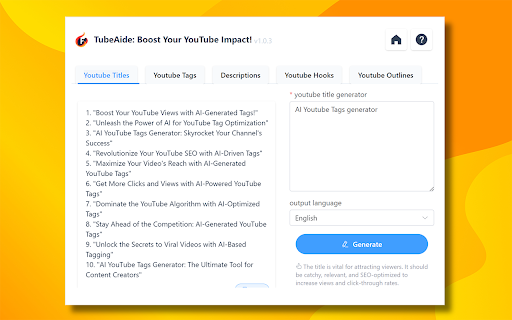
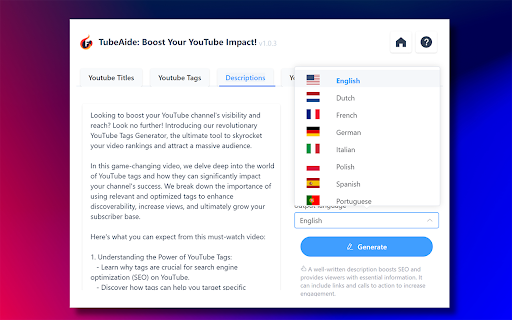
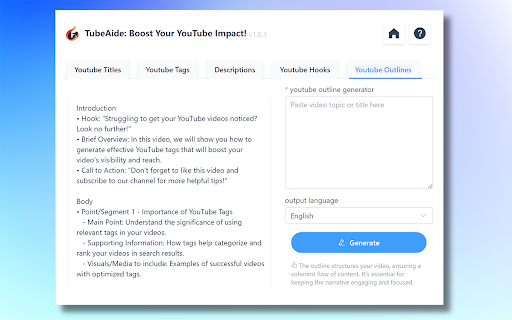
Boost Video with Free AI Youtube Video Tags Generator TubeAIde: Titles, Tags, Descriptions, Hooks, Outlines Creation in 25 languages 💡 Struggling to optimize your YouTube content? Free AI Youtube Video Tags Generator TubeAIde transforms your workflow with an all-in-one Chrome extension, offering powerful tools to enhance your YouTube videos' reach and engagement. Embrace the AI-driven future and elevate your YouTube strategy with TubeAIde's comprehensive suite. Why Choose Free AI Youtube Video Tags Generator - TubeAIde for Your Video Enhancement: ●Comprehensive YouTube SEO suite ●Generates titles, tags, descriptions, hooks, and outlines ●Supports 25 languages for global reach How To Use Free AI Youtube Video Tags Generator - TubeAIde : A Simple Guide 1.Install TubeAIde from the Chrome Web Store effortlessly. 2.Navigate to the YouTube upload page. 3.Let TubeAIde generate optimized content for you. 4.Apply the suggestions and watch your videos soar. Key Features of Free AI Youtube Video Tags Generator - TubeAIde : 1.AI-Powered Generation: AI Youtube Video Tags Generator uses cutting-edge AI to provide you with the most effective YouTube video elements, tailored to your content and audience. 2.Multilingual Support: With 25 languages available, AI Youtube Video Tags Generator ensures your content is globally accessible and optimized for international audiences. 3.SEO-Enhanced Elements: Increase your visibility on YouTube with SEO-optimized tags, titles, and descriptions, ensuring your videos rank higher in search results. 4.Streamlined Content Creation: TubeAIde AI Youtube Video Tags Generator simplifies the creation process, giving you more time to focus on producing quality videos. 5.Detailed Analytics: Learn what works for your audience with in-depth insights into the performance of your generated tags and descriptions. 6.Privacy and Security: Your data remains your own. TubeAIde values user privacy and adheres strictly to Chrome's security standards. 7.Consistent Updates: The TubeAIde team is dedicated to constant improvement, regularly updating the extension to keep pace with YouTube's evolving algorithms. Outperform on YouTube with TubeAIde – the ultimate AI assistant for content creators. FAQs For TubeAIde's AI Youtube Video Tags Generator Q: How does TubeAIde improve YouTube SEO for creators? A: TubeAIde enhances SEO by providing optimized tags, titles, and descriptions, ensuring your videos are discovered by the right audience. Q: Can TubeAIde help non-English speakers optimize their content? A: Certainly! TubeAIde supports 25 languages, enabling content optimization for a diverse global audience. Q: Is TubeAIde user-friendly for those new to SEO? A: Yes, TubeAIde is designed to be intuitive, guiding users through generating and applying optimized content easily. Q: Are my video ideas and content secure with TubeAIde? A: Absolutely. TubeAIde operates with full compliance to Chrome's privacy policies, safeguarding your creative content. Q: What is the cost of using TubeAIde? A: TubeAIde offers essential optimization tools for free while premium features are available for advanced content strategies. Q: How often does TubeAIde receive updates? A: The TubeAIde team continuously innovates, providing frequent updates for seamless functionality with the latest YouTube features. Q: What sets TubeAIde apart from other YouTube optimization tools? A: TubeAIde distinguishes itself with AI precision, multilingual support, and a commitment to user experience and data security.

Immersive Translate: AI Web, PDF & Video Translator
📣 The Website Translation Extension with Explosive Word of Mouth Across the Web [Immersive Translate (沉浸式翻译)] ⭐⭐⭐⭐⭐ 📣 Trusted by 20M+ users worldwide with a privacy-first design. Recognized as Chrome’s 2024 Best Extension. 💻 The Functional Features Are as Follows: - 🚀 Offers bilingual website translate by smartly identifying the main content area of web pages, thus reducing the "intrusiveness" on the original webpage. This brings a better foreign language webpage translation and reading experience, hence it is named [Immersive Translate]. - 🚀 Optimized for Major Websites: Deeply customized for a seamless translation experience on Google Search, top social media platforms (Twitter, Reddit, Facebook), and renowned news websites. Whether you are searching, socializing, or gathering information, your browsing experience will be smoother and highly efficient. - 🚀 Features a mouse hover translation function, allowing you to simply hover the mouse over any paragraph on any webpage, and the corresponding translation will instantly appear below the paragraph. In the [Immersive Translate] design concept, paragraphs are considered the smallest unit, preserving their context, enabling a true understanding and learning of foreign languages. - 🚀 Introduces web page input box translation, where typing in your native language followed by a triple space in any web page's input box (immediately translates your input into the target language you've set). This unlocks a bilingual real-time conversation experience across languages with tools like Google Search, ChatGPT, and others. - 🚀 Hover Translation: Hover over text and use shortcut keys to instantly reveal paragraph translations. Read translations directly beneath the original content for smooth, effective, and immersive bilingual reading. - 🚀 Translate on Text Selection: Select any word or phrase to instantly view AI-powered translation and pronunciation—without leaving the page. - 🚀 Translate PDF(retaining the original document's format and layout), the advanced version supports all kinds of complex formula recognition, table recognition, and picture OCR recognition in PDFs. This ensures the translation maintains the original format and layout as much as possible. Applicable scenarios include, but are not limited to, PDF translation of foreign literature, academic papers, product manuals, etc. - 🚀 Also supports one-click translation of EPUB eBooks, TXT documents, HTML, and subtitle files (ASS/SRT). - 🚀 Automatic bilingual subtitle translation for mainstream online video sites (including YouTube, Netflix and dozens more), allowing one-click translation to break language barriers and enable the exchange of cultural ideas in various languages globally. - 🚀 Enable real-time translation for multilingual meetings on Zoom, Google Meet, and Microsoft Teams. Communicate clearly across languages and collaborate without barriers. - 🚀 Instantly translate Japanese manga, Korean webtoons, and Western comics, so you can read the latest chapters as soon as they’re released—without waiting for official translations. - 🚀 Immersive Translate supports both local image translation and one-click translation of web images—without interrupting your browsing experience. Powered by advanced OCR and inpainting technology, it preserves original layouts and visual styles for a seamless, immersive reading experience. - 🚀 AI Expert: Assign AI specialized industry roles to deliver more professional translations for specific domains. - 🚀 AI Term: Use pre-built terminology libraries to maintain consistent, accurate translations. You can also create and customize your own. - 🚀 Context-aware Translation: Powered by customizable AI terminology. Leverage domain-specific AI expertise and tailored term libraries to achieve more accurate translations across websites, PDFs, and online video subtitles. 🔐 Built with Privacy First Trusted by 20M+ users worldwide. Recommended by major browsers and recognized as Chrome’s 2024 Best Extension. - 🛡️ Zero content retention - 🛡️ No data used for model training - 🛡️ End-to-end encrypted requests Your translations stay yours. - 🚀 Powered by Top-Tier Translation Engines: Currently supports integration with over a dozen global mainstream machine translation services and cutting-edge AI Large Language Models (LLMs), including DeepL, OpenAI (ChatGPT), Gemini, and Claude, perfectly fulfilling your diverse translation needs across any scenario. The Immersive Translate extension is free to use. We hope it helps everyone break language barriers, allowing for an easy, enjoyable, and elegant way to access a wealth of foreign language information on the Internet. ❤️

YouTube Description Generator
This extension is a youtube description generator that works directly inside the YouTube video page. You install it once and keep working where you already are. No dashboards. No switching tabs. Just a clean workflow inside YouTube. The youtube description generator activates the moment a video opens. Your own upload or any public content. Everything starts from the video itself. That is the core idea. If you publish or watch videos regularly, this youtube video description generator fits naturally into your routine. It supports creators and thoughtful viewers. Two audiences. One tool. 📥 Youtube transcript generator: subtitles become the foundation When a video loads, the extension retrieves captions automatically. This includes auto-generated subtitles. Nothing to upload or paste. The youtube transcript generator creates a clear text base from any video. This text powers every next step. The process stays invisible to you. Using generate transcript from youtube video feature, the youtube video transcript generator does the heavy lifting. You stay focused on content, not manual work. 🧭 Youtube chapters and timestamp generator From subtitles, the youtube description generator can build timestamps. Those timestamps turn into youtube chapters. Chapters improve clarity and retention. The timestamp generator creates: - Clickable navigation points - Time stamp youtube markers for key moments - Link youtube timestamp for easy sharing - Youtube timestamp link references Viewers navigate faster. Creators improve structure and SEO. Both sides benefit from the same action. ✍️ Publishing tools for creators Creators can generate key publishing assets with this ai youtube description generator: ➤ SEO-ready youtube description with hashtags ➤ Multiple title options via youtube title generator ➤ Relevant tags for discoverability with youtube hashtag generator The description generator for youtube keeps everything aligned with YouTube norms. Text is usable, not inflated. 📊 Youtube tag generator and discoverability For deeper optimization, the extension adds structure. It supports tagging and relevance. ▸ Use youtube tag generator for cleaner metadata ▸ Boost reach with youtube hashtag generator ▸ Improve visibility without manual research This layer stays optional. Use only what you need. 👀 Youtube ai summary: smart tools for viewers With youtube ai summary, long videos become approachable. Key ideas surface quickly. Perfect for learning and research. The youtube summary feature works for: 1. Interviews and podcasts 2. Educational lectures 3. Product reviews 4. Conference recordings 5. Tutorial videos The youtube video summary condenses hours into minutes. Perfect for busy professionals and students. 🪜 How the youtube description generator works 1️⃣ Install the extension in your browser 2️⃣ Open any YouTube video 3️⃣ Subtitles load automatically via youtube transcript generator 4️⃣ Use generate transcript from youtube video 5️⃣ Create youtube chapters, summaries, or descriptions The youtube video description generator never leaves the page. Everything happens in context. This tool acts as an ai description generator for video content. No prompts to write. No settings to tune. Titles are generated using ai title generator logic. The goal is clarity and relevance. The ai youtube description generator understands context. It reads the transcript and creates relevant metadata automatically. 🎯 Who this youtube description generator is for The description generator for youtube supports both creation and consumption. How does the youtube transcript generator work? It pulls subtitles automatically from any video with captions enabled. No manual input needed. Can I use this as a youtube video description generator for my channel? Yes. The tool generates descriptions optimized for search and engagement. Does the youtube tag generator suggest relevant tags? Yes. Tags are based on video content and current trends. Can I get youtube ai summary for any video? Any video with subtitles works. The ai youtube summary processes captions into key points. 🔐 Privacy and data handling This youtube description generator collects anonymous usage statistics to improve features. We track which functions you use, but not which videos you watch. Your User ID is a random code, not linked to your email or YouTube account. Video statistics are stored separately from user activity — we cannot connect the two. Error logs may temporarily include video context for debugging, but are deleted after 30 days. The youtube video description generator does not sell or share your data with advertisers. YouTube already has the content. This youtube video description generator gives it structure. For creators: youtube title generator, youtube hashtag generator, and full descriptions. For viewers: youtube transcript generator, youtube ai summary, and youtube chapters. Install the youtube description generator once. Use it on every video. Save hours every week.

TranslateTube: YouTube Video Translator
Real-time AI voice dubbing for YouTube videos, no subtitles needed Language barriers shouldn't stop you from enjoying YouTube. Our extension translates videos in real-time using advanced AI, offering both voice dubbing and text translation. • Translates YouTube videos to English and 50+ other languages • Works even with videos without subtitles (no CC required) • Provides AI-generated voice dubbing so you can listen instead of read • Automatically creates transcripts while watching • Translates live streams in real-time as they happen 🔧 How to Use This Extension: 1. Install the extension 2. Open any YouTube video or live stream 3. Select your preferred language 4. Choose translation mode: Voice dubbing or subtitles 5. Click "Start" - translation begins immediately 1. YouTube Video Translator - Convert any video to your language 2. Auto-Translate - Works automatically with one click 3. AI-Powered - Uses advanced neural networks for accurate results 4. Transcript Generator - Creates text transcripts while you watch 5. No Subtitles Required - Translates videos without existing captions • Need to understand videos in other languages? → Get instant translation with voice or text output • Watching content without subtitles? → Our AI generates captions and translates them automatically • Following live international events? → Real-time translation for streams and broadcasts 🎓 Perfect For: • Students watching educational content in foreign languages • Professionals following international industry updates • Travelers preparing for trips with local videos • Anyone enjoying global entertainment without language limits • Supports 50+ languages including English, Spanish, French, German, Russian • Requires internet connection for AI processing • Privacy-focused: no personal data stored • Free basic plan with premium options available ⚠️ Important Note: This extension provides AI-generated translations, not professional human translation. Accuracy may vary with audio quality and specialized terminology.

WayinVideo - AI YouTube Summarizer & Transcript Generator & Moments
Instantly summarize YouTube videos with AI — get transcripts, subtitles, key moments, insights & chat in 100+ languages. WayinVideo uses AI to summarize videos, extract key highlights, convert video to text, and answer your questions — from YouTube and beyond. Instantly gain in-depth insights from all types of videos, including podcasts, courses, interviews, speeches, news, tutorials, movies, sports, and gaming. ✅ Top Features: ⏱️ Instant Summarizer — Get concise video summaries in seconds, no full watching needed 🎯 Key Moments Extractor — Automatically detect and save the most important parts 📄 Transcripts Generator — Convert YouTube videos into accurate, readable text 🧩 Subtitles — Generate and export subtitles (TXT, SRT) easily 💬 Chat — Ask questions and get contextual answers from any video 🌍 Multilingual Support — Summarize in 100+ languages (English, Spanish, Portuguese, French, Hindi, etc.) 🔗 Clickable Timeline — Timestamped summary with one-click navigation 🎯 Perfect For: 🔸 Students & Researchers analyzing long educational videos 🔸 Content creators summarizing podcasts, lectures, interviews 🔸 Professionals needing transcripts of meetings, webinars 🔸 Multilingual users looking to convert video to text in their own language 🔸 Anyone who wants to save time watching videos and get straight to the point 💻 How to Get Started: 🔸 Click “Add to Chrome” and pin WayinVideo to your toolbar 🔸 Sign up for a free account — no credit card needed 🔸 Open any YouTube video and click “Understanding Video in Seconds” 🔸 Get an instant summary, transcript, subtitles, key moments, and interactive chat for deeper insights. 👉🏻 Understand videos smarter and faster — try WayinVideo now.
