
hpfmlhaeplgohafmigojceiacdfmcnid
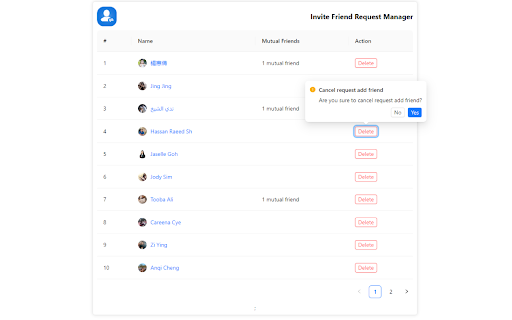
The Invite Friend Request Manager extension is a special extension designed to help users manage and control the friend requests sent on the social networking platform Facebook. With this extension, users can easily view, edit and manage the list of friend requests in a convenient and efficient way. 1. View a list of friend requests: The extension will display a list of all friend requests sent on Facebook. You can view details about the invitation, including the recipient's name and image. 2. Bulk management: If you want to do bulk delete on friend requests, you can select multiple invitations at once and perform delete action

AutoFriends
🌟Introduction🌟 Managing your Facebook™ friends can be time-consuming and tedious, but with AutoFriends, it becomes effortless. AutoFriends is a powerful Chrome extension designed to simplify your Facebook™ experience by automating friend management tasks. Whether you want to add new friends, confirm friend requests, delete unwanted connections, cancel sent requests, or unfriend people, AutoFriends handles it all with just a few clicks. 🌟How It Works🌟 ⏩Install AutoFriends: Add the AutoFriends extension to your Chrome browser. ⏩Log In to Facebook™: Log in to your Facebook™ account. Choose Your Actions: 1.First you need to go to the page according to the task. (for example: if you expect add friend in suggestion section, you should go to the suggestion friend page) 2.Select the desired Task (Add, Confirm, Delete, Cancel, Unfriend) from the AutoFriends interface. 3.Enter the number of friends you want to process 4.Set the interval time (in seconds) 5.If you need set more time interval, you can enable toggle button. it’s working between requests (It is not mandatory to prepare it) (optional) 6.Now click “Start” button 7.You can see it automasion. enjoy! 8.if you click the “Stop task” button, stopped currently running task. ⏩Automate the Process: Sit back and let AutoFriends handle the rest. It will automatically execute your chosen action, saving you time and effort. 🌟Important Notes🌟 This extension was previously called "Friends Add & Confirm". Now it is called AutoFriends. This extension works only with English language in Facebook™. (make sure change language to english in Facebook™). Facebook™ is a trademark of Facebook™ Inc. This extension, namely “AutoFriends" has no connection to Facebook™ inc. Use this extension at your own risk and carefully. The developer is not responsible for any restrictions on your Facebook™ account by using this extension. Using "AutoFriends" Chrome Extension means that you agree to these terms. Facebook auto accept friend request extension, Accept all friend requests fakebook chrome extension, Auto accept friend request Facebook script, Auto send friend request Facebook extension, Cancel sent request, Unfriend all Facebook friends Chrome extension, Delete friends request

Linkedin Messages Cleaner
🧹 Effortlessly bulk 🗑️ delete and 🗂️ archive all your messages in just one click! 🎨 Modern, Beautiful & Pro UI – Clean design, easy to use, and highly responsive ⚡ Fast & Smooth Performance – Built for speed with optimized workflows 🔒 100% Local & Secure – Works only in your browser, no sign-up required, no data stored anywhere 👀 Live Processing View – See real-time deletion/archiving with animated avatars, names, and progress updates 🧠 User-Friendly Experience – Designed so anyone can use it without technical knowledge 🗂️ Bulk Actions in One Click – Save time by handling many messages instantly 🚀 No External Dependencies – Works directly inside your browser environment 📥 Install the extension in your browser 🔄 It automatically redirects you to your Linkeden messages page 🧹 Open the tool panel inside the page 🗑️ Choose your action: Delete or Archive 👆 Click the button and let it run automatically 👀 Watch live progress with animations and real-time updates This extension is not officially authorized by LinkedIn. Use responsibly and at your own discretion.

TMC FB Invite Page
Invite to like the facebook page by TMC TMC FB Invite Page. Automatically invite post likers to increase follow facebook fanpage organic and grow quickly. You can use it with one click on extention chrome. This is the best extension for you. Features included are the following: ★ Works with one click on extention chrome ★ Increase follow facebook fanpage organic and grow quickly ★ Shows the number of people who have not yet been invited to follow the page. ★ Automatically scroll load the list of likers ★ Random time delay for each invite, Show countdown timer ★ User can custom time delay for each invite ★ Protect account for work on process How to use. 1. Open facebook.com on chrome 2. Open post liker to you like 3. Click on the extension (TMC FB Invite Page) 4. Click Start Inviting button

Facebook Auto Inviter
Auto invite people who reacted to your posts on Facebook. Open your Facebook post or Business Suite view. Click the extension icon in the Chrome toolbar. The extension will detect all "Invite" buttons and click them one by one. Watch your page grow as engaged users are invited to follow or like your page. Page admins who regularly post content and want to invite engaged users It only interacts with visible elements on the Facebook page you're actively viewing. You must be logged in and have admin access to the page you're inviting from. 📌 Disclaimer: This extension is not affiliated with or endorsed by Facebook™. Use it responsibly in accordance with Facebook’s terms of service. 📞 Support: For assistance or inquiries, kindly contact us through our Facebook page: https://www.facebook.com/reactool/
