
hpegpecfbjnpdlcilpobeflojponbohi
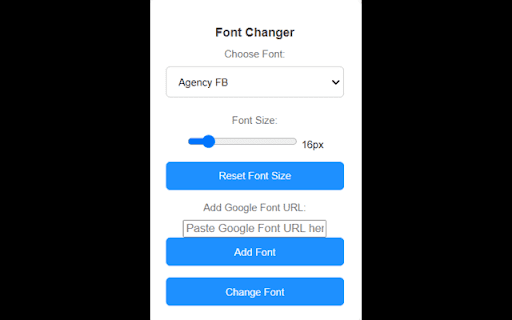
Change the font of all websites to your selected font. A very simple extension which allows you to set custom font for every tab. Preserves the selected font and auto applies to each tab when loaded. I collect no data, I don't really even know how to. The code is open source. Update 1.2 - Fixed auto application of font and a few bugs with icons not drawing. Update 1.3 - Font awesome exclusion works now. Most websites should look perfect. Update 1.4 - Auto apply broke for some reason again, fixed.

Eye Dropper
Pick colors from any website and store them in your palettes. With just two clicks, Eye Dropper allows you to pick colors from any website without hassle. Whether you're a web developer, designer or creative professional, Eye Dropper is a great addition to your toolkit. 👉 Web page Picker: Easily select any color from any web page with just two clicks. Eye Dropper provides a quick and intuitive way to identify and capture colors from your favorite websites. 👉 Color Palettes: Save and organize your favorite colors with a user-friendly interface. Create palettes, organize them and ensure consistency across your projects. 👉 Color Picker: Find that color you are looking for. Adjust hues, saturation, and brightness to find the perfect shade for your needs. 👉 Hex, RGB, and More: Eye Dropper supports various color formats, including HEX, RGB, HSL and HSV. 👉 User-friendly and Lightweight: Designed with a focus on simplicity and performance, Eye Dropper works effortlessly without slowing down your browsing experience. 👉 Free software made with ❤️ by single developer. 👉 Eye Dropper is here to stay: In active development since 2010, also first color picking extension for Chrome. 👉 Trusted by more than million users in Chrome Store, with 2,000 positive reviews. 👉 Safe: Doesn't collect your data. Doesn't track you.

Fontswap - Change the font of any website
Change the font of any website to your favorite Google Font Fontswap is a powerful Chrome extension that lets you personalize the fonts on any website with your favorite Google Fonts. Enhance your reading experience with just a few clicks! Features: 1. Wide Selection of Google Fonts: Choose from a vast library of fonts. 2. One-Click Application: Easily apply your chosen font to any website. 3. Reset to Default: Quickly revert to the original font. 4. Persistent Preferences: Fontswap remembers your font choices for each website. 5. Lightweight & Fast: Optimized for performance and speed.

Advanced Font Changer
Change the font of any website without altering its formatting. 🔔 WHAT’S NEW Now powered by more fonts from user reviews. 72+ fonts loaded and adding more as you read this! 📖 Description: Easily switch the font of any webpage with Advanced Font Changer! Choose from a wide selection of popular Google Fonts and web-safe fonts to customize the look and feel of your favorite websites with just a click. Need to change a website’s font? Advanced Font Changer lets you swap any page’s text instantly. Pick from popular Google Fonts or classic web-safe families; the site refreshes on the spot and your choice is remembered the next time you visit. Perfect for easier reading, dyslexia-friendly viewing, or simply giving the web a fresh look—no sign-ups and no data ever leaves your browser. 🔒 Your preferences are remembered for each site, ensuring you always enjoy the personalized browsing experience you desire. Whether you’re optimizing for readability or just refreshing the style, Advanced Font Changer gives you the tools to make the web truly yours. change website font, google fonts extension, font switcher, readability tool, dyslexia friendly fonts, custom font chrome, easy font changer

Fontonic - Change Fonts
Change fonts of any website with your locally installed fonts! 🖋️ Change Font of Websites Instantly with Fontonic! 📱 Also available on Firefox for Android: https://addons.mozilla.org/en-US/firefox/addon/fontonic Tired of the default fonts on websites? Fontonic lets you change the font of any website with just one click. Customize your browsing experience using fonts already installed on your device. 🎨 Choose from serif, sans-serif, or monospace fonts. Whether you want to change fonts site-wide or just tweak a few elements, you’re in control. ⚡ See changes in real-time by clicking "Apply Selection." Your font preferences are saved—even after closing the tab! ⏪ Not happy with your changes? One click on "Restore" brings back the original fonts. 🔧 Have ideas or feature requests? Drop them in the reviews! 🔍 View the source code on GitHub: https://github.com/amkhrjee/fontonic
