
hoplgofjgfgdcbnlcnblcpgoppokfgji


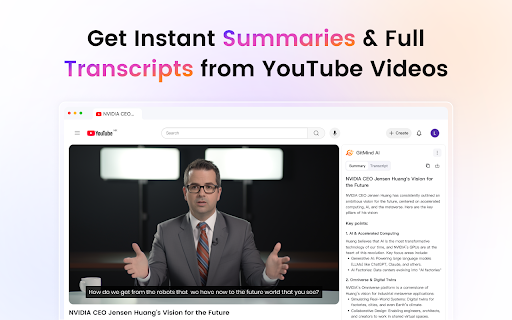

One plugin for all your needs. AI chat, image editing, audio & video processing, PDF editing, and mind map generation. 🌈 Transform your browsing experience with GitMind AI - Your all-in-one solution for content summarization and analysis. Harness the power of integrated AI giants like GPT-4.0 and Claude to summarize, analyze, and visualize any content instantly. Switch seamlessly between models for tailored results—whether dissecting YouTube videos, digesting research papers, or capturing web insights. GitMind AI transforms fragmented information into structured knowledge maps, empowering your productivity in real time. ⭐ Key Features: 🎥 YouTube Video SummariesPaste any YouTube URL to get instant chapter summaries, key quotes, and clear transcripts of the video's content. Whether you're a marketer analyzing competitors, a student studying tutorials, or a lifelong learner, this feature skips the 20-minute watchtime and delivers actionable takeaways—click the plugin icon on any video page to activate. 🎯 File-to-Mind Map ConversionUpload documents (Word, PPT, or text files) and GitMind AI automatically extracts key concepts, relationships, and data to generate structured, editable mind maps. Ideal for students, researchers, and professionals organizing complex reports or presentations, this feature turns hours of manual work into a 30-second task—simply upload your file and convert to mind map to visualize your content. ✏️ Prompt to Mind MapType a topic or question into the AI prompt, and watch GitMind expand it into a multi-layered mind map with logical branches, examples, and definitions. Designed for educators, brainstormers, and content creators, this tool lets you build frameworks for lessons, articles, or strategies instantly—no design skills required. 📄 PDF-to-Mind Map IntelligenceHighlight text in PDFs (research papers, manuals, or contracts), and GitMind AI identifies core arguments, technical terms, and connections to create citation-linked mind maps. Perfect for academics, legal teams, and analysts who need to digest dense materials, it preserves critical context while simplifying navigation through visual hierarchies. 🎙️ Voice-to-Text & Smart SummarizationUpload pre-recorded audio files (MP3, WAV, etc.) directly into GitMind AI, and it will generate accurate, timestamped transcripts. Designed for researchers, students, and journalists analyzing interviews, lectures, or podcasts, this tool lets you quickly extract actionable text from audio—drag and drop files, then export the text or convert key sections into mind map nodes for deeper analysis. ✍️ Idea Capture & Management Jot down spontaneous ideas anytime and anywhere—whether you're reading an article, watching a video, or brainstorming. GitMind AI lets you manage your previous ideas effortlessly. Perfect for writers, entrepreneurs, and planners, this feature ensures no insight is lost: click the plugin icon, type/paste your ideas, and later review your recorded ideas with ease. This extension injects a summary panel directly into video pages such as YouTube by modifying the page DOM. It does not block or interfere with original page content but overlays additional AI-generated insights for user convenience.This extension injects a summary panel directly into video pages such as YouTube by modifying the page DOM. It does not block or interfere with original page content but overlays additional AI-generated insights for user convenience. Why Choose GitMind AI? ● ⚡ 50% faster learning & analysis with AI-curated knowledge maps ● 🎨 Zero design skills needed – Turn chaos into pro-level mind maps automatically ● 💡 Never lose an idea – Capture and organize thoughts across browsing sessions 🚀 Getting Started: 📥 Click "Add to Chrome" and pin GitMind AI to your toolbar. ✨ Create your free account. 🎮 Start exploring the powerful AI features immediately. 💳 Pricing & Subscription GitMind AI is free to use with basic features. Premium features may require a subscription or credits purchase. Visit our website for more details on pricing. Turn chaos into clarity—organize ideas at the speed of thought with GitMind AI! 🧠✨🚀

Kortex-NotebookLM
Transform NotebookLM into your ultimate knowledge hub. Save prompts, export chats, and organize all your interactions seamlessly. Kortex - Your Power Toolkit for Google NotebookLM! Tired of your valuable intellectual work getting lost in different chats or locked inside research sources? Kortex is the browser extension that transforms Google's NotebookLM into a dynamic, interconnected knowledge base. It seamlessly bridges your AI conversations from LLMs, captures insights from any webpage, imports social media content, and adds powerful tools to manage, export, and organize your work. 1. One-Click LLM Archiving An integrated "NotebookLM" archive button in ChatGPT, Claude, Gemini, and Perplexity captures your full conversation and seamlessly imports it into NotebookLM as a perfectly-cited source. Select an existing notebook or create a new one with a single click. 2. Social Media Import Import threads, posts directly to NotebookLM. Capture complete conversations, discussions, and social insights with full context, author information, and source URLs. Perfect for tracking trending topics, discussions, and professional content. 3. Highlight & Snipe Highlight any text on a webpage, right-click, and send it directly to NotebookLM as a new, perfectly-cited source. Perfect for capturing web insights and research snippets on the fly. Works on any website - no subscription required. 4. Bulk Import Tools (Pro Features) • Google Docs Bulk Sync: Sync all your Google Docs as sources to NotebookLM with one click • Link Importer: Import multiple URLs at once from a list • Tab Importer: Import all open browser tabs as sources • RSS Feed Importer: Subscribe to RSS feeds and import articles • CSV Importer: Bulk import sources from CSV files • Web Crawler: Automatically discover and import linked pages 5. Source Downloader Easily export all sources from a notebook into a single, convenient ZIP file. Select multiple sources from within a NotebookLM notebook and export them in PDF, Markdown, Text, or ZIP formats. Download individual sources or entire notebooks with one click. 6. Versatile Chat Export Export your entire Q&A history from within NotebookLM into clean Markdown, plain text, PDF, or JSON files. Copy conversations to clipboard for free, or use the export feature with checkbox selection to create curated briefings with only the messages you need. Toggle user messages on/off for cleaner exports. 7. Curated Briefing Notes Checkbox-select the most important AI responses in a NotebookLM chat to generate a concise, shareable briefing document with just the key insights. Perfect for creating focused summaries and reports. 8. Studio Notes & Artifacts Exporter Export AI-generated notes, study guides, quizzes, briefings, FAQs, and timelines from NotebookLM's Studio panel. Select multiple notes at once and export them in Markdown, Text, or PDF formats. 9. Audio Overview Manager Generate AI-powered podcast-style audio overviews of your research. Manage, download, and organize your audio overviews with custom titles and descriptions. Perfect for consuming your research on the go. 10. Podcast Feed Generator Create custom RSS podcast feeds from your NotebookLM audio overviews. Subscribe in your favorite podcast app and listen to your research anywhere. Automatic feed updates when new audio is generated. 11. Prompt Holder Save, organize, and manage your NotebookLM prompts with folders and tags. Create custom folders with color coding, add descriptive tags, search and filter prompts, and quickly access your saved prompts directly from NotebookLM. All prompts are securely synced across all your devices via cloud storage. 12. Source Views Create custom views to filter and organize your notebook sources. Save your favorite source filters (by search term or filter type) for quick access. Search sources by name and apply filters like "All", "PDFs", "Web", "Google Docs", "Text", and "YouTube". All views are synced across devices. 13. Advanced Dashboard • All Sources View: See all sources across all notebooks in one unified table with search, filtering, and bulk actions • Smart Notebook Search: Search and filter your notebooks directly from the NotebookLM dashboard with real-time search • Global Search (Ctrl+K): Instantly search across notebooks, sources, notes, and actions with keyboard shortcuts • Collections & Tags: Organize notebooks with custom collections and tags for better categorization • Favorites: Mark important notebooks as favorites for quick access 14. Automation Rules • Auto Researcher: Automatically trigger research based on notebook titles or source additions • Podcast Curator: Automatically generate audio overviews when conditions are met • Pipeline Automation: Chain multiple actions together for complex workflows 15. Source Management Delete sources from your notebooks with bulk selection. Remove unwanted or outdated sources to keep your notebooks clean and organized. Select multiple sources and delete them at once. Identify and remove "bad sources" that failed to process correctly. 17. Feature Management Customize your NotebookLM experience by toggling features on or off. Control which Kortex features appear in your interface to create a personalized workflow. Get Support When You Need It: In-app support request system lets you get help directly from the extension. Submit support requests and receive assistance quickly. Transform NotebookLM into your ultimate research and knowledge management hub with Kortex.

NotebookLM Web Importer
Import web pages and YouTube videos to NotebookLM with one click NotebookLM Web Importer is a powerful Chrome extension for saving web pages, YouTube videos, links, browser tabs, RSS feeds, and more directly to Google NotebookLM. Stop copying URLs, switching tabs, and manually organizing sources. With NotebookLM Web Importer, you can capture online content in seconds, add it to the right notebook, and start using NotebookLM to summarize, ask questions, generate insights, and create Audio Overviews. Built for students, researchers, creators, writers, analysts, and anyone who uses NotebookLM as an AI research assistant. ## One-Click Web Page Import Save the current web page to NotebookLM instantly. Turn articles, blog posts, documentation, reports, and reference pages into NotebookLM sources without copy-paste. ## YouTube to NotebookLM Import YouTube videos into NotebookLM so you can study lectures, interviews, tutorials, podcasts, webinars, and long-form videos more efficiently. ## Bulk Import Add multiple sources at once from link lists, open browser tabs, YouTube playlists, RSS feeds, and more. Build a complete research notebook faster. ## Notebook Management Manage your notebooks in one place and keep your NotebookLM research workflow organized while you browse. ## Audio Overview Management Manage NotebookLM Audio Overviews and sync them to a podcast feed, making it easier to listen, review, and learn on the go. ## Full WebSync Workflow Send pages and videos to NotebookLM from your browser, then chat with your sources, generate summaries, create study materials, or produce podcast-style Audio Overviews inside NotebookLM. NotebookLM is great for understanding sources. NotebookLM Web Importer makes it much faster to collect those sources. Use it to: - Save articles, reports, and documentation to NotebookLM - Import YouTube videos and playlists for research or learning - Collect sources from multiple tabs in bulk - Build notebooks from RSS feeds or link lists - Organize research for school, work, writing, or content creation - Turn saved sources into NotebookLM summaries, Q&A, study guides, and Audio Overviews - Reduce repetitive copy-paste work while browsing # Perfect For ## Students Collect lecture videos, course readings, articles, and research materials in NotebookLM. ## Researchers Build source collections from papers, websites, reports, documentation, and reference links. ## Creators and Writers Save inspiration, competitor research, scripts, articles, and YouTube videos into structured notebooks. ## Professionals Gather market research, product docs, news, client materials, and internal knowledge sources for faster analysis. 1. Install NotebookLM Web Importer from the Chrome Web Store. 2. Browse the web or watch YouTube as usual. 3. Click the extension icon. 4. Choose where to import your source. 5. Open NotebookLM to chat with your sources, generate insights, or create an Audio Overview. NotebookLM Web Importer helps you turn the web into a searchable, organized AI knowledge base. If you use NotebookLM for research, learning, writing, analysis, or content creation, this extension saves time every day. Works with Google NotebookLM. This extension is not affiliated with Google.

YouTube to NotebookLM
Send YouTube to NotebookLM. Save videos, sync YouTube channel to NotebookLM, and manage any NotebookLM video easily 🌐 With this powerful extension, you can easily connect YouTube and NotebookLM to create organized, AI-ready notes and summaries. It supports YouTube videos, playlists, channels, and even search results. The extension transforms your video-watching habits into a productive, research-driven workflow. ✅ Why You Need Youtube to NotebookLM? 1️⃣ Add any Youtube video to NotebookLM instantly 2️⃣ Send an entire Youtube playlist to notebook lm for bulk video research 3️⃣ Extract videos from a Youtube channel to notebooklm seamlessly 4️⃣ Turn your video research into actionable insights 5️⃣ Use Youtube search to notebooklm to batch-import search result videos ⚡ Key Features You’ll Love: 💡 Add single or multiple videos from YouTube to NotebookLM app 💡 One-click to create notebook, or choose notebook from your existing list 💡 Extract summaries, timestamps, and AI highlights using notebooklm video overview 💡 Support for notebooklm video podcast content 💡 Quick access button in the browser for fast action 🎯 Turn your browser tab to notebooklm effortlessly 🎯 Extract ideas, arguments, key points from long-form videos 🎯 Use the extension to send a site tab to notebook lm, not just YouTube 🎯 Works with Notebook LM Plus for advanced AI-powered insights 🎯 Compatible with both light and dark themes 🧠 NotebookLM AI uses your saved videos to: 🔸 Generate contextual summaries 🔸 Create structured Q&A formats 🔸 Offer deeper insights from NotebookLM video overview 🔸 Help you build notebooks with long-term value 🔸 Sync video content across all your learning projects This extension isn’t just a clipper — it's a bridge between video learning and structured knowledge capture using the technology. Perfect for All Types of Learners: 💼 Students organizing lecture content 💼 Podcasters summarizing interview footage 💼 Researchers building video-based citations 💼 Creators looking for inspiration 💼 Anyone using NotebookLM for research videos Just find a video, click, and you’re done — whether it's a single clip or an entire Youtube playlist to notebooklm. 🔹 Choose to Create notebook or just Choose notebook from your list 🔹 Add NotebookLM source for smarter future search 🔹 Built-in support for NotebookLM Reddit 🎯 Looking to turn YouTube videos into actionable notes and summaries? The Youtube to Notebook LM extension is your ultimate tool for research, learning, and content organization. 🎯 In just one click, you can send any YouTube video to NotebookLM, including playlists, channels, and even search result pages! ⚒️ No matter how you learn or work, Notebook LM features ensure your NotebookLM YouTube experience is tailored to your needs. ❓ What is Youtube to NotebookLM? 🧩 It’s a Chrome Extension that sends YouTube content (video, playlist, channel, or search result) to NotebookLM app for AI-powered summarization and note-taking. ❓ Can I use it with playlists and channels? 🧩 Yes! You can send a full Youtube playlist to notebooklm or an entire Youtube channel to notebooklm. ❓ Will NotebookLM summarize the videos? 🧩 Yes! The extension helps you access notebooklm video overview and summaries generated by NotebookLM AI 🧠 ❓ Can I choose where to save my notes? 🧩 You can Create notebook or Choose notebook from your existing list – it’s completely flexible. ❓ What about browser tabs that aren’t YouTube? 🧩 You can send any site tab to notebooklm, not just YouTube. Perfect for additional context and source linking. 🌟 Make your video-watching smarter, faster, and more organized with Youtube to NotebookLM. The perfect solution for anyone serious about content digestion and research. Whether you're dealing with podcasts, lectures, documentaries, or vlogs — NotebookLM for research videos transforms how you think, learn, and remember.

Summy - Summarize Youtube Videos and Websites in Seconds
Don't waste time on lengthy videos or articles! Summy is an AI assistant that can help you quickly extract key points from articles…
