
hofmladojdngjbipnihhjdjcnpnmjdpi
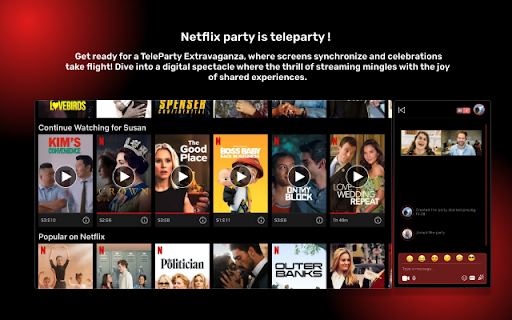


Watch Netflix, Disney Plus,Hulu,HBO,and all worldwide OTT platform in sync with friends Introducing "Teleparty”: Movie & TV Series Companion" - a powerful Chrome extension that revolutionises the way you watch movies and TV series with your loved ones. SyncWatch allows synchronised viewing experiences, where you can enjoy content simultaneously with family and friends, no matter where they are. Stay connected through real-time chat and video chat , engaging in lively discussions while watching your favourite content. The extension seamlessly integrates with popular streaming OTT platforms, ensuring compatibility with a wide range of movies and TV series. The user-friendly interface enables easy navigation and control, allowing you to pause, play, rewind, or fast-forward together. Privacy and security are prioritised, with all communication encrypted for a safe environment. Install Teleparty now and create unforgettable shared moments, whether it's a movie night with friends or a binge-watching session with family members. Embark on a synchronised viewing journey like never before with SyncWatch, designed for Manifest V3 and compatible with the latest version of Google Chrome.

Flickcall: Netflix Party with Video Call
Flickcall is a watch party extension to watch movie & TV shows on popular streaming services together with friends & family. Once a watch party is started, Flickcall’s cutting-edge technology will synchronize everyone’s video players. On top of that, participants can video call and group chat to make the virtual movie experience more fun. Update 11.1.0 - Added support for JioHotstar Update 8.4.1 - Support for 3rd party shows with ads on Amazon Prime Video. - Support for ad based plan on HBO Max. Flickcall now offers free and a premium plan. The free plan supports watch party on all 10 streaming platforms. It offers unlimited text chat and 30 minutes of video chat every week. View list of all supported streaming platforms here https://www.flickcall.com . Premium plan offers everything in free with unlimited video chat. How to start watch party? 1. Start playing the movie or TV show. Once the video starts playing, click the Flickcall logo on the top right. That’s it. If the logo, doesn’t show, hover over the top right corner of the video. You can also click the Flickcall browser icon from the extension menu to start the party. 2. Share the Invite link to add more participants. Flickcall VS other watch party extensions. What makes Flickcall stands out? -Cutting-edge technology to keep video playback in sync. -Video call support in addition to group chat. Flickcall is like Netflix party with video call. -Setup and join the watch party without any hassle. No need to pass instructions to friends to join the party. Just share the invite link, we will handle the rest. -Flickcall is privacy friendly. Your personal chats and video streams are transmitted directly to your friends without passing them to our servers. However, if direct connection is not supported due to a firewall, personal messages and streams are routed via our servers with industry-level encryption (our servers can’t decrypt). - Keep video players in sync to support seek, skip credits, skip intro or even ads playing in one of the participants. It just works - Flickcall remote watch parties work flawlessly even with TV series to binge multiple episodes together making it the best extension to watch with friends. - Watch party on Youtube supports synchronization for multiple videos in the same watch party. Eg. if one user starts playing a new video from recommendations or by searching, playback for everyone will be synchronized. So you can watch tons of unrelated video in sync in a single party. - Supports watching live matches together. So get ready to cheer for your favorite teams together. - Supports Indian OTT platforms. Check full list https://www.flickcall.com. Either you are planning to stream movies with friends or want to go on a virtual movie date or just want to binge together - Flickcall is the best extension to watch movies together.

Teleparty-pro
Sync up your favorite Netflix, Disney Plus, Hulu, HBO, and worldwide OTT platform shows with friends using our Teleparty Syn up with your preferred streaming platform like Netflix, YouTube, HBO Max, Disney Plus, and many more. Have the Blast by Downloading the Teleparty extension on your browser. So, Live Video Chat and share all the fun with your loved ones on one platform. Explore Teleparty: Anywhere and anytime Teleparty Extension Teleparty extension is a wonderful tool where you can watch all your favorite shows and movies on one platform. Here you can plan your virtual date night with your special one and send emojis while streaming. How to Install the Teleparty Extension 1) Visit the Chrome Web Store and search for the extension or you can directly go to the Teleparty extension website. 2) Now click on Add to Chrome to install Teleparty. 3) Pin the Teleparty icon to your browser toolbar for easy access. How to Use the Extension 1) Go to your most preferred streaming platform like Netflix, YouTube, HBO Max, and many more. Remember you must have a valid subscription. 2) Now open the video that you want to stream and start a party by clicking on the Teleparty icon and selecting Start the party. 3) You can invite your friends and share the URL link with them. 4) Now you can watch synchronized shows and movies and the best part is you can chat and video call your friends while streaming. Features of the Teleparty Extension You can invite as many as people. It is compatible with various supported platforms like Netflix, YouTube, HBO Max, Disney Hotstar, and many more. You can discuss your favourite scene, via chat and video call features. Here you can have HD-quality video. With our customization option, you can choose your user icon and nickname. You can share the URL with your friends to watch a party. You will also have the party control watch, you can also host and control the party at the same time. It is downloadable from anywhere in the world. Benefits of Installing Teleparty Extension You can connect with your friends and watch together no matter where you are. Here you can explore new series, shows, and movies on different streaming platforms. It is very flexible like it is up to you whether you want to join or leave a watch party. You will have multiple shows to plan with your friends and family. Don’t worry about the long distance it will connect you with your loved ones. You will feel like they are next to you and streaming your favorite shows. This is the best extension where you can experience the best of synchronized streaming with Teleparty. It is very easy to download and install on your browser. It is the best way to connect with your long-distance friends. Thousands of users are watching their favorite series in the Teleparty extension. So what are you waiting for? Just download the extension and start watch party now. All the product names, trademarks, and registered trademarks are the property of the owner. To use the extension you need to have a valid subscription and account. Add the extension to Chrome now and watch your favorite shows on your preferred streaming platform.

Netflix Party is now Teleparty
Watch Netflix, Youtube, Disney Plus, Max and more in sync with friends Teleparty is a browser extension for watching TV remotely with friends, e.g., for movie nights with that long-distance special someone. It synchronizes video playback and adds group chat to your favorite streaming sites. Join over 20 million people and use Teleparty to link up with friends and host long distance movie nights and TV watch parties today! As of Mar 16 2026, version 5.5.9 of Teleparty is up and running with support for 9 services for free, including Netflix, Youtube, Disney Plus, Max and more. Premium users can also subscribe to unlock our iOS app, video chat, premium features like custom reactions, and 23 extra streaming services. Feel free to reach out to us at team@teleparty.com if you have any questions or run into any issues. Our typical response time is within a few hours. For those users who may be confused and are looking for Netflix Party, you're at the right place! In version 2.0.0 of Netflix Party we added support for three streaming services, with many more on the way. As part of this update we renamed Netflix Party to Teleparty. Version 5.1.8 changes: -Bug fixes for Amazon and Paramount ad-based plans Version 5.1.7 changes: -Bug fixes and improvements for Amazon Prime Video, Disney+ (ad-based plans), Fubo, Youtube TV, and JioHotstar Version 5.1.4 changes: -HBO Max and Hulu quality improvements for ad-based plans Version 5.1.3 changes: -Crunchyroll, Netflix, Paramount, and Amazon quality improvements and fixes Version 5.1.1 changes: -Improvements for guests joining parties -Streaming fixes for Fubo, Max, Sling and Apple TV Version 5.1.0 changes: -Additional Amazon and Youtube fixes Version 5.0.9 changes: -Amazon Prime Video and other fixes Version 5.0.8 changes: -Disney+ fix for breaking change Version 5.0.7 changes: -Disney+ and Spotify fixes Version 5.0.5 changes: -Fixes for Crunchyroll, Disney+, and Youtube Version 5.0.4 changes: -New feature: All chat - Chat and watch along with the entire Teleparty community -Moderation and UI improvements (no longer on by default) Version 5.0.3 changes: -Fixes for Amazon Prime Video Version 5.0.2 changes: -Bug fixes and quality improvements for Hulu & Youtube Version 5.0.1 changes: -Quality improvements and bug fixes -Allow hosts to disable reactions -Fix intermittent disconnects -Improve joining user experience -Spotify search fix Version 5.0.0 changes: -Manifest v3 support -Quality improvements for Disney+ and Prime Video Version 4.6.0 changes: -This month we're adding support for Spotify! -Disney+ next episode fix -PlutoTV and Apple TV+ fixes Version 4.5.9 changes: -Fix for new Disney+ layout Version 4.5.8 changes: -Quality improvements for Netflix, Peacock, Amazon Prime Video, Sling, and Youtube -Improves GIFs in chat sidebar Version 4.5.7 changes: -Fixes for Hulu and PlutoTV, and Amazon Prime Video's new ad-based plan -This month we're adding 1 new premium service: Viki Version 4.5.6 changes: -This month we're adding 2 new premium services: Philo and Fubo -Quality improvements to fullscreen mode, Tubi's sidebar and Disney+ ad synchronization Version 4.5.4 changes: -This month we're adding 2 new services: Disney+ MENA (free) and Sling TV (premium) -Quality improvements to Disney+ parties Version 4.5.3 changes: -This month we're adding 3 new premium services: Mubi, Stan, and Crave -Fixes for Apple TV and Paramount+ parties Version 4.5.1 changes: -Fixes for Crunchyroll parties with ads Version 4.5.0 changes: -Tubi and PlutoTV parties as free services -JioCinema parties for free users -Fixes for Netflix and HBO Max Version 4.4.5 changes: -Add forgot password login page, and fixes a few typos -Added Premium support for Apple TV+ Version 4.4.3 changes: -HBO Max and Paramount+ parties - Fixes Ad synchronization on ad-based plans -Crunchyroll parties - Fixes playback "unclickable video" issue experienced by some users Version 4.4.2 changes: -Improvements to Max and Paramount+ parties Version 4.4.1 changes: Fix breaking change that caused users to be unable to join Amazon and Hulu parties Version 4.4.0 changes: -Added Premium support for Funimation -Fixes for Max and Paramount+ Version 4.3.0 changes: -Added Premium support for Hotstar and Star+ -Add Max Support in the US (Free) Version 4.2.0 changes: Peacock Parties and quality improvements -Added Premium support for Peacock -Fix bug where Paramount+ parties would not work for some titles -Fix synchronization issues on Disney+ Version 4.1.0 changes: Upgrade your parties with Video and Voice Chat! - Premium Video / Voice chat support for the extension - Youtube + Paramount bug fixes Version 4.0.3 changes: -Added Free support for Youtube TV -Crunchyroll Fixes Version 4.0.2 changes: -HBO improvements -Fix confusing wording on Select a video screen in extension popup -Fix bug where changing your premium reactions would log a message in chat Version 4.0.1 changes: Launching Teleparty Premium! -Added Teleparty Premium support for Paramount+, Crunchyroll, and ESPN+ -Show off with premium badges, customize your reactions and personalize your chat experience -Save 43% when you sign up this month!

Watch Party
Watch Netflix, Youtube, Disney Plus, Hulu, HBO, and Amazon Prime Video in sync with friends Introducing "WatchOTTParty: Movie & TV Series Companion" - a powerful Chrome extension that revolutionizes the way you watch movies and TV series with your loved ones. SyncWatch allows synchronized viewing experiences, where you can enjoy content simultaneously with family and friends, no matter where they are. Stay connected through real-time chat, engaging in lively discussions while watching your favorite content. The extension seamlessly integrates with popular streaming OTT platforms, ensuring compatibility with a wide range of movies and TV series. The user-friendly interface enables easy navigation and control, allowing you to pause, play, rewind, or fast-forward together. Privacy and security are prioritized, with all communication encrypted for a safe environment. Install WatchOTTParty now and create unforgettable shared moments, whether it's a movie night with friends or a binge-watching session with family members. Embark on a synchronized viewing journey like never before with SyncWatch, designed for Manifest V3 and compatible with the latest version of Google Chrome.
