
hodneljnifpbcnhmlommhmmpoknlioil
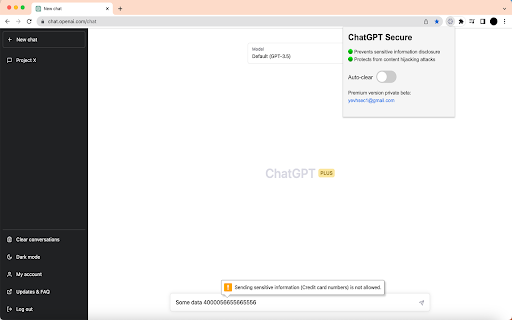
Prevents sensitive information disclosure and protects from content hijacking attack on https://chat.openai.com/ ChatGPT Secure is designed to protect users from the potential copy-pasting of sensitive information to ChatGPT. Also, it prevents potential content hijacking attacks via prompt injection. If you have any feedback or suggestions feel free to contact me via yevhsec1@gmail.com

Chatgpt Notes
Take and organize notes from ChatGPT conversations Enhance Your ChatGPT Conversations with ChatGPT Notes! 🗒️ Struggling to keep track of key insights during long conversations? ChatGPT Notes lets you save, organize, and manage chat responses directly within the ChatGPT interface. No need to switch between apps—just click, save, and organize your ideas in real-time. Features: 🚀 One-Click Saving: Easily capture important chat responses with the custom icon. 🗂 Folder Organization: Structure your notes with folders—create, rename, or delete as needed. 📥 Export Options: Download notes as PDFs or DOC files for easy sharing or storage. ✨ Persistent Storage: Your notes stay intact across sessions with local storage. Install the extension and open ChatGPT. Use the 🚀 icon next to responses to save notes. Select or create folders on the fly to organize your notes. Click the “View Notes” button anytime to access your saved notes. Export your notes as PDF or DOC files when needed. 📌 No need to copy-paste—save notes directly from ChatGPT. 📌 Stay productive and build your own knowledge base with ease. 📌 Organize ideas and insights without losing focus. Get Started Today! Download ChatGPT Notes and take control of your conversations!

ChatGPT Report Builder
Transform any AI chat into polished web reports and websites. Password protection, analytics, and prompt tools included. Instantly convert any AI conversation into professional web content directly within the platform. Works seamlessly with ChatGPT, Claude, Gemini, Perplexity, Grok and all major AI platforms. No more manual copy pasting, formatting, or hunting for hosting solutions. Powered by Quick File Maker Cloud, publish securely with password protection and engagement analytics. KEY FEATURES (for a quick 2-minute interactive demo go to https://chatgptreportbuilder.com) ✅AI Chat → Professional Web Content — Direct conversion for ChatGPT threads, or use our prompt enhancer for Claude, Gemini, and other platforms. ☁️ Secure Cloud Publishing — Publish any self-contained HTML file and get a shareable webpage link in seconds. No technical setup, no hosting fees, no domain configuration required. 📝 Smart Prompt Library - Save, organize, and instantly enhance your best prompts. Turn "make a website" into detailed technical specifications with our AI enhancer, then copy-paste to any AI platform. 📊 Engagement Analytics — Know exactly how many times your report was viewed, the average session duration spent and date since your file was last accessed. ✍️ Live Text Editor & Builder — Edit HTML text in real time, or instruct the AI with commands to restructure the entire report on the fly. Refine wording with our AI co-editor, generate on-brand images. 🖼️ Upload and Display Images — Embed screenshots, charts, or brand graphics. All images are automatically hosted with shareable URLs. 📄 Multi-Format Export (PDF / DOCX / HTML / PNG) — Distribute reports in whichever format your audience prefers. 🎨 Custom & Reusable Templates — Save any published report's layout, formatting, and logo as a custom template. Reapply your unique branding to future reports in a single click, ensuring consistency every time. [For ChatGPT Users Only] 📚 Local Report Library — Keep file archives in your browser for easy access and management. Works with ANY AI Platform While optimized for ChatGPT, this tool works with Claude, Gemini, Perplexity, Grok or any AI platform. Never be locked into a single AI ecosystem. Install the extension and sign in securely. Open any AI conversation (ChatGPT optimized, works with all platforms). Choose Your Path: - For Speed: Click “Generate Report” to instantly use a pre-built or saved template. - For Custom Control: Instruct the AI directly to build the exact report structure you need (e.g., "Generate a report with an executive summary, a three-column section, and a conclusion."). - For Better HTML results: Paste your basic prompt (e.g., 'make a landing page'), get back an optimized prompt with technical specifications, best practices, and clear structure guidance. (Optional) Use the Live Editor to make final tweaks and add your images. - Generate and either download or publish online with a shareable link. 1. Business & Strategy Consultants Elevate your client deliverables. Use ChatGPT Report Builder to capture entire AI-powered brainstorming sessions, then quickly assemble a professional advisory report. Embed essential charts, add your company logo, and structure the insights into a polished document. Share your final strategy with stakeholders using a secure, password-protected link and get notified when they've viewed it. It's the fastest way to turn strategic analysis into a high-value, client-ready asset. Better yet, save your polished document's structure as a custom template to ensure every client deliverable maintains perfect brand consistency with zero extra effort. 2. Financial Professionals (Advisers, Brokers, & Agents) Quickly create professional, secure documents for any client, whether you're in wealth management, insurance, or mortgage brokering. ChatGPT Report Builder helps you compile product comparisons, policy information, or market updates into a single, polished brief. Incorporate charts and add your branding, then deliver it to clients via a password-protected link. The view-tracking feature provides confirmation that your client has reviewed the information, streamlining communication and compliance. 3. Teachers & Educators Save time on lesson prep and create engaging materials your students will love. Use ChatGPT Report Builder to brainstorm lesson ideas, generate quiz questions, and capture educational content from across the web. Compile everything—from historical photos to science diagrams—into polished, shareable study guides or digital handouts. It's the perfect assistant for creating rich, organized resources for your classroom. 4. Academic Researchers & Students Struggling to keep your research organized? Use ChatGPT Report Builder to consolidate scattered information into a single, cohesive document. Capture key insights from AI chats, clip relevant charts and data from articles, and automatically add source links. Export everything as a polished study guide or a comprehensive literature review, perfect for exam preparation or thesis work. It’s the smartest way to organize your research and build your knowledge base. 5. Product Managers & UX Leads Streamline your product documentation workflow. Capture user feedback from AI-powered analysis tools, snip screenshots of mock-ups or competitor features, and consolidate everything into a perfectly structured report. Stop forcing your feature specs into generic templates. Simply instruct the AI: “Structure this as a Product Requirements Document with sections for User Stories, Technical Specs, and Success Metrics.” Share the report with your team and track who has viewed it, ensuring everyone is on the same page without endless follow-ups. 6. Content Marketers & Community Managers Transform your raw research into valuable content that engages your audience. With ChatGPT Report Builder, you can easily curate insights from industry articles, capture AI-generated ideas, and compile them into professional-looking reports or newsletters. Share these exclusive resources with your community using a password-protected link, and track engagement to see what resonates most. It's the perfect tool for building authority and delivering consistent value. Once you've perfected the format for your weekly newsletter or report, save it as a template to slash your production time for future content. 1. How does the browser extension work? Install the extension and open any AI conversation. For ChatGPT, click "Create Report" for direct conversion. For other platforms (Claude, Gemini, etc.), use our prompt enhancer to generate optimized instructions, then copy-paste to your AI. 2. Can I upload and host my own HTML files too? Yes! You can upload any self-contained HTML content and get the same professional hosting, password protection, and analytics—perfect for AI-generated websites, landing pages, or any web content you've created. 3. Do I need to sign up or pay to use it? No. You can try it completely free—no credit card required. Install the extension and start creating reports immediately. Upgrade to a paid plan later only if you need higher usage limits or advanced AI features. 4. What happens to my ChatGPT conversations and data? Your conversations are processed by our AI only to create your reports and are stored securely in your private account. We use Firebase (Google Cloud) for storage and do not share your data with other users. Your data is never used to train AI models—it's only used to generate your specific reports. 5. Can I share these reports with clients and colleagues? Yes. Use the "Publish and Share Link" feature to generate a password-protected link with engagement tracking—perfect for client deliverables and team presentations. You'll know exactly when and how long people spend reviewing your content. 6. How does the AI-powered editing work? Our AI co-editor lets you refine your reports in real-time. Simply give natural language commands like "make the executive summary more concise" or "add a conclusion section," and the AI will restructure your content instantly. You can also use it to improve wording, generate on-brand images, or completely reorganize your report layout. 7. Is my data secure and private? Yes. We use Google Cloud storage with HTTPS encryption and access controls for published reports. You can also choose to save HTML files locally in your browser instead of publishing online. Published reports are private by default - only visible to people you share them with. Links aren't indexed by search engines, and all data processing uses secure, encrypted connections. 8. Limits depend on your subscription tier (Free, Starter, Pro, Premium) and are designed for fair use. Account sharing is prohibited. See our Terms of Service for full details on limits, intellectual property rights, and service modifications. 9. How is this different from copying and pasting AI text? Manual copying loses formatting, context, and professional polish. Our AI-powered tool intelligently structures your content, generates executive summaries, applies professional styling, enables secure sharing with password protection, provides engagement analytics, and offers live AI-assisted editing—capabilities manual copying can't match. 10. Can the AI help me create better prompts? Yes! Our AI Prompt Enhancer transforms basic prompts into professional, detailed instructions. For example, input "make a landing page" and get back an optimized prompt with technical specifications, best practices, and clear structure guidance—resulting in much better HTML output. 11. What if I want to customize my report structure? Use our AI-Guided Report Builder for ultimate control. Simply provide custom instructions like "Create a two-column report with a sidebar for key takeaways and a section for embedded charts," and the AI will build exactly what you need. For ChatGPT, you can also save successful layouts as reusable templates. 12. Does this work with AI platforms other than ChatGPT? Absolutely! While optimized for direct ChatGPT integration, our prompt enhancer works with Claude, Gemini, Perplexity, Grok, and any AI platform. Generate enhanced prompts, copy to your preferred AI, then upload the results for the same professional formatting and publishing features. Private & Secure Not shared with third parties – Your conversations stay private. Not used for AI training – We never use your data to train models. Encrypted in transit (TLS 1.3) – All data transmission is secured with enterprise-grade encryption. Built for consultants, researchers, students, and any professional who values time-saving automation and polished presentations, ChatGPT Report Builder elevates your entire AI content workflow—from raw dialogue to compelling, hosted deliverables.

PasteSecure: Redact Sensitive Data for ChatGPT, Gemini, Claude, Email & etc
Auto-detect and redact sensitive info when pasting into ChatGPT, Claude, Gemini, Email, Crypto and other AI tools. PasteSecure is the ultimate privacy tool that automatically detects and redacts sensitive data (PII, API Keys, Passwords) before you paste into ChatGPT, Gemini, Claude, email and etc. PasteSecure helps safeguards your sensitive data by detecting, alerting, and redacting content in real time. Why You Need PasteSecure: Whether you're a developer sharing code, handling client data, utilizing AI like ChatGPT, Gemini, or Claude, PasteSecure is your first line of defense. Prevent costly mistakes, protect your identity, and maintain compliance by ensuring sensitive content never leaves your clipboard. • Real-Time Monitoring & Redaction: PasteSecure automatically scans text from your clipboard during paste events and even as you type, instantly redacting any recognized sensitive data. • Private File Scanning: Securely scan local files (.docx, .xlsx, .csv, .txt, etc.) for sensitive information directly in your browser. Your files are never uploaded, guaranteeing complete privacy and security. • Credentials: Username & Password combinations. • Personal Identifiable Information (PII): SSNs, Driver's Licenses, Passports, Phone Numbers, • • Physical Addresses, and International IDs. • API Keys & Secrets: An extensive library covering keys for AWS, GitHub, & and etc. • Financial Data: Credit Card Numbers, Bank Accounts, and Routing Numbers. • Crypto Assets: Wallet Addresses, Private Keys, and 12/18/24-word Seed Phrases. • And more, including Medical (PHI), Network, and System-level data. • Site-Specific Policies: Define custom rules for trusted domains. Effortlessly disable redaction on your internal company portal while keeping it active everywhere else. • Granular Category Toggles: Easily enable or disable specific categories of data detection to fit your workflow. • Global Allowlist: Prevent specific strings, like your work ID or phone number, from ever being redacted. • Mute Function: Temporarily pause all monitoring for 3 minutes with a single click. • Activity Log: Review a complete history of all redaction events, including what was found and on which site or file. • Exportable Reports: Download your activity log as a CSV file for compliance or auditing purposes. • Undo Function: Instantly copy the last piece of original, un-redacted text to your clipboard if you need to reverse an action. Take control of your data privacy today. Install PasteSecure and browse with the confidence that your sensitive information is always protected. User Responsibility: PasteSecure is a powerful tool to help you prevent accidental data exposure, but it is not a substitute for your own diligence. The ultimate responsibility for the information you share online always remains with you. ***Policies Tab: Create site-specific rules to enable or disable monitoring and redaction, or fine-tune protection categories for individual domains. Manage multiple site policies with simple edit and delete options. ***Allowlist Tab: Add trusted items like phone numbers, IDs, or custom text you never want redacted — ensuring flexibility without compromising safety. ***Activity Log: Review a clear history of redactions, with options to undo the last action, export reports (CSV), or clear the log entirely. ***Right-Click Redact & Mute: Instantly copy and redact text using the browser’s context menu — perfect for secure sharing without exposing sensitive details. ***File Scanning: Securely check spreadsheets, and text files for sensitive data before you share.

PowerPal for ChatGPT
A Chrome extension to enhance the ChatGPT experience with additional features like search and add favorites. Experience a new level of customization and efficiency with your ChatGPT interactions, backed by the assurance of local, secure data storage. We present to you, PowerPal for ChatGPT - a Chrome extension designed to significantly enhance your ChatGPT experience. With PowerPal, you can easily sift through your ChatGPT conversations, manage your favorites, and now, personalize your ChatGPT user interface with your chosen fonts and colors, all while maintaining your data privacy and security. **NEW** Maximize your chat efficiency with PowerPal's Multi-Chat Delete feature! Streamline your digital workspace by quickly selecting and deleting multiple conversations at once. Our user-friendly interface ensures easy navigation and seamless integration with your daily browsing, making chat management hassle-free and efficient. Customize your ChatGPT Experience: Add a personal touch to your ChatGPT user interface by choosing different fonts, changing colors, and adding background images as per your preferences. Make your conversations as unique as you are! Search Conversations: Find specific conversations effortlessly by typing in a query. PowerPal's search functionality lets you navigate through your ChatGPT history and locate the information you're looking for in no time. Add to Favorites: Cherish your most valuable conversations by marking them as favorites. This feature enables easy access and helps you revisit them as and when required. Sync Conversations: Keep your cached conversations current with PowerPal's sync feature. This ensures that your search results and favorites always display the most recent information. Local Data Storage: PowerPal prioritizes your privacy by securely storing your conversation data and favorites locally on your device. Your information remains safe, private, and protected. With more exciting features on the way, PowerPal for ChatGPT is set to become an indispensable tool in your ChatGPT arsenal. Take the first step towards an upgraded ChatGPT experience by installing PowerPal today. Experience the power of customization and efficient data management, all while prioritizing your privacy!
