
hodkbimmigfgpdncdpnpklnmidghmofi

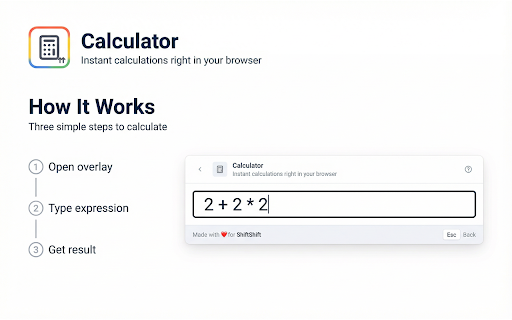


Calculate expressions and solve equations in your browser with history and one-click copy. Perform instant calculations right in your browser with this powerful calculator Chrome extension. This tool helps you calculate expressions, solve equations, and handle complex mathematical operations without leaving your current webpage. Do you need quick calculations while browsing the web? Are you tired of opening calculator apps that take time to load? This calculator Chrome extension solves these problems by providing immediate access to a full-featured math tool directly in Chrome. 1️⃣ Calculate mathematical expressions instantly with automatic real-time evaluation 2️⃣ Solve equations with variables using advanced symbolic algebra capabilities 3️⃣ Access extensive function library including trigonometric, logarithmic, and exponential functions 4️⃣ View calculation history with up to 10 recent results for quick reference 5️⃣ Copy results to clipboard with one click for easy usage in other applications How this calculator extension works step by step: ➤ Open the calculator Chrome extension using keyboard shortcut or toolbar icon ➤ Type your mathematical expression directly into the input field ➤ Watch results appear automatically as you type with intelligent debouncing ➤ Press Enter to save calculations to history for future reference ➤ Click the copy button to instantly transfer results to your clipboard This online calculator Chrome extension supports standard arithmetic operations including addition, subtraction, multiplication, division, modulo, and exponentiation. The math calculator handles complex expressions with proper operator precedence and parentheses grouping that follows standard mathematical conventions. ▸ Students working on homework and studying mathematical concepts ▸ Professionals performing quick calculations during work tasks ▸ Developers testing formulas and mathematical logic in code ▸ Researchers analyzing data and computing statistical results ▸ Anyone who needs instant access to mathematical computations Common use cases for this math calculator: • Calculate percentages, discounts, and financial computations quickly • Solve algebraic equations with single or multiple variables • Evaluate trigonometric functions for angles and measurements • Compute logarithms and exponential values for scientific work • Perform unit conversions and dimensional analysis calculations This scientific calculator extension includes comprehensive function support. Use trigonometric functions like sin, cos, tan, and their inverse counterparts. Access logarithmic functions including log, log10, and log2. Utilize exponential functions with exp and power operations. Apply mathematical utilities like sqrt, abs, floor, ceil, and round for various calculation needs. Questions about this calculator Chrome extension: Does it work offline? Yes, once installed this extension processes all calculations entirely in your browser. No internet connection required after installation, ensuring you can calculate expressions anywhere without network dependency. How accurate are calculations? This calculator extension uses the mathjs library with high precision arithmetic. Results maintain accuracy for standard mathematical operations and handle floating point numbers with appropriate precision. Can it solve complex equations? Yes, the calculator Chrome extension includes symbolic algebra capabilities. Enter equations with variables and the tool solves them step by step, showing solutions in clear mathematical notation. Your productivity improves when you can calculate expressions instantly without context switching. This Chrome calculator eliminates the need to open separate applications or navigate to calculator websites. Get immediate results while staying focused on your current task. - Instant calculations without leaving your current webpage - No technical knowledge required for setup - Works completely offline after installation - Lightweight design with minimal system impact The intuitive interface makes this browser calculator accessible to everyone. No technical knowledge required, no complicated settings to configure. Just type your expression and see results appear automatically with adaptive font sizing that adjusts based on expression length. Access this tool instantly using the ShiftShift command palette. Press Shift twice or use Cmd+Shift+P (Mac) / Ctrl+Shift+P (Windows) to open the palette from any webpage. Navigate with arrow keys, press Enter to select, or Esc to go back. The extension integrates with the ShiftShift ecosystem, providing: ➤ Quick search across all your installed tools ➤ Customizable theme (Light, Dark, or System) ➤ Support for 52 interface languages ➤ Smart sorting by frequency of use or alphabetically Install this calculator Chrome extension today and transform how you handle mathematical calculations. Stop interrupting your workflow to open calculator apps. Stop manually copying numbers between applications. Start calculating instantly with a tool that integrates seamlessly into your browsing experience. Privacy and security remain priorities in this online calculator. All processing happens locally in your browser with no external servers involved. Your calculations stay private on your device. No data collection, no tracking, no cloud uploads required. Transform your ability to perform calculations using this comprehensive calculator Chrome extension. Whether solving equations, evaluating expressions, or computing mathematical functions, you have professional tools at your fingertips that make mathematical work simple and accessible.

JPG to ICO
Convert JPG images to ICO icon format with multiple sizes for favicons and desktop icons Convert JPG images to ICO icon format instantly with this powerful JPG to ICO converter Chrome extension. This tool helps you create multi-size icon files for favicons, desktop shortcuts, and application icons with customizable size options that work entirely in your browser. Do you need to create favicon files for your website from JPG photos? Are you looking for a way to convert JPG logos or graphics into Windows icon format without installing desktop software? This JPG to ICO converter Chrome extension solves these problems by providing fast, reliable icon creation directly in your browser. Key benefits of this JPG to ICO converter extension: 1️⃣ Convert JPG and JPEG files to ICO format with multiple embedded sizes 2️⃣ Choose from six standard icon sizes: 16x16, 32x32, 48x48, 64x64, 128x128, 256x256 3️⃣ Quick presets for Favicon, Windows, Desktop, and Minimal configurations 4️⃣ Real-time file size comparison showing conversion results 5️⃣ Works completely offline in your browser with no data uploads required ➤ Drag and drop JPG files or click to browse and select images ➤ Choose icon sizes using checkboxes or quick preset buttons ➤ Click convert to create your ICO file with all selected sizes ➤ Download the multi-size ICO file immediately with one click This JPG to ICO converter handles various image scenarios seamlessly. The automatic resizing technology scales your images to each selected size with high-quality interpolation, ensuring crisp icons at every dimension. ▸ Web developers creating favicons for websites and web applications ▸ Software developers packaging icons for Windows applications ▸ Designers preparing icon sets for clients and projects ▸ Content creators building branded desktop shortcuts ▸ Anyone who needs reliable JPG to ICO conversion without software installation Common use cases for this ICO creation tool: • Create multi-size favicon.ico files for websites with all standard sizes • Convert JPG logos into Windows desktop shortcut icons • Generate application icons for Windows software distribution • Build icon files for browser bookmarks and shortcuts • Prepare icons for Windows file associations and system integration This image format converter provides detailed information about each conversion. See original file sizes, converted sizes, dimensions, and all included icon sizes at a glance. Understanding these metrics helps you optimize your icons effectively. The ICO format explained simply: ICO files are container formats that hold multiple image sizes in a single file. When Windows or a browser needs an icon, it selects the most appropriate size from the container. Including multiple sizes ensures your icon looks sharp whether displayed as a tiny favicon or a large desktop icon. Standard icon sizes and their uses: Access this tool instantly using the ShiftShift command palette. Three ways to open: 1. Double-tap Shift key quickly from any webpage 2. Press Cmd+Shift+P on Mac or Ctrl+Shift+P on Windows and Linux 3. Click the extension icon in your browser toolbar Navigate the command palette effortlessly with keyboard shortcuts: - Arrow keys Up and Down to move through the list - Enter to select and open items - Esc to go back or close the palette - Type to search across all your installed tools Customize your experience through Settings accessible from the command palette: Extension Recommendations Feature: The Command Palette can display recommendations for other useful extensions from the ShiftShift ecosystem. These recommendations appear based on your usage patterns and help you discover complementary tools that enhance your productivity. You can dismiss any recommendation if you prefer not to see it. Does it work offline? Yes, this extension processes images entirely in your browser. No internet connection required after installation. What sizes should I choose? For favicons, use the Favicon preset with 16x16, 32x32, and 48x48. For desktop icons, include 256x256 for high-DPI displays. The Windows preset covers all common Windows icon requirements. Will my JPG quality be preserved? Yes, the converter uses high-quality image scaling algorithms. Each size in the ICO file is optimized for clarity at that specific dimension. Privacy and security remain priorities in this JPG to ICO converter Chrome extension. All image processing happens locally in your browser with no external servers involved. Your images stay private on your device. The extension connects to ShiftShift servers only for the extension recommendation feature. No image data collection, no tracking, no cloud uploads required. The extension works efficiently with images of various sizes. Small images convert instantly while larger files process smoothly without freezing your browser. Lightweight design ensures minimal impact on browser performance. Install this JPG to ICO converter Chrome extension today and transform how you create icon files. Stop struggling with complex desktop software for simple icon conversion. Start creating professional multi-size ICO files instantly with reliable results and full control over included sizes.

n8n++ — Editor Toolkit for n8n
Format code on save, jump to source nodes, copy cURL, and search workflows — all inside your n8n editor. Instant Prettier formatting and one‑click invalid JSON repair for n8n. Clean workflows, faster debugging. Make n8n editing feel like a real IDE. n8n++ brings Prettier‑style formatting and “fix invalid JSON” magic directly to Code and HTTP nodes, so you can build faster and ship cleaner workflows. Highlights: - Cmd/Ctrl+S = clean, readable code (like using Prettier) - Auto‑repair invalid JSON payloads - Copy cURL from HTTP node - Cmd/Ctrl+Click to jump to referenced nodes - Highlight syntax for JSON and HTML - System Message formatting in AI agent - Code node logs output (console.log and print commands) - Search workflow by code - Optimized for self‑hosted n8n

Scientific Calculator
Google Scientific Calculator, convenient and fast calculation Are you constantly switching to a desktop calculator app for complex calculations? Want a powerful calculator at your fingertips while browsing the web or looking up information? Scientific Calculator Pro is your ultimate solution. It seamlessly embeds a full-featured scientific calculator into your browser, providing instant and accurate support whether you're conducting academic research, engineering calculations, or tackling everyday math problems. We've combined powerful functionality with a classic, intuitive design to give you the most efficient calculation experience. 🚀 Powerful beyond simple calculations. Say goodbye to basic calculators that only handle addition, subtraction, multiplication, and division. Scientific Calculator Pro provides a full suite of professional scientific calculations, rivaling the power of a physical scientific calculator. 📐 Comprehensive scientific function library. Algebraic operations: Supports complex calculations like brackets, percentages, reciprocals (1/x), squares (x²), cubes (x³), arbitrary powers (yˣ), and factorials (x!). Trigonometric Functions: Full support for sin, cos, tan, and their inverse hyperbolic functions (sinh, cosh, tanh). Easily switch between angle (Deg) and radian (Rad) modes with one click, meeting diverse calculation needs. Logarithms and Exponentiation: Includes functions such as natural logarithm (ln), common logarithm (log), and exponential powers of the natural constant e (eˣ). Square Root Operations: Supports square root operations such as square root (√). Common Constants: Built-in one-click input for pi (π), and support for random number generation (Rand). Classic Store and Recall Memory Functions: A full suite of classic memory operations, including M+ (store and accumulate), M- (store and subtract), MR (read memory), and MC (clear memory), allow you to easily handle complex multi-step calculations. Advanced Function Switching: Activate more advanced functions using the 2nd key, expanding the calculator's capabilities. ✨ User-Friendly Design and Superior Experience Classic Retro Interface: A dark panel with a high-contrast key layout provides comfortable viewing and reduces fatigue. The digital display uses pixelated fonts, perfectly recreating the feel of a classic calculator. Unique Independent Window Mode: In addition to using the calculator as a toolbar popup, you can also use it as a standalone, draggable desktop application via the right-click menu **"Open in Independent Window**"! This way, the calculator will always be front-of-mind when reviewing documents in multiple windows, eliminating the need to repeatedly open it. Instant Access, No Waiting: As a browser extension, it stays in the toolbar and launches instantly with a single click. It's responsive and responsive, eliminating the need to wait for the app to load. 🎯 Wide Range of Applications Students: Solve complex computational problems in mathematics, physics, chemistry, and other subjects. Engineers and Developers: Provide convenient tools for engineering calculations and algorithm analysis. Researchers: Quickly verify calculations when processing experimental data or writing academic papers. Anyone who needs a tool that's more powerful and convenient than the default calculator. Say goodbye to tedious app switching and make complex calculations easier and more efficient than ever before. Install [Scientific Calculator Pro] now and let powerful calculations stay in your browser!

Word to PDF
Convert Word documents to PDF format locally in your browser Convert Word documents to PDF format instantly with this powerful Word to PDF converter Chrome extension. This tool helps you transform DOCX files into professional PDF documents directly in your browser without uploading files to any server. Do you need to convert Word documents to PDF for sharing or archiving? Are you looking for a quick way to create PDF files from DOCX documents without installing desktop software? This Word to PDF converter Chrome extension solves these problems by providing fast, reliable document conversion entirely on your device. Key benefits of this document converter extension: 1️⃣ Convert multiple Word files to PDF format simultaneously 2️⃣ Preserves text formatting including headings, lists, and basic styles 3️⃣ Works completely offline in your browser with no file uploads required 4️⃣ Fast conversion that happens entirely on your device 5️⃣ No file size limits beyond your device capabilities ➤ Drag and drop DOCX files or click to browse and select documents ➤ The tool processes your Word files locally in the browser ➤ Click convert to transform your documents into PDF format ➤ Download converted PDF files immediately with one click This DOCX to PDF converter handles document conversion seamlessly. The conversion technology extracts text and formatting from Word documents and renders them as properly formatted PDF files. ▸ Office workers converting reports and documents for sharing ▸ Students preparing assignments and papers in PDF format ▸ Business professionals creating PDF versions of proposals and contracts ▸ Anyone who needs to convert Word documents without Microsoft Office ▸ Users who value privacy and prefer local file processing Common use cases for this convert Word tool: • Transform Word documents into PDF for email attachments • Create PDF versions of reports for archiving and distribution • Convert DOCX files when you need a universally readable format • Prepare documents for printing with consistent formatting • Generate PDF files from Word documents on any computer This Word file converter provides information about each conversion. See file sizes and page counts at a glance. The converted PDF files maintain the text content and basic structure of your original documents. Access this tool instantly using the ShiftShift command palette. Three ways to open: 1. Double-tap Shift key quickly from any webpage 2. Press Cmd+Shift+P on Mac or Ctrl+Shift+P on Windows and Linux 3. Click the extension icon in your browser toolbar Navigate the command palette effortlessly with keyboard shortcuts: - Arrow keys Up and Down to move through the list - Enter to select and open items - Esc to go back or close the palette - Type to search across all your installed tools Customize your experience through Settings accessible from the command palette: Extension Recommendations Feature: The Command Palette can display recommendations for other useful extensions from the ShiftShift ecosystem. These recommendations appear based on your usage patterns and help you discover complementary tools that enhance your productivity. You can dismiss any recommendation if you prefer not to see it. Does it work offline? Yes, this extension processes documents entirely in your browser. No internet connection required after installation. What about document formatting? The converter preserves text, headings, lists, bold, italic, and basic table structure. Complex layouts and embedded images may not render exactly as in the original. Are my files secure? Absolutely. All document processing happens locally in your browser. Files are never uploaded to external servers. Your documents remain private on your device. Privacy and security remain priorities in this Word converter Chrome extension. All document processing happens locally in your browser with no external servers involved. Your files stay private on your device. The extension connects to ShiftShift servers only for the extension recommendation feature. No document data collection, no tracking, no cloud uploads required. The extension works efficiently with documents of various sizes. Small files convert instantly while larger documents process smoothly without freezing your browser. Lightweight design ensures minimal impact on browser performance. Install this Word to PDF converter Chrome extension today and transform how you work with document files. Stop struggling with online converters that require file uploads. Start converting Word to PDF instantly with complete privacy and reliable results.
