
hnponmaomjmekojeloiidmepefopdhod
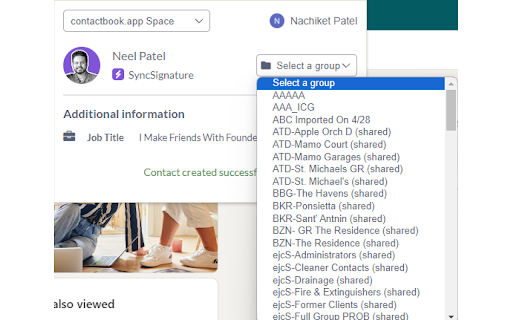
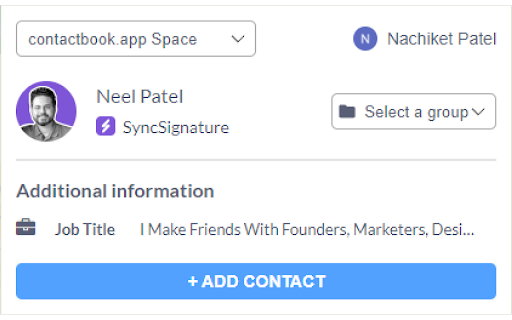
Extract contact data from LinkedIn, Gmail, Twitter, Facebook or Instagram and build contact lists together with your team. Effortlessly manage and organize your contacts with the ContactBook Contact Extractor. This powerful Chrome extension allows you to quickly extract, categorize, and share contacts from various sources like Gmail, LinkedIn, Twitter, Instagram, Facebook and more—all within a few clicks. Easy Contact Extraction: Seamlessly extract contacts from emails, social networks, and other platforms directly into your ContactBook. Phone Number to Company Details: Convert phone numbers into actionable company details directly from Gmail, LinkedIn, Twitter, Instagram, Facebook and more. Customizable Tags: Organize your contacts with custom tags for easier search and filtering. Team Collaboration: Share contacts with your team instantly, ensuring everyone stays on the same page. Google Sync: Automatically sync your extracted contacts with Google Contacts, keeping everything up-to-date. Perfect for professionals and teams looking to streamline their contact management process. Start organizing your contacts like a pro with ContactBook Contact Extractor!

ESUIT | Posts Exporter for Facebook™
Bulk-export Facebook posts from profiles, groups & search results. Stream to server via webhook for CRM, database, or automation. Support exporting or downloading posts, attachments, comments, and screenshots for: - Any group's posts - Any user's posts in a group - Any page's posts - Any user's profile posts - Your saved posts - Search results - Post's link Effortlessly export Facebook posts with this dynamic extension. Unlock the power to effortlessly bulk-export posts from any timeline, page, or group. This versatile tool supports multiple export formats such as JSON, HTML, and CSV, and even allows you to export directly to Google Sheets. This extension allows you to bulk-export all posts from ANY one timeline, any page and any group and your saved posts. Unlike the tools provided by facebook, this extension allows you to export other people's data. You can import the exported posts to other platforms, such as wordpress or blog, or you can use these posts for data analysis. JSON type files can be processed by any programming langs. If you are a developer, this is very useful for you. If you need to subscribe to our service, we will collect your email address to verify your subscription status. (We only collect this data from subscribers; if you do not subscribe, we will not collect any of your data.) This is our privacy policy. https://esuit.dev/privacy-policy Notice: this extension has In-App Purchases. This extension includes features that require payment to unlock unlimited usage. Please refer to our pricing page for more details. https://esuit.dev/pricing/export-posts-for-facebook Additional Features: In the Popup, we provide the following additional features: Function Description: A brief description accompanied by a video tutorial demonstrating how to use this extension. Login Button: Use when you need to subscribe to premium features or log in with an existing subscription. Relevant-Ext: We provide brief recommendations and introductions to relevant extensions in a small section. Encountering an issue? Report it to us 💪: If you encounter any issues, you can get in touch with us through this link, and we will assist you in fixing it. Warning Facebook™ is a trademark of Facebook Inc., registered in the U.S. and other countries. This is an independent project developed by ESUIT. and has no relationship to Facebook™ or Facebook Inc. this extension is not officially developed by Facebook™, The author is @William Chen Got feedback or experiencing any issues? Let us know on Facebook! Your input is important to us and we're here to help. https://www.facebook.com/esuitdev

Business Leads Scraper Tool – Extract Leads from Social Search
Business leads scraper tool to extract people, pages, groups, and place information from Facebook search results easily. Business Leads Scraper Tool is a Chrome extension designed to extract publicly available information from Facebook search page results. It helps users collect structured data from search results related to people, pages, groups, and places for marketing, research, and analysis. This tool is commonly used by marketers, researchers, and businesses that rely on Facebook search to discover potential leads, analyze competitors, or study communities. Instead of manually browsing and copying information from search results, Business Leads Scraper Tool automates the process and provides organized output for further use. What the Business Leads Scraper Tool Does Business Leads Scraper Tool allows users to: • Scrape data from Facebook search result pages • Extract people-related information shown in search results • Collect page details such as name and category • Extract place and business listing information • Scrape group-related data visible in search results • Collect data from multiple search result pages The tool can extract publicly visible people-related information from Facebook search results, such as: • Name • Location (when visible) • Basic profile details shown in search This information can be useful for audience research and lead discovery based on search queries. Page Data Extraction Business Leads Scraper Tool allows users to extract page-related information from Facebook search results, including: • Page name • Page category • Description (when visible) • Public engagement indicators shown in search This helps users analyze brands, businesses, and competitor pages. Place and Business Listing Data The extension can extract place and business-related information displayed in Facebook search results, such as: This is useful for local business research and market analysis. This helps users identify relevant communities and interest-based groups. Built for Marketing, Research, and Lead Generation Business Leads Scraper Tool is commonly used for: • Facebook lead generation • Audience and market research • Competitor analysis • Community and group discovery • Data collection from Facebook search By automating search result extraction, the tool saves time and improves consistency. Easy to Use and No Technical Knowledge Required The extension is designed for simplicity. • No programming or technical skills required • Works directly inside the browser • Run it on Facebook search result pages • Start scraping with a few clicks This allows easy use of the data in spreadsheets, CRM systems, or research tools. Privacy and Responsible Usage • Extracts only publicly available information • Does not bypass logins, private profiles, or restricted areas • All data is processed locally on the user’s computer • No user data is collected, stored, or shared User privacy and responsible usage are always respected. Support If you have any issues or inquiries related to the Business Leads Scraper Tool extension, please contact: info.scrappertool@gmail.com Disclaimer This Chrome extension is not endorsed, affiliated with, authorized, sponsored, or certified by Facebook Inc. Facebook™ is a trademark of Facebook Inc., registered in the U.S. and other countries. This is an independent project developed by SCRAPPERTOOL and has no relationship with Facebook or Facebook Inc.

CRM, Phone Number & Email Finder for LinkedIn
Search, tag, find, and recall every email, phone number, and connection – solo or as a team. LeadDelta is a LinkedIn CRM for networking and LinkedIn phone & email finder. It allows you to manage and organize your network as well as instantly enrich LinkedIn contacts with verified business and personal emails and phone numbers. Built for salespeople, marketers, executives, and recruiters who want to turn LinkedIn connections into revenue. Unlike bulky, generic CRMs, we auto-import, enrich, and let your whole team collaborate—right in your browser, without extra apps or spreadsheets. 🗂️ Centralize and organize your entire network in a lightweight CRM 🤝 Collaborate effortlessly with your team 🔍 Find business & personal emails and phone numbers from LinkedIn in one click 🎯 Create lead lists directly from LinkedIn ☰ Filter your network with over 15 customizable data points 🏷 Sort, tag, and add personalized notes to your connections ✅ Create tasks & reminders 📥 Organize your messy inbox to never miss an opportunity 📧 Send personalized messages at scale and save time 🤖 Leverage AI to enhance your messaging ⬇️ Export and bulk-remove connections in seconds ⬆️ Import contacts easily and streamline your workflows ⚙️ Integrate seamlessly with Zapier and HubSpot (beta) 🗝 Unlock valuable data & signals from your network ⚡️ Build custom workflows to automate processes and boost productivity NEW feature You can now instantly get: ✅ Business emails ✅ Personal emails ✅ Phone numbers Find all essential contact data directly within LeadDelta—no switching tabs, no manual research, no wasted hours. Our smart Waterfall Enrichment leverages multiple top-tier sources, delivering the best verified results every time. ✔️ Say goodbye to manual research ✔️ Stop bouncing between tools ✔️ Works with the contacts you already have ✔️ Flexible, pay-as-you-go credit system ✔️ We charge credits only if we find email/phone Whether prospecting, recruiting, or doing outreach, this will save you hours a week. Build powerful lists: - Find verified Emails and phone numbers directly in LeadDelta - Get contact data from targeted LinkedIn Search lists - Prospect and Enrich decision-makers at target accounts - Find Emails and Phone from LinkedIn Event Attendees Instantly enrich your connections with verified data, simplifying direct outreach and boosting engagement and response rates. Ideal for nurturing relationships, targeted follow-ups, and maximizing your existing network’s potential.

folkX – Lead capture: Add B2B leads and find emails & phone numbers
folkX lets you add contacts to your folk from anywhere on the web. folkX lets you connect your CRM to all your favorite social channels, so you can accelerate sales and build relationships anywhere on the web. Its seamless integration with Gmail, WhatsApp, and all of your favorite socials, lets you optimize your social selling workflow and save tons of time. With folkX, you can: - Import leads to your CRM in seconds - Enrich missing data in one click - Access message templates in your DMs and personalize with CRM data - Set reminders, create shared notes, and add people to your pipeline without leaving the tab - See who’s already in your CRM at-a-glance Here’s how it works 1. Download the free folkX extension for Chrome 2. Sign up to folk’s CRM at https://folk.app/ 3. Pin the folkX extension to your browser 4. With folkX, add new or update existing contacts in your folk CRM from a profile on any website folk is like the sales assistant your team never had.
