
hnnnmelcpiibopogaehhhhpkmfbeajjg
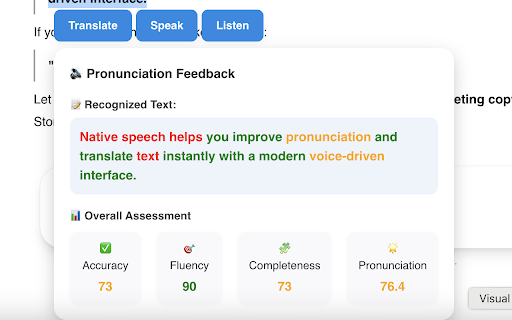


Translate any selected text for free. Practice pronunciation and listen to native speech with a NativeSpeech account. Practice speaking, listening, and translation with AI-powered real-time speech assessment. Select text on any website and start learning instantly. Supports all English accents and other languages. Translate any selected text for free. Practice pronunciation and listen to native speech with a NativeSpeech account. Step-by-step Instructions: 1. Install the extension. 2. On any website, select any text — you should see a list of buttons: "Translate", "Listen", "Practice" and "Ask AI". Click any of them to get started. 3. Use the extension window to adjust the target language or select a preferred voice. You can also show or hide feature buttons. 4. Toggle Disable/Enable extension easily on right click. Enjoy!

Voice In - Speech-To-Text Dictation
Use dictation to type in 10k+ sites in 50+ languages. VoiceIn transcribes your speech to text in real time. Voice In enables voice typing --- it makes it easy to type in the browser using voice-to-text. Whether it is writing emails in Gmail, answering assignments in Classroom, responding to customer tickets, replying to chats or learning pronunciations, Voice In Speech-To-Text capability lets you do them all using your voice. For more information, visit https://dictanote.co/voicein/ WORKS WHERE YOU DO Voice In for Chrome allows you to use the power of speech recognition to type emails in Gmail or write blog posts on Wordpress or send messages in Slack. Voice In works in Gmail, Outlook, web-based CRMs and EHRs, dating sites, Teladoc, and in any site that contains a text box. TRUSTED BY THOUSANDS OF USERS Voice In is trusted by 500K+ users across more than 50 countries who record over 5 million minutes every month. Students, journalists, salespeople, medical professionals, elders, and anyone who wants to work more effectively use Voice In daily. FREE TO USE Our Basic plan comes with everything you need to dictate for free. DICTATE IN 40+ LANGUAGES Voice In recognizes 40+ languages including Portuguese, Italiano, Deutsch, Français. You can also use Voice In to practice your pronunciation in all these languages. VOICE IN IN THE NEWS "If you’ve ever been using a website and wished it had a voice input, now you can add one yourself." – LifeHacker SUPPORT Would love to hear your feedback! If a particular site does not work or you have feedback, email us at support@dictanote.co

Speak It: Text to Speech & Read Aloud
Speak selected text and read aloud instantly. Text to Speech (TTS) reader with natural voices. Speak selected text and read it aloud instantly with this fast Text-to-Speech (TTS) reader. Turn any webpage text into natural speech with a simple read aloud tool for everyday browsing. Just select text on any webpage and press Alt+S or use the right-click menu to start listening instantly. Speak It is a lightweight text-to-speech extension that lets you listen to articles, webpages, and selected text directly in your browser. It is perfect for reading long content, accessibility, language learning, proofreading text, or listening while multitasking. • Speak selected text instantly • Text-to-Speech (TTS) reader with natural voices • Read aloud any text on webpages • Right-click context menu support • Keyboard shortcut Alt+S • Adjustable speech speed • Multiple voices and languages Speak It uses the browser’s built-in Text-to-Speech engine, so it works fast and keeps your text private without sending data to external servers.

Speakoala - Text to Speech (TTS)
Use natural voices to read any website and local documents, with support for area selection playback. With just one click, it reads webpages, selected text, and common documents aloud in a natural-sounding voice. So you can keep learning and staying informed while commuting, working out, doing chores, or relaxing. - One-click read-aloud With a single click, it reads the entire page or just the selected text. - Area selection playback Select any area on the page to listen precisely to the parts you care about. - Select-to-read Highlight any text and tap the floating button to play instantly. - Local PDF and Word read-aloud Supports bringing local PDF and Word files into the same listening workflow. - Precise highlight tracking Highlights text in sync as it’s read, helping you follow along and understand better. - Ambient background sounds Add rain sounds, white noise, and more to help you stay focused. - Speed and volume controls Adjust playback speed from 0.25x to 3x, and fine-tune volume to suit your environment. - Multiple languages, multiple voices Switch between languages and voices for a more natural listening experience. 📢 Supported Languages and Voices 📢 - 70+ languages: Speakoala supports over 70 languages, including English, Mandarin Chinese, French, German, Arabic, Japanese, Korean, Hindi, Russian, Spanish, Portuguese, and more. - 300+ natural voices: Speakoala supports over 300 realistic, natural-sounding voices. 😄 Who It’s For 😄 - 👨🏫 Educators - 👨🎓 Students - 💼 Professionals - 📖 Reading enthusiasts - 👀 People with reading difficulties - 👩🦯 Accessibility users

Typing Through Voice by Spokenly
Type by speaking on any website. Voice dictation for any text field, with multi-language support and a single keyboard shortcut. Voice Typer is a Chrome extension that converts speech to text in any text field on any website. It works through your microphone, supports multiple languages, and activates via the extension icon or a keyboard shortcut. The product positions itself as a way to write up to three times faster than manual typing. It fits a wide range of use cases: taking lecture notes, drafting emails and messages, transcribing interviews, creating content, and filling out forms. The extension is free on the Chrome Web Store, requires microphone permission and an internet connection for recognition, and does not store audio beyond what is needed for transcription. Settings include language selection, customizable activation shortcuts, and sound effects. Accuracy depends on microphone quality, background noise, and speech clarity, and the resulting text can be edited like any normal input.
