
hnfikimmejnoigenobgcjmcampcmcgpl


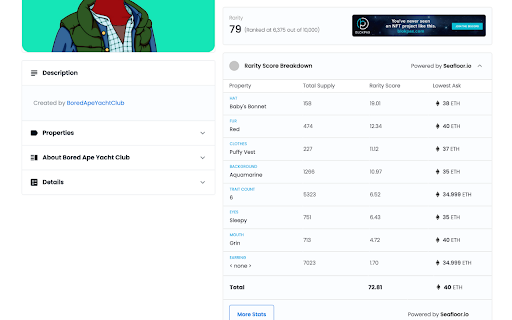

A browser extension by SeaFloor that lets you check the latest stats for your NFTs. Latest SeaFloor extension that will allow users to check latest status for NFTs at OpenSea. It will show the rarity score and rank and its trading volume, and so much more.

NFTEye
Boost your OpenSea experience with rarity ranks and analytics insights. NFTEye boosts your trading experience with free inline rarity ranks and deep analytics. Features: 1. Collection Head-up Display. Including Royalties, Rarity Rank, Floor Trends, On Sale Listing, Next BlueChip Probability, etc.(FREE) 2. Floor Matrix. Floor Matrix shows all on sale listing NFTs distribution and Floor Strength. This feature can also help you snipe undervalued/potential items with lower prices and better ranks in the collection. (FREE) 3. Added Buy Rank feature: NFTEye compares rarity rank and listing price to identify the best deals for all on sale items in collection. 4. Trait Floor. Each NFT has different traits which have different rarities and prices. With the help of Trait Floor, you can find the underpriced NFTs (lower trait floor price with better rarity). (FREE) 5. Relative Sales & Listings. Check the sales or listings that have a better rank and worse rank compared with your current viewing item. (FREE) 6. Rarity ranks & collection trends. View inline rarity ranks, collection floor price trends, and volumes without leaving OpenSea for FREE. 7. Inline rarity ranks for items in transaction history for FREE. 8. Support Opensea and Sudoswap. 9. And many features on the way. (FREE / Members only)

NFT Rarity Rankings
NFT Rarity Ranking extension The extension allows you to see the rarity ranks of NFT collections directly on OpenSea and LooksRare without switching tabs. Thanks to this extension by metarankings.io, you can easily find rare NFTs to snipe at a bargain. Rarity ranks are calculated accurately using the latest trait normalization formulas. New NFT collections are added regularly. Note: All displayed data cannot be considered as financial or professional advice. Always do your own research.

Ethereum Gas Price Extension
A simple free utility for your browser that helps you decide how much to spend on your next Ethereum transaction. This extension helps you keep track of the congestion on the Ethereum blockchain. It shows the latest fees so you can decide what's best for you to price your transactions.

IPFS Companion
Harness the power of IPFS in your browser IPFS Companion harnesses the power of your locally running Kubo IPFS node (either through the IPFS Desktop app or the command-line daemon) directly inside your favorite browser, enabling support for ipfs:// and ipns:// addresses, automatic IPFS gateway loading of websites and file paths, easy IPFS file import and sharing, and more. IPFS is a peer-to-peer hypermedia protocol designed to make the web faster, safer, more resilient, and more open. It enables the creation and dissemination of completely distributed sites and applications that don’t rely on centralized hosting and stay true to the original vision of an open, flat web. Visit https://ipfs.tech to learn more. - Automatically use IPFS to retrieve sites, files, and other resources already stored on IPFS (including redirecting DNSLink hostnames to IPNS names via your choice of gateway) - Support content-addressed IPFS paths (/ipfs/) and URIs (ipfs://) in your browser, and redirect them to the gateway of your choice - Share files from your browser by importing them to your local IPFS node via right-click or drag-and-drop, including the option to preload files at a public gateway - Check gateway info and Kubo RPC status with a single click, see how many peers Kubo RPC is connected to at a glance from your browser’s menu bar - Copy shareable links, snapshot links, IPNS/IPFS paths, and CIDs for IPFS-hosted sites - Common IPFS tasks — like pinning files and launching your IPFS Web UI dashboard — are available right in your browser - Options to toggle IPFS redirects globally or per website You’ll need to have a local IPFS node running on your computer to enjoy all IPFS Companion's features — either from your terminal (https://docs.ipfs.tech/install/command-line/) or using the friendly, free IPFS Desktop app (https://docs.ipfs.tech/install/ipfs-desktop/). Learn about IPFS and how it’s changing the Internet at https://ipfs.tech See the IPFS Companion privacy policy at https://github.com/ipfs/ipfs-companion/blob/main/PRIVACY-POLICY.md
