
hnenidncmoeebipinjdfniagjnfjbapi

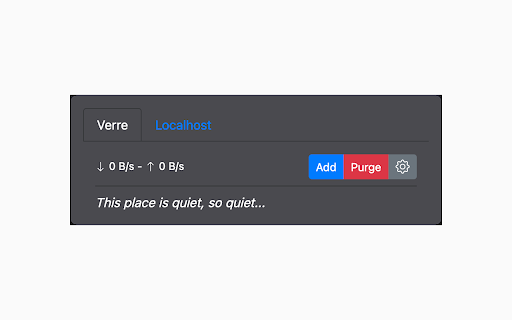


Download files with Aria2 Aria2 Integration brings powerful download management to your browser by connecting it directly to your Aria2 server or Motrix instance. Send links, selected text, browser downloads, torrent files, and metalink files to Aria2/Motrix in just a few clicks. Manage multiple servers, monitor active and queued tasks, and keep everything under control from a clean, easy-to-use popup. Features - Send links and selected text directly to Aria2/Motrix - Automatically capture browser downloads and redirect them to your server - Add torrent and metalink files from URLs or local files - Manage multiple Aria2 servers/Motrix instances - View active, waiting, paused, completed, and failed tasks - Pause, resume, retry, or remove downloads from the popup - See progress, speed, ETA, and task status at a glance - Customize capture behavior with: - minimum file size - excluded protocols - excluded sites - excluded file types - Preserve the full destination file path when needed - Receive notifications for successful additions and errors - Choose light, dark, or automatic theme mode - Incognito mode options, including: - automatic download purging - RPC parameters overrides

Aria2 Explorer
Speed up your downloads with Aria2, manage your download tasks easily. Aria2-Explorer captures browser's download task and exports it to Aria2 via JSON-RPC interfaces to complete download task. Aria2 is a lightweight multi-protocol & open-source command-line download utility. It supports HTTP/HTTPS, FTP, SFTP, BitTorrent and Metalink. 1. For Windows, please install Aria2 Manager: https://apps.microsoft.com/detail/9p5wq68q20wv?cid=cws Other platform, please download Aria2 utility: https://github.com/aria2/aria2/releases/latest. 2. For Windows, please run Aria2 Manager . Other platform, please run Aria2 in the Terminal with typing aria2c --enable-rpc. 3. Install this Chrome extension. 4. Enable auto-capture on the extension options page and configure others as you need. (For Motrix user, please use http://localhost:16800/jsonrpc as the RPC URL) After these steps, you could enjoy the multi-threads and BT download experience inside the Chrome. Warning: Please turn off auto-capture function, when you are using other extension to download network resources. Otherwise, there will be conflict and exception arisen. Features: [ ZERO collection of user data and privacy ] 1. Auto capture browser download tasks - Capture notification - Support magnet links - Toggle auto-capture by shortcut (Default: Alt + A) - Set all Aria2 options manually before download - Filter task by the domain, file extensions or file sizes Filter priority: domain > file-ext > file-size, white-list > black-list 2. Auto-select Aria2 RPC server by matching the preset download URL pattern 4. Synchronize and store all settings on the cloud 5. Support for zh-CN/zh-TW/en/fr/it/ja/ko/ru/uk languages 9. Support shortcuts in the options page (Save: Alt + S Reset: Alt + R Download: Alt + J Upload: Alt + U)

Yape
Extension for PyLoad to easily monitor and add downloads Yape stands for Yet Another PyLoad Extension. It's a dead simple browser extension for monitoring and easily adding downloads to a PyLoad server.

floccus bookmarks sync
Sync your bookmarks privately across browsers and devices **Floccus Bookmarks Sync: Private, Cross‑Browser & Device Sync** *Securely synchronize bookmarks across Chrome, Firefox, Edge, and more using your own cloud storage.* **Seamless Cross‑Browser & Cross‑Device Sync** - Sync bookmarks between Chrome, Firefox, Edge, and any browser that supports extensions. - Works on desktop, mobile, and tablet. - Syncs instantly when you add or edit a bookmark. **Ultimate Privacy & Control** - No data is stored on Floccus servers. - All data stays on your chosen backend (Nextcloud, WebDAV, Google Drive, or Git). - Optional end‑to‑end encryption for WebDAV and Google Drive. **Flexible Backend Support** - Nextcloud, Linkwarden, KaraKeep any WebDAV server, Git repositories, Google Drive, Dropbox - Choose the backend that best fits your workflow. **Easy Setup & Usage** - One‑click installation from the Chrome Web Store. - Simple wizard guides you through selecting a backend and configuring sync. - Automatic updates keep your bookmarks in sync. - **Privacy‑First** – Your bookmarks never leave your chosen storage. - **Cross‑Platform** – Works on all major browsers and devices. - **No Ads / No Fees** – Free to use, no hidden costs. Although, I do appreciate donations :) - **Customizable** – Pick any backend you trust. - **Community‑Supported** – Open‑source code and active community. **Get Floccus now and take control of your bookmarks!** If you'd like to support the creation and maintenance of this software, you can donate here: https://floccus.org/donate/ Please file bug reports or requests for help over on Github: https://github.com/floccusaddon/floccus

Varia Integrator
This extension allows Chrome or any Chromium-based browser to integrate with the Varia download manager. When the extension is enabled, it will route all started downloads to Varia. This way, you don't have to manually copy and paste the link in order to download it via Varia. In order to route the downloads to Varia, make sure to flip the switch in the extension, and make sure Varia is not running in remote mode. Varia is currently available for Linux and Windows. Varia uses aria2 under the hood, running on the 6801 port. If you have an aria2c daemon locally running on that port, you could use this extension for that as well, but it was primarily built for use with Varia. Varia - and this browser extension - is an open source project licensed under the Mozilla Public License v2.0. You can find it on GitHub to check it out, submit bug reports, or contribute code.
