
hnboflikohmohjkhkjcgidccollbibmp
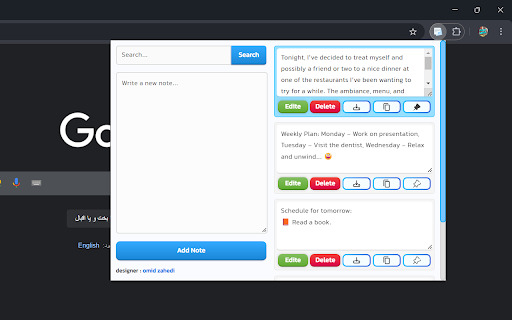
A simple and efficient notebook for taking notes. Notepad is a powerful and efficient tool designed for taking notes. With a clean interface and essential features, it's the perfect companion for organizing, whether you're a student, a professional, or someone who loves jotting down ideas. Key features: 🖋️ Quick Note Taking: Record your thoughts quickly and easily. 📌 Pin important notes: Pin your most important notes so they are easily accessible. ✏️ Editing and updating: You can change your notes at any time. 🗑️ Delete Notes: Easily delete notes you no longer need with one click. 🔍 Powerful Search: Search and find notes quickly. 💾 Download notes: You can easily download your notes in txt format. 🔒 Privacy: Your data is stored in local storage. Why choose notebook? Efficient: Focus on your notes without clutter or distractions. Rich Features: Combines essential tools like pinning, editing, downloading and deleting for ultimate productivity. Lightweight: It won't slow down your browser or use too many resources. How to use: Install and pin the Note Book extension from the Chrome Web Store. Click the Note Book icon in your browser toolbar to open the program. Start typing to create your first note. Use the pin button to keep important notes at the top. Edit, delete or download notes as needed using intuitive controls.

BeeSave Web Clipper
Save, copy, and organize any text from web pages. Quick paste and export to PDF/TXT No more lost links or forgotten quotes! BeeSave Web Clipper helps you easily save, copy, and organize any text from web pages, and even export it to PDF or TXT for your convenience. Do you know that feeling when you find valuable information online, but it quickly gets lost among countless open tabs or simply forgotten after a few hours? BeeSave Web Clipper is your reliable assistant, designed to solve this problem once and for all. It's an intuitive browser extension created for those who value their time and strive for maximum productivity when working with information. How BeeSave Web Clipper Boosts Your Productivity: Instant and Convenient Text Saving: No more manual copying and pasting. Just select any text you're interested in on a web page, and save it with a single click! Use your familiar Ctrl/Cmd+C combination, a convenient hotkey, or the context menu — the choice is yours. Perfect Organization of Your Data by Groups: Every saved clip can easily be assigned a single group. This allows you to create a clear structure for your data and instantly find the information you need, by filtering it by topic, project, or any other criteria you define. You can work with texts sorted by groups, with all of them at once, or only with those saved from the active web page. **Full Control Over Your Text Collection:** Browse all collected text clips or focus only on those related to the currently open tab. Merge multiple text clips into one large, cohesive document. This is ideal for creating notes, compiling information on a specific topic, or preparing reports. Edit your saved entries directly within the extension to adapt them to your current needs. Rearrange clips by changing their position within groups. By default, they are sorted by creation date, but you can always change the order. All Necessary Metadata Always Handy: Every saved text clip is automatically marked with its save date and a direct link to the source web page. You'll always know where the information came from and when it was saved, which is invaluable for citations and source verification. Quick and Smart Text Insertion Anywhere: Forget about searching and copying again! Right-click in any text input field on a website and instantly insert any previously saved clip or even an entire merged group of text. This significantly speeds up filling out forms, writing emails, comments, social media posts, or creating notes. Protection Against Accidental Data Loss: Accidentally deleted an important clip or merged the wrong ones? Don't worry! Recent actions (merges or deletions) can be easily undone, ensuring your peace of mind and confidence in data preservation. Flexible Export of Your Collection: Need your collected text outside the browser? No problem! Export selected or all saved clips into convenient formats — a simple text file (.txt) or a professional PDF document (.pdf). Save your notes, research materials, or quotes for offline work, sharing, or printing. Who Is BeeSave Web Clipper For? Students and Learners: Effectively gather material for term papers, theses, reports, and academic research. Researchers and Analysts: Systematize data, facts, quotes, and sources for your projects. Content Managers and Marketers: Save examples of compelling copy, article ideas, competitor information, and trends. Developers and IT Professionals: Quickly clip useful code snippets, documentation, problem solutions, and links to valuable resources. Journalists and Bloggers: Instantly collect quotes, facts, statistics, and materials for articles and publications. Copywriters and Writers: Accumulate ideas, phrases, and text examples for inspiration and effective writing. Project Managers: Gather requirements, task details, comments, and any other information scattered across web pages. Editors and Proofreaders: Save rules, style guidelines, examples of errors, and successful phrasing. Anyone who actively works with information online: If you frequently read, research, collect, or create data online, BeeSave Web Clipper will become your indispensable tool for boosting productivity. BeeSave Web Clipper is more than just a copying tool. It's your personal, dynamically evolving knowledge base, a powerful text organizer, and an intelligent assistant that will significantly enhance your efficiency and help you always have the necessary information at your fingertips. Install BeeSave Web Clipper today and transform your approach to working with web text!

Noted - Minimalist Notebook
Write notes in a minimalist, gorgeous and private notebook. 📘 Noted: The Simple, Private Note-Taking App Noted is a lightweight Chrome extension for quick notes, simple tasks, code snippets, ideas, lists, and anything else you want to keep close at hand. It gives you a clean writing space that opens from the browser toolbar, with an optional Chrome side panel view for longer sessions. - Find text inside the current note with `Ctrl + F`. - Create both notes and task lists. - Star important items for quick filtering. - Use dictation with your browser's speech-to-text support. - Add emoji icons to notes and tasks. - Customize each item with themes, font face, and font size. - Set default theme and font preferences for new items. - Search, sort, filter, rename, and organize items from the Files view. - Drag items into a custom order. - Import and export your notes. - Switch between popup and side panel views. Noted stores your notes in Chrome extension storage. Your content stays in your browser and is not uploaded to an external server by Noted. - Fast, minimalist note-taking. - Rich text formatting with lists, quotes, code blocks, colors, alignment, and indentation. - Task mode with clickable completion controls. - Local-first storage for privacy. - Custom note colors, fonts, and emoji icons. - In-note search with highlighted matches. - Files view with search, filters, sorting, starred items, and row actions. - Popup resizing and side panel support. - Offline support. Noted is built for anyone who wants a simple, private place for everyday notes without a heavy workspace or account-based note system. Download Noted today and transform the way you keep track of your notes and ideas!

Side Note
Side Note is a lightweight and intuitive Chrome extension designed to enhance your note-taking experience. With Side Note, you can easily capture and organize your thoughts, ideas, reminders, and important information right from your browser.

Notebook Sidebar
Notebook Sidebar is a handy tool for quick and easy note taking with advanced features. Chrome Note book Sidebar Extension📝✨ With this extension, you can have a light and fast notepad in the Chrome sidebar and it helps you to note and save ideas, notes, reminders and various tips in it. ✍️ Ability to record, edit and save notes 📌 Ability to pin important notes 🔒 Local storage of notes in a completely secure way 📥 Ability to export all notes 🔍 Ability to search for posts 📏 Ability to adjust the desired height for each note
