
hmnejeapagdhabnejdigopeapioelmeo
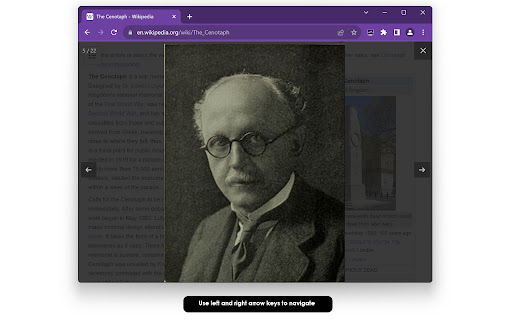
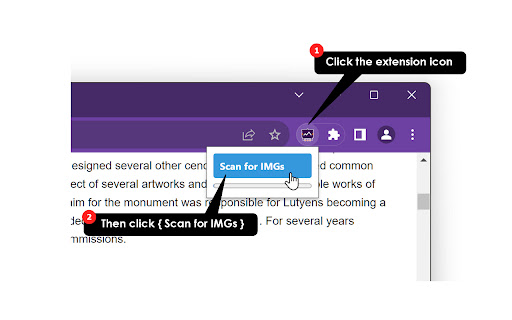

Get all images on the page and create a slideshow. Creates a slideshow from all images on the current page. ... 𝗤𝘂𝗶𝗰𝗸 𝗦𝘁𝗮𝗿𝘁 ① Click the extension icon. ② Click the [Scan for IMGs] button. ③ Extension scans active tab to find all images currently loaded. ④ Once done, use the arrow keys to navigate. ⑤ Click [ × ] on the upper right to close. 𝗟𝗶𝗺𝗶𝘁𝗮𝘁𝗶𝗼𝗻𝘀 🔸Extension ignores images smaller than 100px. 🔸Only images that have fully loaded are detected. 🔸Delay added to ensure that all images have loaded before scanning. ... For ease of access, please pin the extension to the toolbar. Extension does not collect any data, and only runs when the user clicks the icon.

Picture Reader
Extracts all images from a webpage. Features include slideshow playback, image size filtering, and batch downloading. Picture Reader is a browser extension that extracts all images from the current webpage and displays them in a unified interface. This extension provides features such as slideshow playback, image size filtering, and batch downloading, making it easier for users to browse and manage images on webpages. Full screen view, view mode Main Features - Unified Browsing of Extracted Webpage Images: Automatically extracts all images from the current webpage and displays them in a unified interface. - Image Manipulation: Supports zooming in, zooming out, and rotating images. Support keyboard navigation ←→, scroll wheel zoom, drag and drop to move/switch pictures, touch operation of cell phone and tablet. - Slideshow Playback: Supports timed playback of images, allowing users to set the playback interval. - Image Size Filtering: Filters images based on user-defined size criteria, displaying only those that meet the criteria. - Batch Downloading: Supports batch downloading of images from the current image list, making it easy for users to save and manage images. (Some sites may have restrictions and may not be available for download) - Auto-Load: automatically scrolls and loads the image content of the web page. - Hoverbox Quick Entry: Provides customizable and configurable hover button quick entry (disabled by default). - Optional features: automatic full screen, forced maximization of the image (full screen width and height) Thank you for use it, if you like it, please give it 5 stars the extension! Update Logs: v1.1.0 Optimized the reading and downloading experience for certain websites. v1.0.9 Download and reading experience optimization, performance optimization v1.0.8 New Configuration Panel , Auto Full-screen Zoom, Force Image Maximization v1.0.7 New Hoverbox Quick Entry: Provides customizable and configurable Hover Button Quick Entry (off by default). v1.0.6 Optimization: Close the popup window instead of going back to the previous page when using the side mouse button v1.0.3 New features: download error, page autoload (handle lazy loading) , fix site-specific adaptation bugs If you have any questions or suggestions, please contact us through the following ways:

Photo Slideshow
View all images on the page in a full screen slideshow. Imagine landing on a blog packed with stunning travel photos, a product page overflowing with high-resolution images, or an online portfolio brimming with creative artwork. You want to see every picture at full size without opening new tabs, right-clicking “View image,” or fighting an awkward lightbox that only shows thumbnails. Photo Slideshow removes all that friction. With a single click on the extension icon, it sweeps the current tab for every network-served image, dims the background, and launches a sleek, keyboard-friendly viewer that cycles through the images in gorgeous full screen. Designers & Art Directors Need to confirm that client assets appear crisp on production pages Rapidly cycle through every image at native resolution, checking colour, contrast, and layout without hunting through DOM inspectors Photographers & Visual Artists Want an effortless way to showcase web-hosted portfolios to clients or friends Turns any page—Flickr, 500px, DeviantArt, personal blogs—into a clean, full-screen slideshow for impromptu presentations E-Commerce Shoppers & Reviewers Often frustrated by tiny inline pictures or carousels that hide variants Instantly displays every product angle and lifestyle shot in one place so buyers can zoom through details Educators & Technical Trainers Need to talk students through diagrams or screenshots scattered across a lesson page Keyboard navigation makes it easy to step forward or back while screen-sharing, keeping students’ focus on the visual Accessibility Advocates Prefer keyboard over mouse, rely on predictable controls Simple arrow/space/Esc commands, high-contrast overlay, and zero mouse dependence improve usability for many motor-impaired users Reasons to Install Today Speed – Turn a cluttered page into a clean gallery in under half a second. No external libraries = no extra load time. Focus – The dark overlay eliminates distractions, letting colours pop and details shine. Perfect for UI reviews or mood-board sessions.

Slideshow Tabs
A Chromium extension to slideshow open tabs. This extension slide shows tabs on all open windows. Version - 1.0 - Run slide show on all windows with given timeout. - Supports audio and only active tab is un-mute and all other tabs are muted. - Remembers user preference Version - 3.0 - Added support for 13 widely spoken languages All appreciation and applause to my family ! If you like my work, you can support me through below link https://www.buymeacoffee.com/sbsh

Tiniest Gallery
Save and organize images, videos, and text snippets. Features: categorization, slideshow, color extraction, and zip download. 🌟🎉✨ Embark on an extraordinary creative journey with the Tiniest Gallery extension! Create your own gallery of stunning images, videos, and text snippets! - Save images, videos, and text snippets from any webpage. 💾 🖼️ 🎥 💬 - Organize your content into different categories. 📁 🗂️ - View your saved gallery in a beautiful, responsive layout. 👀 📸 - Enjoy a fullscreen slideshow of your saved items. 🖥️ 🎠 ✨ - Extract and copy dominant colors from images and videos. 🎨 🌈 - Save HEX codes of palette colors with a simple click. 🎨 💾 - Download your saved content as a zip file. ⬇️ 📦 - Filter your content by type: images, videos, or text snippets. 🔍 🏷️ - Control slideshow duration with an intuitive slider. ⏱️ 🎚️ - Quickly access your gallery through a toolbar icon. 🚀 🔧 🔒 Privacy-focused: No sign-up required, no login needed, and your data is saved only on your computer - never on any external servers! 🖥️ 🔐 The Tiniest Gallery extension is a powerful tool for artists, designers, researchers, and anyone seeking visual inspiration or an organized personal collection. 🎨✨🖌️ Unleash your creativity, organize your inspirations, and discover a world of captivating colors and images - all while maintaining complete control over your data. 🌈✨🎨 Install Tiniest Gallery now and let the magic unfold in fullscreen glory, right on your own device! 🌟🌈🎉💻
