
hmmihfgkpbkkgkajgocbldhjhliajjin
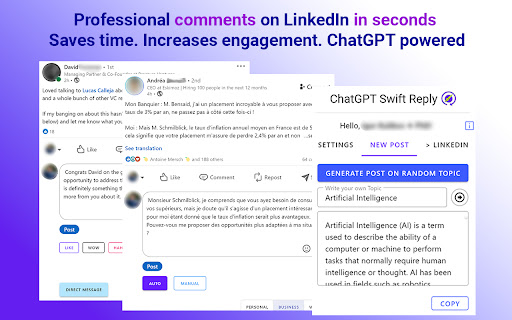
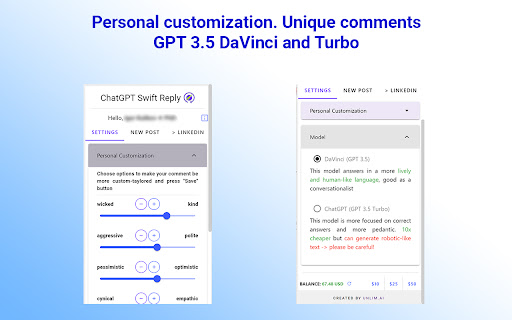

ChatGPT comments / replies / posts for LinkedIn with personal customization and context-awareness Swift Reply - is a tool that helps you to comment and post on LinkedIn with the power of ChatGPT, i.e. context awareness and human-like text generation. 👉No need to read the post (or comment) that you want to reply/comment! AI analyzes the post that you want to comment - and gives you the best answer. 👉You can customize your reply/comment choosing from many parameters - from personality traits to type and length of an answer. 👉Swift Reply understands the context of LinkedIn posts and/or comments and therefore creates the best answer. Generated comments/replies are professionalized, unique and with no mistakes, they are noticed and appreciated by LinkedIn algorithm. This will raise your Social Selling Index 🗣 . 🎯And one more thing. Swift Reply generates a personal Direct Message with reference to the post or comment. No more fear of a blank page in DMs. ⚡⚡⚡No subscriptions! Pay as you use! You can create as many replies as you need. No limitations.

AIResponse - Ai Response Generator Free For LinkedIn Reply (No Signup)
Generate AI-powered responses for LinkedIn posts and messages with ease. AIResponse - Ai Response Generator Free For LinkedIn Reply (No Signup) Boost your LinkedIn engagement with AI-generated replies! AIResponse is a simple yet powerful Chrome extension that helps you create smart, relevant, and personalized comments for LinkedIn posts. Whether you want to provide support, crack a joke, share an idea, or ask a question, AIResponse has got you covered. Just choose a category, and let the AI craft the perfect response. It's quick, easy, and sure to make your LinkedIn interactions more meaningful. 🔴 Extension Features: ✔ Generate AI-powered comments for LinkedIn posts. ✔ Choose from multiple response categories like Support, Idea, Joke, and more. ✔ Easy to use with AI Reply button click on any LinkedIn post. ✔ Automatically integrates with LinkedIn’s comment box. 🔴 Why Use This Extension: Using AIResponse can significantly enhance your LinkedIn interactions by making it easier to craft thoughtful and engaging comments. Whether you're short on time or struggling with what to say, this extension leverages AI to generate smart, relevant responses tailored to the tone and context of each post. By offering a variety of categories like Support, Idea, or Joke, AIResponse allows you to choose the perfect angle for your comment, ensuring your participation in discussions is both meaningful and impactful. This not only saves you time but also helps you stand out in your professional network, fostering stronger connections and more engaging conversations on LinkedIn. . 🔴 How to Use This Extension: ✔ Install the Extension ✔ Login with Your Gmail Account ✔ Navigate to LinkedIn ✔ Find a Post ✔ Select a Category ✔ Generate Your Comment ✔ Review and Edit (Optional) ✔ Engage Effortlessly 🔴 Disclaimer: This extension uses AI technology to generate comments for LinkedIn posts based on the categories you select. While the AI aims to provide accurate and contextually appropriate responses, it is recommended that you review and, if necessary, edit the generated content before posting. The extension requires access to your Gmail account for login purposes but does not store or share your personal information beyond what is necessary for functionality. Users are responsible for ensuring that their comments align with LinkedIn's community guidelines and standards. The creators of this extension are not liable for any misuse or inappropriate content generated by the AI.

LinkedIn Quick Replies
Fast editable answers for LinkedIn messages LinkedIn Quick Replies add a modal with 5 editable replies in the messages tab which you can drag-and-drop to answer, spending less than a second to reply to (or ask) the same questions over and over again instead of writing them down or copying from elsewhere. Free and open source, no tracking or data collecting. Check the links for more info.

Replya - FREE LinkedIn Comment Generator & AI Assistant
Generate perfect LinkedIn comments instantly with AI. Free comment suggestions, personalized tone, and one-click apply. Generate perfect LinkedIn comments instantly with AI. Free comment suggestions, personalized tone, and one-click apply. 🚀 Free LinkedIn AI Comment Generator - Boost Your Professional Engagement Transform your LinkedIn networking with Replya, the intelligent comment assistant that helps professionals engage authentically and efficiently. Generate perfect, personalized comments in seconds! 🎯 Instant AI-Powered Suggestions * 5 unique comment variations per post * Context-aware responses that understand post content * Personalized to your professional background * One-click apply directly to LinkedIn 🎨 Full Customization Control * 4 Professional Tones: Professional, Enthusiastic, Friendly, Thoughtful * 3 Length Options: Short (5-15 words), Medium (20-35 words), Long (50-60 words) * Optional emojis and engaging questions * Real-time regeneration with updated filters 👤 Smart Personalization * Uses your job title, company, and expertise * References poster by name automatically * Builds on your existing draft comments * Maintains your authentic professional voice ⚡ Seamless LinkedIn Integration * Native UI that matches LinkedIn’s design * Replya logo "R" button appears right in comment box * Smart caching for instant re-access * Works on all LinkedIn posts Perfect For: ✓ Job seekers building their network ✓ Professionals growing their LinkedIn presence ✓ Sales & marketing teams engaging leads ✓ Content creators responding to audience ✓ Executives maintaining thought leadership ✓ Anyone who wants thoughtful comments faster How It Works: 1. Click the Replya logo "R" button in any LinkedIn comment box 2. AI analyzes the post and generates 5 tailored suggestions 3. Customize tone, length, and style preferences 4. Click “Apply” to insert into comment field 5. Edit if needed and post! Why Choose Replya? 🆓 Completely Free - No hidden costs or premium tiers 🚀 Saves Time - Comment 10x faster than writing from scratch 🎯 Increases Engagement - Professional comments get more responses 💼 Career Growth - Build your network and visibility 🤖 AI-Powered - Leverages latest language models ⚡ Lightning Fast - Generate suggestions in 2-3 seconds Start Engaging Smarter Today! Install Replya now and experience the easiest way to boost your LinkedIn presence. Join thousands of professionals who are commenting with confidence and building stronger professional networks.

LinkedIn AI Reply
Our intelligent assistant helps you craft personalized, thoughtful, and professional responses to LinkedIn messages. Whether you're networking, job hunting, or managing business relationships, this AI-driven extension saves time and ensures your replies stand out. Send messages on LinkedIn In 3 small steps: 1. Click the icon to open prompt 2. Generate Reply according to prompt 3. Click on Insert to insert the message and send reply Take your LinkedIn communication to the next level with the power of AI. Download LinkedIn AI Reply now and supercharge your professional conversations! Free and open source, no tracking or data collecting. Check the links for more info.
