
hmgkjfnohmdgceckjdnghncnpmpeoopa
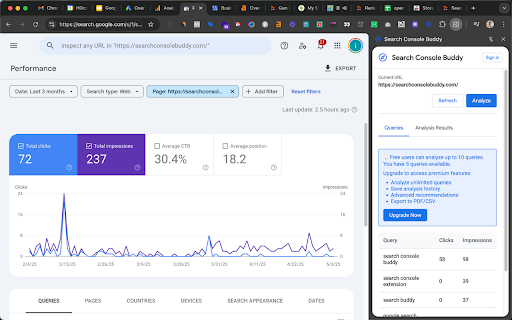

Unlock hidden SEO potential by analyzing Google Search Console data to identify content gaps and boost your search rankings. Search Console Buddy helps SEO professionals, content marketers, and website owners optimize their content based on real Google Search Console data. 🔍 Content Gap Analysis - Automatically identify keywords where your page appears in search results but misses clicks - Compare your content against top-ranking competitive pages - Get instant visibility into missing topics and opportunities 📊 Real-time Search Console Integration - Works directly within Google Search Console - No need to export or import data manually - Quick content analysis with just a few clicks 🤖 AI-Powered Content Generation [Premium] - Generate optimized content suggestions that target your missing keywords - Choose from multiple AI models including GPT-4o Mini, Gemini 2.5 Flash, and DeepSeek Chat - Generate content in multiple languages including English, Chinese (Traditional & Simplified), Japanese, and more - Premium users receive 50 content generation credits each month 💼 Complete Content Workflow - Analyze: Identify missing queries directly in Search Console - Optimize: See which topics should be included in your content - Generate: Create ready-to-implement content enhancements - Export: Save your analysis and suggestions for later use 📱 Convenient Side Panel Interface - Access all tools without leaving Google Search Console - Easily toggle between analysis and content generation - Clean, intuitive design that works seamlessly with Search Console 🔒 Privacy & Security: - No data stored on external servers - Your Search Console data remains secure - API keys are stored locally in your browser - Works entirely within your browser environment 💰 Pricing Options: - Free Plan: Access to content gap analysis and keyword insights (limited to 10 queries per analysis) - Premium Plan ($10/month): Unlimited analyses and 50 monthly AI content generation credits Supercharge your SEO content strategy today with Search Console Buddy - the essential toolkit for data-driven content optimization! Release Notes (Latest Version): - Added AI-powered content generation with 4 different models - Implemented multi-language support for all content generation - Added credits system for premium users (50 credits per month) - Improved UI with clearer query selection and better progress tracking - Enhanced content export options including HTML formatting - Fixed various performance and stability issues

SEO Search Simulator by Nightwatch
Simulate search engine queries from any location on Google and easily check and track your website or your competitor's rankings. Simulate unbiased search engine queries from any location on Google and effortlessly check the rankings of your website or your competitors'. Nightwatch's search simulator is an indispensable tool for SEO professionals seeking a straightforward and effective solution for rank tracking, enabling you to monitor website positions in SERPs (search engine results pages). For those conducting numerous searches, encountering rate limits or captchas can be a challenge. For a more robust solution that surpasses browser and extension limitations, explore the Nightwatch app (https://nightwatch.io).

GSC Guardian
Stay on top of your website's health. Check for incidents in your Google Search Console data with a simple graph. GSC Guardian 2.10 - Enhanced Google Search Console with Visual Algorithm Tracking 🔒 Security Verified: This extension has been independently reviewed for security to ensure that your data is not being uploaded to any unauthorized third parties: https://manus.im/share/VTfoAgDalRZmVeBU7ePuX2?replay=1 New: Bulk CSV Import - Upload historical annotations and migrate data efficiently ⭐ Trusted by 15,000+ SEO professionals worldwide 🏆 US Search Awards - Best Search Software Finalist ⭐ Please support us with a rating if GSC Guardian helps your workflow! ⭐ SECURITY ENHANCEMENTS • Complete security audit and code review completed • Enhanced security measures with independent verification • Public security transparency implemented for all future releases • Streamlined codebase for improved performance and reliability BULK ANNOTATION IMPORT • Upload CSV files containing hundreds of annotations at once • Preview annotations before importing to ensure accuracy • Download our CSV template to get started immediately • Ideal for migrating historical data or team handovers ENHANCED USER EXPERIENCE • Status messages now auto-hide for a cleaner interface • Annotations are filtered by Search Console property • New "Show All Resources" option for multi-property views • Improved visual hierarchy with dashed annotation lines JULY 2025 STABILITY UPDATE • Fixed compatibility issues with recent Google Search Console changes • Resolved date range switching bugs • Improved annotation property association ALGORITHM UPDATE VISUALIZATION See Google's algorithm updates as visual overlays on your traffic graphs. Instantly understand if traffic changes correlate with known updates. COMPREHENSIVE ANNOTATION SYSTEM • Add context to traffic changes with timestamped notes • Import/export annotations for team collaboration • Search and filter annotations by date or keyword • Maintain historical records of site changes and optimizations DARK MODE Reduce eye strain during extended analysis sessions with a carefully designed dark theme. MULTI-LANGUAGE SUPPORT Available in 9 languages: English, Spanish, Dutch, French, Portuguese, German, Italian, Japanese, and Russian. DATA PORTABILITY Export all annotations and incidents to CSV or Google Sheets for reporting, backup, or migration purposes. FOR SEO & MARMETING AGENCIES • Track client site changes across multiple properties • Document optimization efforts with timestamped annotations • Export visual reports showing algorithm impacts • Onboard new team members with historical context via CSV import FOR IN-HOUSE SEO & MARKETING TEAMS • Correlate development releases with traffic changes • Maintain audit trails of SEO implementations • Share insights across departments with exportable data • Track seasonal patterns with historical annotations FOR WEBSITE OWNERS • Understand traffic fluctuations in context • Document when content was published or updated • Track marketing campaign launches against organic performance • Build institutional knowledge about site performance FOR SEO CONSULTANTS • Quickly assess algorithm impact during site audits • Import client annotations for comprehensive analysis • Generate visual reports for client presentations • Maintain detailed records across multiple client projects 1. Install the extension from Chrome Web Store 5. Use import/export features for bulk operations IMPROVE ANALYSIS • See patterns between updates and performance • Maintain comprehensive historical context • Make data-driven decisions with complete information PROFESSIONAL REPORTING • Export annotated data for client presentations • Create visual timelines of SEO efforts • Document ROI of optimization work • API integrations with project management tools • Automated annotation rules • Multi-account management dashboard • Advanced filtering and analytics • Actively maintained with regular updates • Responsive support team • Your data remains within Google's ecosystem • No external servers or data collection • Independent security verification with public audit available • Open to feature requests from the community Install GSC Guardian to add powerful visualization and annotation capabilities to Google Search Console. Questions or feedback? We're here to help make your SEO workflow more efficient.

Free Content Scraper
Scrape content from Google search results and download as text Free Content Scraper: Extract and Download Text from Search Results Free Content Scraper helps you easily extract and download text content from websites found in your Google search results. Our extension streamlines research and information gathering by allowing you to select multiple search results and extract their key content in one click. What This Extension Does Free Content Scraper appears as a convenient side panel when you click its icon while browsing Google search results. It displays all the organic search results from your current Google search page, allowing you to: Select which websites you want to extract content from using simple checkboxes Extract the main text content from multiple websites with a single click Download all extracted content as a neatly formatted text file Identify video results with clear video badges, helping you focus on text-based content Why You Should Install Free Content Scraper Save Hours of Research Time Instead of opening dozens of tabs and manually copying content from each website, Free Content Scraper lets you extract content from multiple sources simultaneously, saving you valuable time and effort. Focus on Organic Results We automatically filter out ads, sponsored content, shopping results, local business listings, and other non-organic search results, allowing you to focus on genuine content relevant to your search. Clean, Readable Text Our extension removes unnecessary HTML, navigation elements, ads, and other clutter, delivering only the main text content that matters to you in a clean, readable format. Easy Organization Downloaded content includes the original website titles, URLs, and search query information, making it simple to organize your research and cite sources properly. Privacy-Focused Free Content Scraper operates directly within your browser. We don't collect your data, track your searches, or store any information on remote servers. Perfect For: Students researching for essays and papers Journalists gathering information from multiple sources Content creators looking for inspiration and references Researchers collecting data from various websites Anyone who wants to save time extracting information from search results How to Use Perform a Google search Click the Free Content Scraper icon in your browser toolbar Select the websites you want to extract content from in the side panel Click "Scrape Selected URLs" Once scraping is complete, click "Download Content" to save as a text file Free Content Scraper makes online research faster and more efficient by bringing the most relevant content from your search results together in one convenient download. Try it today and transform how you gather information from the web!

Query Scout | Access Google Search Console for SEO Anywhere
Query Scout, the best Chrome extension for Google Search Console Query Scout is the ultimate SEO extension for accessing Google Search Console data from any page on your site. It lets you explore search queries and apply filters for in-depth SEO analysis. Whether you're an SEO professional, a marketer, or handling site development, this extension will quickly become an essential tool in your workflow! Seamless integration with Google Search Console Access SEO data from any page on your site Discover ranked keywords and apply custom filters Create your own regex rules for advanced analysis Export data as CSV or view it directly in Search Console No keyword limits with Premium version Custom regex filters for deeper insights => Access the extension unlimited => No keyword limits per page => Custom regex filters 1.0.8 : Statut Premium persistent 1.0.7 : Fix disconnection problem 1.0.6 : Compatibility with subdomains 1.0.5: Fixed login persistence 1.0.4: Improved custom regex module 1.0.3: Added the ability to create custom regex rules!
