
hmbmmdjlcdediglgfcdkhinjdelkiock
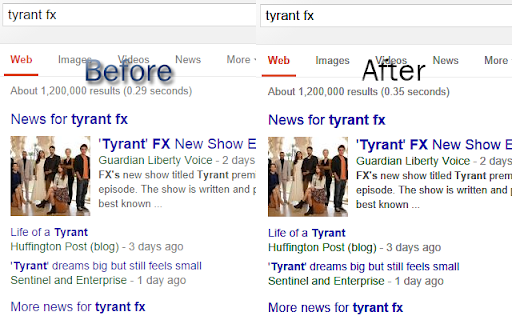

Font Rendering Enhancer for Chrome. Darker and clearer text on the pages. Description Font Rendering Enhancer comes from Opera Font Rendering by thunder13. Darker and clearer text on almost every page (http and https). Modified and ported Mac OSX Font Rendering by proxxy (from Opera on Presto engine). "The windows browsers render the fonts based on the normal sub-pixel rendering without implementing Font smoothing, anti-aliasing as noticeable as Mac OSX. This tweak applies text to be displayed more anti-aliased using CSS3 property. So modern browsers supporting CSS3 and userstyle support would be able to support it. ;)"

Enhanced Image Viewer
Features: ✓ Position images in center or top left corner ✓ Set custom background color ✓ Zoom, rotate, pan and scroll images with improved controls ✓ Flip images horizontally and vertically ✓ Pixelate images for viewing pixel art and lossless formats ✓ Hide scrollbars ✓ View images in the current tab ✓ Works with local files and incognito mode ✓ Enhances images on Reddit • No more headers and footers on images opened directly • Works with single images and image galleries in an overlay ✓ Enhances images on image hosting sites • Skips the continue button • Shows the image full-screen automatically Feel free to leave any feedback you might have on the support page or contact us by email.

Chrome Font Super Enhancer
Chrome Font Super Enhancer is an add-on to increase the readability of texts in Chrome, especially in those websites which use thin fonts. For many users, the Chrome browser renders these fonts too lightly, and in some case they're very difficult to read. This add-on has an intelligent function that calculates the exact amount of darkness to apply to characters (based on their color and luminance), which results in a perfect rendition. If you enjoy this extension and you would like to use additional features reserved for donors, please send me a donation! Thanks (pin extension to your toolbar or go to options to see the donation button) NEW in v2.10: Dark mode support! NEW in v2.11: Fallback for dynamic content! NEW in v2.12: Auto page refresh when changing options! NEW in v2.13: Fix for bad rendering in Google search form NEW in v2.14: Added unlock code field (in options) to remove Paypal button after donation. You'll receive the unlock code to your Paypal address NEW in v2.15: Fix for Google Calendar. Better support for dynamic content pages. NEW in v2.16: Faster rendering and bugfix NEW in v2.17: Text enhancing applied also to INPUT elements NEW in v2.18: Added a slider to further increase char thickness NEW in v2.19 (minor update) Reordered options page, added "NEW" badge on icon for update notifications NEW in v2.22: (minor update) Avoided unnecessary filter application on certain input types NEW in v2.23: Added website exclusion list (feature reserved for donors) NEW in v2.24: Added letter spacing option (feature reserved for donors)

Lexend for Chrome™
Make reading online easier and more enjoyable by formatting pages with the Lexend font. With the Official Lexend Font Chrome Extension, you can transform how you view websites and dive into the world of Lexend fonts. 🖋️ Features Say goodbye to boring fonts and enjoy the versatility of Lexend! This extension makes it easy to change the font on any website to your favorite Lexend style. Choose from these fantastic fonts: 🤝 Built & Maintained by the Helperbird Team The Lexend Font Chrome Extension is lovingly crafted and continuously maintained by the passionate team at Helperbird. We ensure a seamless and delightful user experience for everyone. Looking for more than just font magic? Check out Helperbird for all things accessibility, reading, and writing! Use code "lexend" at checkout for an exclusive 25% discount. 🌐 Website Curious about Lexend's intriguing history? Visit Lexend.com for a fascinating look into this exceptional font. 🆕 Version 2024.6.9 Completely rebuilt using the side panel for a more intuitive experience. Much lighter and quicker, improving performance. Enhanced accessibility features for a better user experience. 🆕 Version 3.0.0 Support for icons to add a personal touch. Streamlined code for better performance. Only essential permissions requested. 🔄 Version 2.0.1 Stunning new UI and layout for an enhanced browsing experience. Upgraded to MV3 manifest, leveraging the latest Chrome features. Efficient, clutter-free code. Privacy-focused permissions review and adjustments. For any questions or assistance, feel free to contact Robert at robert@lexend.com. Unleash your creativity and explore the beauty of Lexend fonts with our official Chrome extension. Get ready for a captivating browsing experience. Install now and elevate your web journey! 🚀

OpenDyslexic Font for Chrome
Change the font of web pages to OpenDyslexic Font OpenDyslexic Font Changer is a Chrome extension that makes reading on the web easier for people with dyslexia. By changing the font of web pages to OpenDyslexic, a typeface designed to improve readability for readers with dyslexia, this extension helps to reduce the stress and frustration often associated with reading on the web. With this extension, you can enable or disable the OpenDyslexic font with a simple toggle switch. You can also select the font style you prefer from a dropdown menu, including regular, bold, and italic. OpenDyslexic Font Changer works on any website, and you can customize the font settings to your liking. The extension is easy to use and helps make reading on the web more accessible for everyone. Whether you have dyslexia or just find reading on the web challenging, OpenDyslexic Font Changer can help make the reading experience more comfortable and enjoyable. Try OpenDyslexic Font Changer today and experience the benefits of OpenDyslexic for yourself!
