
hmafjcehofkeaijnboefjjlldnjglgdj

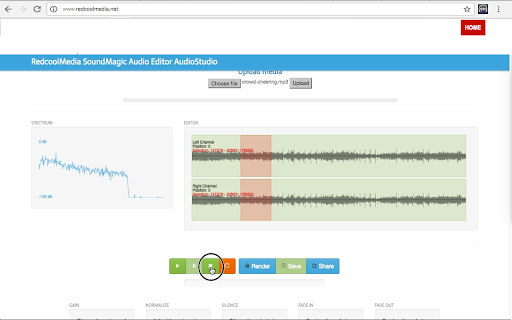
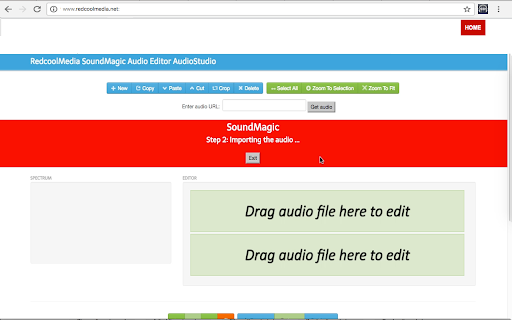
SoundMagic to create, edit, copy, cut, paste and crop audio files MP3 and WAV Create, edit, copy, cut, paste and crop audio files with formats MP3 and WAV. SoundMagic C is a fast audio editor that allows you to manipulate your audio files. Its main features are: - New button, that create a New project in which to modify any MP3 or WAV audio file. - Copy, Cut, Delete.Crop and Paste sections of the audio file. - Buttons to select the whole audio, zoom over an audio section or zoom to fit. - Import an audio file MP3 or WAV from a URL. - Import an audio file MP3 or WAV from the local disk. - Display the spectrum of the audio files while being listened. - Buttons Play/Pause over the audio files that are being imported. - Render and save locally the audio files created. - Button Share to send a link that contains the audio file. - Change the volume of the selected audio sequence with a gain multiplicator. - Adjust the volume to the maximum of the selected audio sequence. - Silence the selected audio sequence. - Create a linear fade int of the selected audio sequence. - Create a linear fade out of the selected audio sequence.

Movie maker MovieStudio video editor
Movie maker online to create, edit and record videos, and adding videos, audios, images and texts MovieStudio is an extension to make movies, record videos, edit videos, modify them using another videos you can import. MovieStudio also allows to add audios, images, and texts into your movies and videos. Moreover, it scans and collects the webpages you browse in the Internet. These webpages are uploaded to our servers in order to know if they contain MP4 files that can be edited using our extension integrated with our online app. Its main features are: * Record any video and import them in your project: - MovieStudio provides a button that capture videos from your camera. The video recorded are imported in your Gallery along with other objects that can be used to make your movie. - After importing your recorded video in your Gallery, drag your video from the Media Gallery to the timeline. Drag it to Layer 0 or any other layer. - Refer to the following section in order to know what to do with any of your video. * Add and modify MP4 or WEBM videos included in your project: - You can import videos from the Internet by pasting in the link, or uploading a local video. Once you have found a MP4 or WEBM video you like, copy the link by right-clicking on the Video link and selecting Copy Link Address from the context menu. Then paste the link into your VideoStudio project and click on Get Media. - Drag your video from the Media Gallery to the timeline. Drag it to Layer 0 or any other layer. Once you have dragged your video to the timeline, you will enter in an editor from which you can extend the video time or shorten it, you can turn the video portion of your clip off; and you can do the same thing with the audio, as well as turn the volume down. - You assemble your project in layers. Layers with lower numbers appear above layers with a higher number. So layer one appears on top of layer two. * Add any MP3 audio file in your project taking into account that adding MP3 audio files is similar to adding video files: - Once the MP3 audio files are imported you can drag your audio from the Media Gallery to the timeline from which an editor is open. - The audio editor allows to extend the audio time or shorten it, and select only a portion of your audio if you would like. * Include texts into your movie. In the Events tab there is an option to add some text to your video. MovieStudio provides an editor for this text integration. It allows to change the time when your text starts and ends, move it around on the canvas, and change the way it transitions on and off the page. It also allows to change the font and color. * Include images into your movie or video. In the Events tab there is an option to add some images to your video. The formats supported are PNG, JPG and GIF. MovieStudio provides an editor for this images integration. It allows to change the time when your image appears in your video. * Create your MP4 movie or video file. In the Project tab there is a button to create a MP4 file with your composition of videos, audios, images and texts. This MP4 creation uses the open source software FFMPEG. MovieStudio is an enhancement of our VideoStudio but with more capacity and features. It is also based on Mozilla Popcorn Maker. Popcorn Maker could handle sound or video that could come from a number of places like videos from YouTube, Vimeo, or SoundCloud. VideoStudio has removed any feature related to YouTube, Vimeo, or SoundCloud in order to be compliance with YouTube, Vimeo and SoundCloud service terms.

APM Music Audio & Video Editor By MatchTune
Automatically and quickly auto-edit and preview your music tracks. Instantly resize any song to your exact desired duration with the custom TuneBlades plugin for APM Music. Songs are rarely the length you are looking for. Adapting them for different durations often requires re-editing the whole song, which can easily become a time-intensive, budget-draining process. With our AI-powered, custom TuneBlades plugin for APM, you can automatically generate shorter or longer edits of a song to fit your needs, while preserving tempo, melody fundamentals & vocal integrity. 🪄 Rescale songs to any desired duration Adapt music to your exact needs while preserving tempo, melody fundamentals & vocal integrity. 🎵 Hear up to 10 alternate edits, adapted to you If you’re not happy with the first edit, don’t worry! We got plenty more for you. ✅ Upload a video or import from the web Drag & drop, upload, or paste a URL and we’ll sync the music track to your video’s exact duration. 🎥 Instantly sync music to your video See if a track if the right fit for your video right away, before even having to download it.

Video editor OpenShot online
Create and edit videos with OpenShot online The OpenShot video editor is a Chrome extension that allows to create and edit videos online. It is an integration with an OpenShot instance, which is a free and open-source video editor . It supports commonly used video codecs that are supported by FFmpeg like WebM (VP9), AVCHD (libx264), HEVC (libx265) and audio codecs like mp3 (libmp3lame) and aac (libfaac). The program can render MPEG4, ogv, Blu-ray and DVD video, and Full HD videos for uploading to the internet video websites. It is a video editor integrated with our file manager to manage only video file types with this desktop app. OpenShot main features are - Support for many video, audio, and image formats (based on FFmpeg). - Unlimited tracks / layers. - Clip resizing, scaling, trimming, snapping, rotation, and cutting. - Video transitions with real-time previews. - Compositing, image overlays, watermarks. - Title templates, title creation, sub-titles. - Scrolling motion picture credits. - Solid color clips (including alpha compositing). - Support for Rotoscoping / Image sequences. - Advanced Timeline (including Drag & drop, scrolling, panning, zooming, and snapping). - Video encoding (based on FFmpeg). - Digital zooming of video clips. - Time-mapping and Speed changes on clips (slow/fast, forward/backward, etc...) - Custom transition lumas and masks. - Audio mixing and editing. - Digital video effects, including brightness, gamma, hue, greyscale, chroma key. (bluescreen / greenscreen) , and many more. In order to handle the video compositions this extension includes the following functionality over the files used by this extension: - Personal files and directories in the Cloud. - Operations with files and folders: copy, move, upload, create folder/file, etc - Search for files. This is not a video player, it is a video editor, so do not expect great quality when playing video or audio. Download locally the video composed by OpenShot to play it with the right quality. This OpenShot Video Editor extension uses the platform http://www.offidocs.com. It is available for free online users but it also allows the integration with premium users and on-premises OffiDocs deployments where the OffiDocs OpenShot video editor is installed. IMPORTANT: This extension scans the URLs browsed in order to detect video files. The video files detected appear in a file list located in the extension popup that are retrieved from our servers. The scanning is performed from our servers so your URL are reported to our system. No personal data is collected. This scan can be disabled with a checkbox that appears in the extension popup. If you disable this scanning, this functionality is not available so then the extension functionality is very limited.

Music mixer DJMusic
DJMusic music mixer to combine, listen and play with SoundCloud and YouTube music streams DJMusic, a music mixer with two music boxes where you can mix, listen and play with the music streams provided by SoundCloud and YouTube according to their service terms. - Integration with official APIs Soundcloud and YouTube. - Search for tracks using the SoundCloud API. - Search for tracks using the YouTube API. - Play the music tracks the search has produced as results in two music boxes. - Change the playback speed of a track while is played. - Play/pause button that plays or pauses audio at the current time. - Create a music cross fader that could fade the volume in and out between two different musics that are playing simultaneously. It moves the volume between one deck to the other, but also that keeps track of the individual volume value of each deck - Sound effects: Speed up or slow down each track, change the sound volume. - Audio and video player using Wavesurfer.js. - Web Audio API.
