
hlbfmkkpoejdgflgpmcpjohjhablmcfj
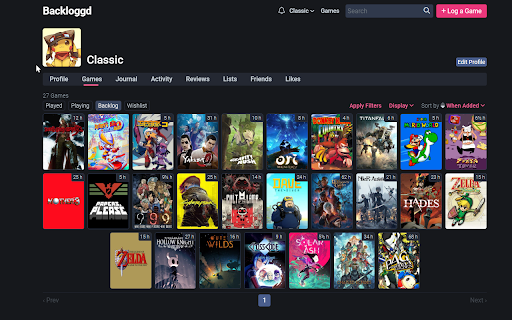
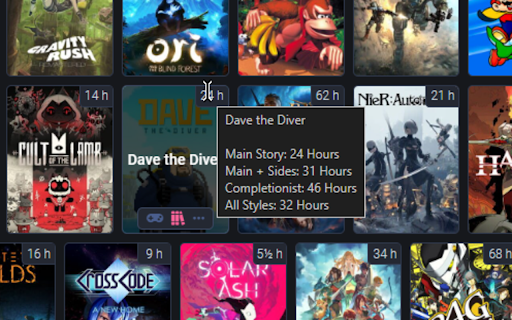
This extension shows the normal beat time for Backloggd 🎮 See the time to beat in any game from your backlog! ⏳ You can hover your mouse on the time badge to know others times like extras and 100% ⚙️ You can also select the default type of time to show (story, completionist, etc) and the badge position by right-clicking the extension icon. 👨🏻💻 The extension is open source: https://github.com/ClassicSpeed/backloggd-hltb and any feedback is appreciated! - Fixed path for HLTB Api. - Fixed path for HLTB Api. - Fixed path for HLTB Api. ### Added - Now uses HLTB Api directly. - Game's main page and related games will now show the time badges too. - Added "All" category back. ### Changed - Fixed game cache not working. - Reduced the amount of refreshes needed to load the badges. - Updated to work on the latest version of backloggd.com - No longer uses an HLTB Proxy, temporarily switched to data from another source. - The data will be updated for a while until a new proxy is found. - Removed "All" category (since it's not included in the new data). - Clicking in a badge now opens a new tab with a HLTB search for the game. - You can now click on the badge to open the HLTB page for the game. - You can also right-click on the badge to change the HLTB name used for the stats - If the game is not found on HLTB, the badge will show a question mark. - You can click the "?" on the badge to enter the HLTB name manually. - This will be saved and used everytime you visit backloggd. - Fixed HLTB search not escaping strings correctly, resulting in wrong search results. - Time badge is no longer removed when the game is not found on HLTB. - Fixed extension not working on backloggd.com (without www) - Fixed menu not working after restarting the browser - Fixed extension enable option not disable the extension correctly - Option in extension context menu (right-click on the extension icon) to change the badge position - Fixed extension menu not working on Firefox - Added time badges to other covers (like search items and a game's main page) - Added cache to improve the response time. - Improved page changing detection. - Now the badge load first and then the time gets added, so the user gets a less jarring transition. - Firefox version released - Option in extension context menu (right-click on the extension icon) to: - Enable/Disable the extension - Select the preferred time to show (main, completionist, etc.)

Letterboxd Services
Letterboxd extension that provides you torrents for movies. 🎬 Instant torrents — find downloads for any movie directly on its Letterboxd page, no searching required. 🔍 Zero effort — just browse Letterboxd like you normally would and let the extension do the rest. 🌐 Multi-browser — works on both Chrome and Firefox. 💛 Free & open source — built by film lovers, for film lovers. ⭐ Enjoying the extension? Star us on GitHub! https://github.com/pypp/letterboxd-services

Letterboxd Hours and Minutes
Transforms the minutes of a movie to a more logical hours and minutes This extension changes the minutes of a movie to a more logical hours and minutes to be more intuitive. Giving the hours is much more useful for the user that the minutes if the movie is over 60 minutes long. Letterboxd lists movie length only by the minutes. This can sometimes by confusing as you often have to calculate the length in hours yourself.

Letterboxd Tweaks
Enhance Letterboxd with cleaner movie cards, instant search suggestions, and various quality of life improvements. 🎬 Cleaner movie cards 🔍 Instant search suggestions 🚫 Hide useless filters, sorts, or navbar items ✨ Various quality of life improvements 🔓 Open source & free - find the GitHub repo here: https://github.com/JSerwatka/letterboxd-tweaks 1. Upon installing the extension, several default options, like better search and film cards, are enabled automatically. 2. To change options, click the extension's icon and select your preferences. 3. Each option has a description. To see visual comparisons, right-click the icon and select "Options" to view before-and-after images for each feature. Letterboxd Tweaks extension does not analyze or send any user data. All the essential data needed for the extension to function, such as your selected themes and color scheme preferences, are stored locally within your browser. This extension requires thorough testing, so if you encounter any issues, please report them as bugs here: https://github.com/JSerwatka/letterboxd-tweaks/issues You can support this project by: ❤️ Rating it 🤗 Proposing changes and contributing to its development 🐛 Reporting any bugs you encounter ☕ Buying me a coffee here: https://buymeacoffee.com/jserwatka - Display the cast member's image when hovering over their name. - Automatically add a movie to the diary after rating it. - Show an indicator if a movie is already in the watchlist. - Allow removing a movie from a list directly from the movie component. - Add keyboard shortcuts for search and make it a command component.

Friends Average for Letterboxd
Shows a extra Histogram for your friends Additionally to the default Letterboxd histogram, this extension shows a histogram and average just for the users you follow. The code is available on GitHub. Feel free to adapt it or make it work with other browsers. If the extension broke, please report it on GitHub or write a mail
