
hlambaminaoofejligodincejhcbljik

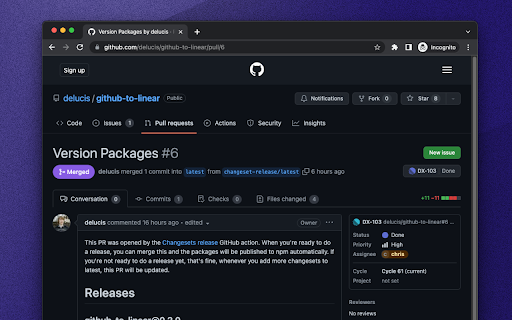
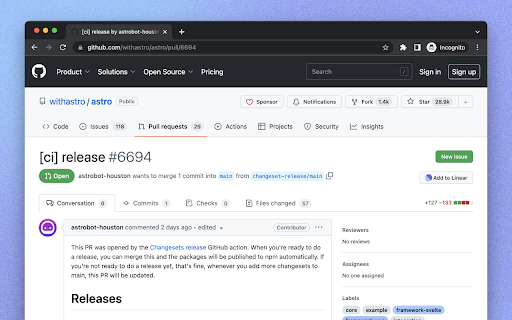

View and create Linear tickets from any GitHub PR or issue. This extension makes it easier to view and create Linear issues associated with GitHub issues and PRs while browsing on GitHub. - It injects an “Add to Linear” button in every issue and PR on GitHub — quickly create a new Linear ticket which links back to the PR or issue you want to track. - Shows information about associated Linear issues in the sidebar of GitHub issues and pull requests.

Le Git Graph - Commits Graph for GitHub
A browser extension that displays the git graph for any GitHub repository. Calling all GitHub enthusiasts! Elevate your coding prowess with our exceptional browser extension, "Le Git Graph" – the ultimate tool that transforms your GitHub journey into a captivating visual spectacle. 🚀 Embrace Visual Clarity: Integrating seamlessly into the GitHub website, "Le Git Graph" introduces a dynamic and interactive Git graph to your repositories. No more deciphering complex commit logs or struggling to make sense of intricate branching patterns. This extension unveils your version control history in a striking, user-friendly graph, making project navigation an absolute breeze. 🎨 A Work of Art: Behold the mesmerizing visual representation of your Git history with "Le Git Graph." Witness branches, merges, and commits come to life in an organized and aesthetically pleasing manner. Analyze project progress, identify code changes, and make informed decisions with unparalleled ease. 🔍 Intuitive Exploration: Experience GitHub navigation like never before! "Le Git Graph" empowers you to explore branches effortlessly, delve into commits, and seamlessly switch between versions. Uncover hidden relationships between code changes and gain valuable insights with just a few clicks. 🛠️ Empower Collaboration: Take collaboration to new heights! "Le Git Graph" facilitates seamless code reviews, efficient conflict resolution, and effective communication among team members. Boost productivity and build remarkable projects together, all while enjoying the delightful visual experience. ⚙️ Hassle-Free Setup: Getting started is a breeze! Download "Le Git Graph" from your browser store, and instantly elevate your GitHub interface with this powerful extension. Lightweight, dependable, and compatible with major browsers, it ensures a smooth coding journey from the get-go. ⭐ Embrace the Revolution: Step into the future of GitHub collaboration and unleash the true potential of your repositories with "Le Git Graph" extension. Experience coding productivity like never before! 👉 Don't miss out on this game-changing tool – download "Le Git Graph" now and embark on an awe-inspiring coding adventure! Happy coding!

GIFs for GitHub
Easily search and add a GIF into any GitHub comment box. Do you simply *need* GIFs to express yourself in GitHub? All those pull requests, code reviews, issues, and comments... wouldn't life be easier if you could just search and add a GIF in the click of a button? Well, look no further. Now you can search GIPHY straight from any comment box in GitHub, and add a GIF to your wordy masterpiece in a matter of seconds. No more trying to find a GIF that's under 10MB, no more manual tab opening and searching, no more writing your own markdown — just living your best GIF life. How does it work? - Click the GIF button in the top right of your comment box - A GIPHY dropdown will appear on-screen so you can search for your purrfect GIF - Select your GIF, and it will appear wherever your cursor is in the text box - You're done! Send away See the website for more info.

GitHub Better Line Counts
Lots of code is generated nowadays and GitHub's line counts are not representative of a PR's true size. This extension subtracts generated files from the total line counts, giving you a better idea of how big a PR really is. That's it. Generated files are detected from the branch's root .gitattributes file. See GitHub's docs to learn how to mark a file as generated: https://docs.github.com/en/repositories/working-with-files/managing-files/customizing-how-changed-files-appear-on-github For a simple example, checkout this extension's .gitattributes file! https://github.com/aklinker1/github-better-line-counts/blob/main/.gitattributes The extension is open source: https://github.com/aklinker1/github-better-line-counts

GitHub Isometric Contributions
This extension allows you to toggle between the normal GitHub contribution chart and an isometric pixel art version.
