
hkppkincliogkmamcddjhodnkkdlccfo

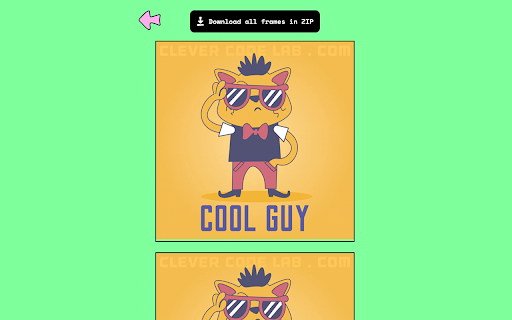
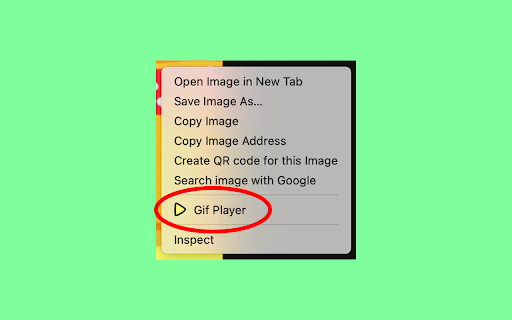
GIF Player allows you to upload and control the speed of your GIFs, saving any frame for the perfect reaction, meme or share. Introducing the GIF Player - the ultimate tool for viewing and controlling your GIFs. With this extension, you can upload a GIF file and take a closer look at each individual frame. Say goodbye to fast-paced GIFs that make it hard to catch the action. With GIF Player, you can adjust the speed to your liking and slow it down or speed it up as needed. Not only can you control the speed, but you can also save any frame you like, giving you the perfect image to use as a reaction, meme, or simply to share with friends. With a simple and intuitive interface, GIF Player makes it easy to upload and view your GIFs. Whether you're a fan of funny memes or enjoy watching short animations, this extension is a must-have for any GIF enthusiast. Get your hands on the GIF Player today and start exploring your GIFs like never before! HOW IT WORKS: Just make right mouse click on the GIF, select "Gif Player" and magic happens.

SuperGIF
This Chrome extension bundles SuperGIF class from libgif-js and brings basic play controls for animated gifs into your browser. Main purpose of this extension is to improve user experience when watching long animated gifs in a browser. Typical user is someone who watches screen capture converted into animated gif and wishes to pause the animation to focus on some detail on currently captured screen. This rather trivial task is not really straightforward as there are no pause/resume controls built-in. This extension adds "SuperGIF" context menu to GIF images on the currently visited site. When triggered, image is parsed into individual frames and replaced with canvas that plays the animation frame by frame. User can then pause/resume or seek by clicking on the canvas. For a simple example, install the extension and test it on this animated gif: https://github.com/buzzfeed/libgif-js/blob/master/example_gifs/rub_test.gif . Under the hood this extension bundles SuperGIF class from libgif-js project and adds little bit of custom logic to registered event handlers.

Animated Image Controls - Scrub through animated WebP, GIF, AVIF, APNG
Take full control of animated images on the web! Animated Image Controls gives you video-player-like power over animated image formats. • Universal Support: Works with all modern animated formats including GIF, WebP, AVIF, and APNG. • Scrub Through Frames: Use the slider to move back and forth through the animation timeline, just like a video player. • Frame-by-Frame Inspection: See the exact frame count (e.g., "Frame 12 / 45") and pinpoint specific details. • Play/Pause Toggle: Instantly stop an animation or resume it at your own pace. • Non-Intrusive Design: The extension stays out of your way. A small "Show controls" button appears only when you hover over a supported animated image. • Modern Performance: Built using the native ImageDecoder API for smooth, efficient, and color-accurate rendering without heavy resource usage. 🎯 Perfect For: • Designers & Developers: Inspect animation frames and timing details. • Meme Enthusiasts: Find that perfect reaction frame. • Accessibility: Pause distracting or rapid animations to improve reading focus. This extension runs entirely within your browser. It does not track your browsing history or send personal data to any external servers. 1. Hover your mouse over any animated image. 2. Click the "Show controls" button that appears in the corner. 3. Use the toolbar to pause, play, or scrub through the animation! Take control of the web's moving images today with Animated Image Controls!

GIF Finder
Search and discover your favorite gifs! Tired of heading to google for that perfect gif? Use GIF Finder to quickly and easily search for gifs without the need to open a new tab and rummage through google results. Simply pin the extension to your toolbar, click the icon, type in your search term and hit enter! Once you find that perfect gif, click and drag it to your desktop. Click the trending icon at the top right to view the top trending gifs.

GIF Maker
GIF Maker is an extension that enables you to create GIF files easily inside your browser. As the source for the GIF file, this app needs some images (at least two) or a video file. Once one of these inputs is provided, you can click on the - Make GIF - button to create the GIF file. Please note that, before making the GIF image, there are a few settings that you can adjust. If you want to save the GIF file to your machine, please click on the - Download - button. The file will be saved to the default download location on your machine. On the top right corner of the UI, there is a reload button to reload the app (in case something goes wrong or an error occurs). Please note that the default size for the GIF image is (300 x 300) pixels, however, you can edit this value from the UI. This app uses an open-source JavaScript library called gifshot (https://yahoo.github.io/gifshot/). Note: to convert images to GIFs, please add all images at once to the app interface (top-left section). The app does not support adding images one by one. You can either drop all images or press the green plus icon to choose files. You need at least two images to generate a GIF file. If you found a bug to report, or have a feature request in mind, please fill out the bug report form on the add-on's homepage (https://mybrowseraddon.com/gif-maker.html).
