
hkonaiafngflkdohimjnfilmolagfkef
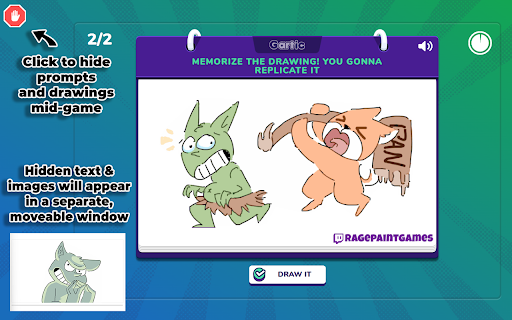

🚫 Block Users Click on a player or avatar to block their drawings and prompts. Blocking by user will only work during the album reveal. 🛑 Safe Mode During the game, clicking the check mark icon in the top left will enable safe mode. All prompts and images will be blocked by default. Clicking again will return prompts back to normal. ⚠️Flagged Users A list of problematic Gartic Phone Twitch users is being built out by streamers and mods. If a user joins your game from this list they will be marked in orange. This is mainly English speaking users. 👁️🗨️ Preview window Separate preview window to see any blocked prompts or images. No need to cover your screen while streaming and slow down the game. 👤 Pick Avatar Instead of getting a random avatar you can select from the list of avatars. 🚩 Minimum Twitch Account Age Can set how old a Twitch account must be in options. Any user account that is newer than the required days will be marked in yellow. A popup will also display before starting a new game with a flagged user. Can also get account age by hovering over a user. 🔍 Larger Scrollbar Enable to increase the size of scrollbars. Especially useful while playing on a tablet. 🕛Custom Timer During the game you can set a countdown timer in minutes. Can be useful for longer rounds or as a countdown for time based channel point redeems.

PDF Editor
PDF Editor - edit, merge and combine PDF documents. PDF Editor - Edit, Merge, and Combine PDF Documents with Ease (Works Completely Offline) Introducing the ultimate PDF editing tool for your browser - PDF Editor. This powerful extension puts all the essential PDF management features right at your fingertips, empowering you to streamline your workflow and boost your productivity. What sets PDF Editor apart is its complete offline functionality. This means your PDF files never leave your device, providing you with a secure and private way to work with your documents. No need to worry about your sensitive information being uploaded to any cloud services - PDF Editor keeps everything on your local machine, ensuring your data remains under your full control. Whether you need to make quick edits to a PDF, combine multiple documents into a single file, or reorder the pages within a PDF, PDF Editor has you covered. With its intuitive interface and comprehensive set of tools, you can breeze through your daily PDF tasks with unparalleled efficiency. - Edit PDF Text, Images, and Annotations - Seamlessly modify the content of your PDF files, from updating text to adjusting image placements. PDF Editor's advanced editing capabilities ensure your documents always look polished and professional. - Merge PDFs into a Single Document - Combine multiple PDF files into one cohesive document, making it easy to organize your paperwork and share comprehensive information with colleagues, clients, or partners. - Split PDFs by Extracting Pages - Quickly extract specific pages from a PDF and save them as individual files, ideal for separating relevant sections or creating custom document compilations. Reorder Pages within a PDF - Rearrange the pages of a PDF document with a simple drag-and-drop interface, allowing you to customize the flow and presentation of your content. Unlock the full potential of your PDF documents with PDF Editor. This extension is designed to streamline your workflow, save you time, and help you maintain a professional, organized digital document management system - all while keeping your data secure and offline. This extension uses affiliate links to help finance the development costs. Additionally, any sponsored ad links within search engine results will be hidden to prevent potential bugs or issues.

Gartic Tools
Extension for Gartic Phone online game. Adds useful tools for drawing and playing. This extension adds multiple useful tools to gartic phone online game Current features: Rotating the game canvas Flipping the game canvas

Skribbl.io Helper
Gives you potential answers on skribbl.io Skribblio Helper is a chrome extension that provides potential answers automatically to its users. It interprets the hints given by skribbl.io and finds all possible answers among 3600+ words. Features: - Support for English, German, Spanish, Korean and French - Click on a word to have it submitted - Submitted words are removed from the word list - The word list is updated automatically when more hints are given - Search function to further narrow down potential answers - Use the tab key to cycle through words then press the enter key to quickly submit - Pressing the shift and backspace key will return to chat and clears it - Change between 4 sorting orders (Alphabetical, Most Picked, Difficulty, Mixed) - Support for custom word lists and have the ability to disable the official word list

Roblox Server Finder
A server finder that attempts to find a server with a specified amount of players What is Roblox Server Finder? Roblox Server Finder is an alternative to scrolling though ton of servers until you find the right one. It allows you to specify information such as the amount of players. Then based on your input, a fast working algorithm finds you the closest match! How to use 1) Select Servers Tab. 2) Select amount of players with slider. 3) Press "Smart Search". 4) Join Server. Please if you encounter any issues contact me via Email. == Notice! == Due to ROBLOX API CHANGES AGAIN! You can no longer view all of the users within a server, for now I've put a band aid fix on this release because i've been working on it for a while. However, i will be migrating to the new layout in a future update. Thank you for continuing to use Roblox Server Finder.
