
hkmjaemcanhghbbikckiojknlhkkogdh
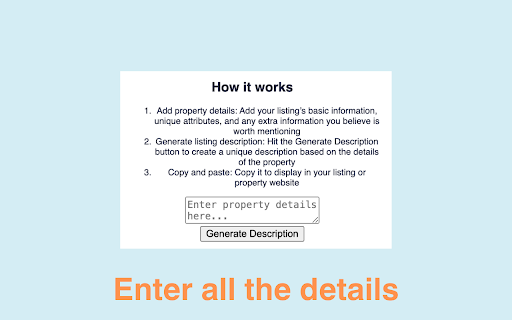
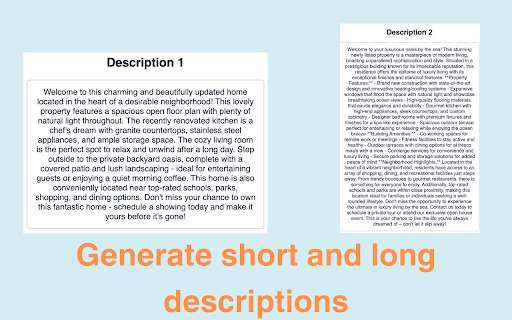
Generate compelling real estate listings, social media posts, and emails with AI tailored for real estate professionals. AI Writer for Realtors – Instant Property Descriptions Powered by AI 🚀 Boost Real Estate Listings with AI-Generated Descriptions – Save Time & Sell Faster! AI Writer for Realtors is the ultimate Chrome extension for real estate agents, brokers, and property managers who want to create high-converting, SEO-friendly property descriptions in seconds. Say goodbye to writer’s block and hello to engaging, professional listings that attract more buyers and renters! ✨ Why Choose AI Writer for Realtors? ✅ AI-Powered Property Descriptions – Generate unique, persuasive, and detailed real estate listings with just one click. ✅ Save Hours of Writing – Automate your workflow and focus on closing deals instead of drafting descriptions. ✅ Optimized for SEO & Conversions – Get keyword-rich, compelling content that ranks higher and attracts more leads. ✅ Easy-to-Use Chrome Extension – Works seamlessly on Zillow, Realtor.com, MLS portals, and any property listing site. ✅ Customizable & Professional – Tailor descriptions to match your brand voice and highlight key selling points. 1️⃣ Enter Property Details – Add location, square footage, bedrooms, amenities, and unique features. 2️⃣ Generate AI Description – Click once to get a ready-to-use, high-quality property description. 3️⃣ Copy & Paste – Instantly add the AI-generated text to Zillow, MLS, Craigslist, or your website! 🏆 Perfect for: ✔ Real Estate Agents – Stand out with captivating listings that sell faster. ✔ Property Managers – Quickly generate rental descriptions that attract tenants. ✔ Homeowners & FSBO Sellers – Get professional-grade listings without hiring a copywriter.

Kloser
Close all tabs and open default tab Simple extension for closing all tabs in active window and opening New Tab Page or your selected page. You can edit settings of this extension, such as you can choose preferred tab which will be opened after using the extension and you can set will be extension close pinned tabs. Use the shortcut: Ctrl + Q

Stop It Grandpa
NOW AUTOMATICALLY UPDATES! Boomer parents becoming increasingly radical over time? Got a friend who's starting down the path of white supremacy? Thinking your friends are sneaking in that direction and it's freaking you out? No problem! Just get this app onto their browser and they'll be redirected from their favorite propaganda to more rational news sources. It's like child block for the elderly!

NIFB Toolkit
NIFB Toolkit is a simple and minimalist extension which features various convenient tools for NIFB users. Current Features: • The Gospel in 56 Languages • Quick & Easy NIFB Link Sharing • KJV Bible Search • NIFB Livestreams

Faro
Save pages with highlighted taglines - Bookmark manager ⨯ web highlighter Chaos in your bookmarks? Can't find what you want? They end up gathering dust? Or you don't even try and end up with 100s of open tabs? Faro is made to fix that! It's the simplest way to save & keep track of pages. With it, even thousands of saves don't get overwhelming. When saving, you highlight a sentence to act as a tagline. It helps you remember what the page is about and why you saved it. If unsure - just save whatever sentence you're reading. All saves appear on your dashboard. They come most-recent-first by default, so you don't forget what you recently saved. You can pick up your reading where you left off - no need for a separate reading list. You can also pin & archive to further arrange it. Organize them with tags. Since you're reminded what you saved and why, you can do it later. It makes your saves much easier to manage than bookmarks. Faro supports nested tags (eg: recipes/vegan), so combines the best of tags and folders. Clicking a save takes you right back to your highlight - especially useful for longer articles. Also: ➣ export to bookmarks to keep them if you uninstall Faro ➣ copy links to highlights and share them or paste into Notion, Obsidian, etc. ℹ️ About your data: When installing you can read: "it can read and change all your data on all websites" The only information that ever gets uploaded (when signed in) when you use it to save: ➣ Open page address ➣ Saved highlight/quote - what's visible in the sidebar ➣ Timestamp ➣ Debug info e.g. errors The extension also keeps track the currently open tab for each window - to update the sidebar as you navigate - but doesn't save or upload that data.
