
hklmffdokpefcfabkmkpjnkoakehigjg

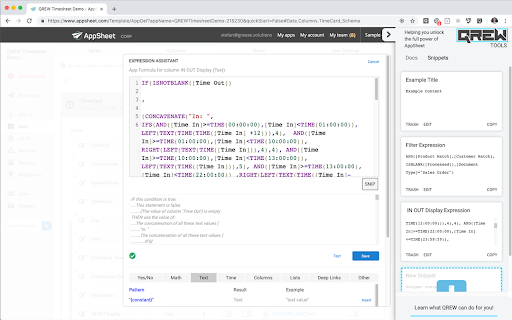
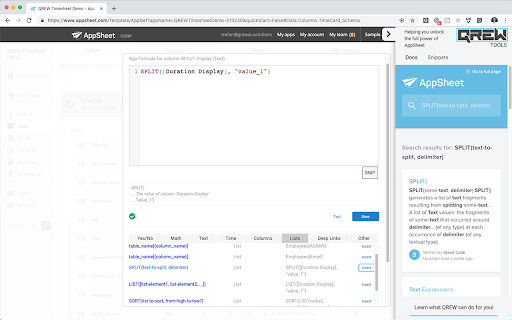
A Free Toolkit for Building Better AppSheet Apps (The Extension formerly known as QREW Tools) Key Features include: - A structured Text Editor Overlay on Expression Assistant fields that color codes expression names, matching parenthesis, static string values and more! (Now with Multiple Color Themes, optional text functions, and AUTOCOMPLETE, ) - Turns Expression Library items into links that open the AppSheet Documentation in the sidebar - Common Expressions that you use can be "Snipped" and stored* in the sidebar for easy access. - Shows all Data Tables, Columns, and Views inside your app with Quick actions to insert them into your editor. - Collate and Process AppSheet Recovery files into Table specific CSV files for easy upload into your live data tables. *These snippets are stored in local browser memory, so clearing your browser memory WILL DELETE any saved snippets. You can now optionally link your Snippets with your AppSheetTraining.com account which will allow them to be accessed on any device you're logged into. NO MORE ACCIDENTALLY DELETED SNIPPETS!! Yayy!! ** You can review our Privacy Policy at this link https://docs.google.com/document/d/1_KQd5Q9r1UXgKUysqX4rI5nlDdhUzSmYQmxz58w9sT4

AppSheet Notification Extension
Displays toast notifications filtered by user email and app ID. AppSheet Notification Extension After years of waiting, I finally built it myself—a simple, no-nonsense Chrome extension that brings real-time toast notifications for AppSheet. No more missing updates or waiting for email alerts. Now, you get instant notifications, just like they should be. How It Works Install the extension, and whenever your AppSheet app needs to notify you, it sends a message to the notification server. The extension then pops up a clean, modern toast notification right in your browser. Setup Guide 1. AppSheet Configuration Go to AppSheet → Automation → Bots Add a new Webhook action Set the URL to: https://chrome-appsheet-toast-extension-production.up.railway.app/notification Use the POST method and send a JSON body like this: { "title": "Task Completed", "description": "Your task has been successfully processed.", "targetEmail": "your.email@example.com", "targetAppId": "your-app-id" } That’s It! No clutter, no unnecessary alerts—just real-time notifications when you need them. It’s simple, smooth, and finally the way AppSheet notifications should work.

Appsheet Print
Quickly print and export PDF, Docx, Excel, Google Sheets, and more from Appsheet. No sync and no automation needed. The AppsheetPrint extension is designed to enhance your experience with no-code platforms...With this extension, you can easily extract and manipulate HTML data from your configured actions. ----------------------------------------------- Key Features: HTML Extraction: The extension captures HTML content from specified URLs, enabling you to gather information seamlessly. Once the HTML data is extracted, you can export it in multiple formats, including PDF and Excel, making it ideal for reporting and data analysis. User-Friendly Interface: The extension is designed with user experience in mind, allowing you to perform actions with minimal effort and technical knowledge. Compatibility with No-Code Tools: Users can manipulate the extracted data in real-time, facilitating immediate access to information needed for decision-making. Use Cases: Reporting: Generate reports in PDF or Excel format from HTML data, simplifying the process of sharing information with stakeholders. Data Analysis: Export data for further analysis, making it easier to derive insights and make informed decisions. Documentation: Create well-structured documents directly from HTML content, ensuring accuracy and clarity. ----------------------------------------------- Usage Instructions: 1. Use the "Overview" button to Guide. 2. Use the "Option" button to enable or disable auto-printing. 3. For more information, refer to the guidelines provided in this section. Feel free to reach out for any questions or feedback! To use this extension, configure your HTML output in the action settings. Use the structure below for the Action "Go to a Website": https://example.com: You can use any URL, preferably a non-functional one for easier processing. : Your HTML content. Use AI chat tools for quick HTML creation. ----------------------------------------------- Conclusion: The AppsheetPrint extension is a powerful tool that streamlines the process of extracting, decoding, and exporting HTML data, making it a valuable asset for anyone using no-code applications. Whether you're generating reports, analyzing data, or creating documentation, this extension is here to simplify your workflow.

AppSheet Password Field Fixer
Automatically converts password input fields to proper password type on AppSheet login page Automatically converts password input fields from text type to password type on AppSheet login page for enhanced security and privacy protection. 🔧 Key Features: - Auto-detects Password fields on appsheet.com/start/ - Converts type="text" to type="password" instantly - Works immediately upon page load - No configuration required - fully automatic - Lightweight and performance-friendly ⚡ How to Use: 1. Install the extension 2. Visit appsheet.com/start/ 3. Password field will be automatically secured Perfect for AppSheet users who prioritize login security and want proper password field masking without manual intervention. 🎯 Why Use This Extension: Sometimes AppSheet login forms display password fields as plain text, making your credentials visible on screen. This extension ensures your password is always properly masked for privacy and security. Works with dynamic content loading and provides fallback mechanisms for maximum reliability across different AppSheet page configurations.

AppSheet Table Formatter
Format and style tables in AppSheet applications. Customize table appearance, borders, fonts, and add print functionality. AppSheet Cover Table - Print Optimization Tool for AppSheet AppSheet Cover Table is a powerful extension that enhances the printing experience on the AppSheet platform. Specifically designed for AppSheet users, this extension provides comprehensive table formatting and printing capabilities. Key Features: • Convenient print buttons in toolbar and screen corner • Easy table customization with font, color, and alignment options • Flexible table size and border adjustments • Heading format support (H1, H2, H3) with multiple customization options • Quick settings save and apply across multiple tables Benefits: • Save time with intuitive printing interface • Create professional and readable reports • Flexible customization for business needs • Improve workflow efficiency in AppSheet Technical Features: • Real-time style preview • Persistent settings storage • Seamless integration with AppSheet interface • Responsive design support Free to use and easy to implement, AppSheet Cover Table is an essential tool for AppSheet users looking to optimize their printing workflow.
