
hkkofcjgmaiigakmdfifjkkjinljdimj


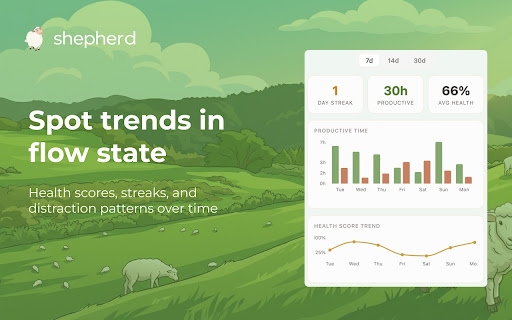

Auto-tracks your browsing time & gives you a daily focus score. See where your hours go, grow your sheep, and stay productive. Free. Shepherd automatically tracks how you spend time in your browser and gives you a daily productivity score, so you can see exactly how focused you really are. No timers to start, no buttons to press, no manual input. Just install it and browse normally. Stay focused and watch your virtual sheep grow healthy and strong. Get distracted, and your sheep gets sickly. It’s weirdly motivating — and completely free. ⏱ AUTOMATIC SCREEN TIME & BROWSING TRACKER Unlike manual time trackers and Pomodoro timers, Shepherd runs passively in the background with zero friction. It automatically tracks time spent on every website and categorizes your browsing activity as productive or distracting. In real time. No start/stop buttons. No accounts to create. No onboarding flows. Install in 30 seconds and Shepherd immediately starts building a clear picture of where your hours go. - See exactly how much time you spend on each website - Browsing is auto-categorized as productive or unproductive - One clean panel shows you where your day is going, right now - Lightweight and passive — you’ll forget it’s running Every day, Shepherd calculates a focus score based on how you actually spend your time online. It’s not a guess — it’s data-driven insight into your real browsing habits. - Daily and weekly productivity scores - Visualize when you’re typically distracted throughout the day - Spot bad trends before they snowball — or double down on what’s working - Track how your focus and concentration evolve over weeks and months - AI-powered insights that go beyond basic time charts Shepherd doesn’t just tell you how much time you spent online. It tells you whether that time was well spent — and helps you understand your productivity patterns so you can improve. 🐑 FUN GAMIFIED COMPETITION: GROW YOUR SHEEP Every day, you get a new sheep. How you spend your time determines how it grows. Stay focused through long work sessions and your sheep grows up healthy and strong. Your pasture flourishes. Get distracted too much and your sheep gets a little dirty — or sick. It’s a simple visual motivator that makes focus feel rewarding. Teams and friends have started getting competitive about their sheep health, which turns daily productivity into something genuinely fun. 🧠 WHO IS SHEPHERD FOR? Founders & Busy Professionals — End the week knowing exactly where your time went. Shepherd replaces that uneasy “I was busy but what did I actually do?” feeling with clear data. Remote Workers & Freelancers — Understand your work-from-home patterns. See your peak focus hours, identify your biggest distractions, and structure your day around when you’re naturally most productive. Students — Track study time vs. distraction time across the day. Stay focused during exam prep, long assignments, and research sessions. See whether you’re actually studying or just browsing between tabs. Developers & Engineers — Protect your deep work time. Monitor flow state vs. context switching and identify the browsing patterns that break your concentration. Teams — Install Shepherd across your team and compare focus scores. The sheep competition is optional but surprisingly motivating. Shepherd is completely free. Automatic time tracking, AI-powered productivity scoring, daily and weekly analytics, gamified focus — all included from day one. No premium tiers, no feature gates, no trials. Your browsing data stays on your device. Shepherd helps you understand your habits without compromising your privacy. No ads, no data selling, no surveillance. 1. Install the extension 2. Pin it to your toolbar 3. Browse normally That’s it. No account creation, no onboarding, no configuration. Shepherd starts tracking immediately and builds your productivity profile in the background. Click the icon anytime to check your focus score, see your sheep, and review your browsing analytics.

Dad Reply - One-click emoji replies for Gmail.
Dad Reply adds a one-click emoji reply button directly to Gmail, sitting next to your standard reply button. Stop typing "thanks!" and "got it!" for routine acknowledgments. Works exclusively with Gmail in Chrome. Click the Dad Reply button or select your emoji, and send - no typing required. Key features: - One-click emoji responses in Gmail - Customisable skin tones - Multiple custom emoji options (Pro) - Auto-send functionality (Pro) - Works with Gmail automation workflows Perfect for handling GitHub notifications, CRM updates, or any email that needs acknowledgment without conversation.

Pause.do: AI pause & attention tracker
Privacy-first extension that adds pause prompts to scroll, tab overload, long sessions, and AI tools so you think before acting. pause.do helps you interrupt autopilot online. It adds intentional pause prompts to scrolling, tab overload, long sessions, and even AI tools so you think before you act. Instead of blocking websites or shaming you, pause.do creates a moment of awareness at the exact second drift begins. 1️⃣ Install the extension and choose the websites you want awareness on 2️⃣ pause.do detects scroll loops, long sessions, tab overload, and AI prompts 3️⃣ A clean pause overlay appears you decide whether to continue or step away What You Get ✅ Think First prompts before AI tools ✅ Scroll and session check-ins ✅ Tab overload detection ✅ Focus windows for deep work ✅ An Attention Map showing focus, drift, and patterns ✅ All data stored locally on your device

Apiary - Web Highlighter & Annotator
Highlight and take notes directly on what you read online and instantly share them with friends and colleagues. Easily highlight and take notes on what you read online and then easily save them for later and share them with friends and colleagues in one click. Apiary is a free to try chrome extension based product that allows you to easily highlight and take notes on what you read online. After you have annotated something online it will be saved to your Apiary account where you can then organize in any way you like with our folder system. You can than easily share directly from the website where you took the notes or from your Apiary account later on with anyone you want. Just highlight and get a shareable link you can send to anyone with one click. When using Apiary on a website or email online you have two options. You can choose to just highlight some text or you can highlight and add a comment to that highlight. Allowing you to save and share you favorite parts and current thoughts while reading it with others. You can view your annotations live by clicking the chrome extension and having the Apiary sidebar appear showing all the highlights and notes you have made on that page. Or you can view them later in your Apiary account where we save all the contents of what you were reading and the highlights and notes you took. Allowing you to get the full context of whatever you were taking notes on. Annotate, save, and share what you read online instantly today. ----------------------------------------- Key Features: Web and Email Highlighting Take Notes On What You Read Online Apiary Account Access With Organization Systems Quick and Easy Shareable Notes Private Notes That Only You Can See Automatically Saving Notes ------------------------------------------- How To Use: In order to use the Apiary Chrome Extension you will need an account with Apiary. Please visit www.myapiary.io to create an account today. 1) Create An Account On Apiary (www.myapiary.io) 2) Download Chrome Extension 3) Sign Into Chrome Extension w/ Your Apiary Account 4) Select Text (Left Click & Drag) You Wish To Annotate 5) Click On Apiary Popup To Either Highlight Or Take Note On Selected Text 6) Delete An Annotation By Clicking On A Highlight And clicking Delete Icon 7) Share Your Notes For A Page By Clicking The Apiary Share Button On Bottom Left Corner Of Window 8) View A Note By Either Visiting Your Apiary Account Or By Clicking View On A Currently Annotated Web Page ------------------------------------ Pro Tips: 1) Make Sure You Are Logged Into Apiary Chrome Extension If You Are Having Issues Annotating 2) Organize Your Notes Into Folders On Apiary To Easily Find Notes Later 3) Share Your Notes With Friends By Clicking Share Button And Sending Link To Friends. --------------------------- Got Feedback? Please reach out to us at support@myapiary.io If you find bugs please let us know at https://forms.gle/rHvoLZwaXfVcbAMJ7. If you have a feature request please let us know at https://forms.gle/vguFD2Rxi2FCsSQi8. By installing the extension, you agree to Apiary's Terms of Service, Privacy Policy, and Community Guidelines (which can be found here: https://www.myapiary.io/term-services and https://www.myapiary.io/privacy-policy)

Kloser
Close all tabs and open default tab Simple extension for closing all tabs in active window and opening New Tab Page or your selected page. You can edit settings of this extension, such as you can choose preferred tab which will be opened after using the extension and you can set will be extension close pinned tabs. Use the shortcut: Ctrl + Q
