
hkjhlamdcibpimbakombmbeigjajlmao

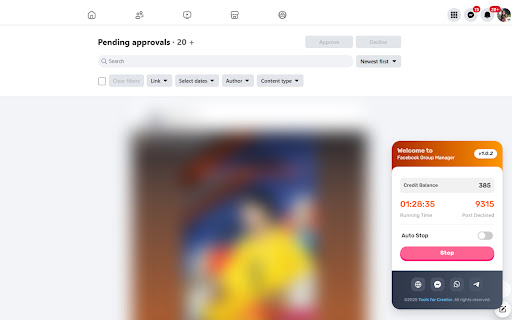

Easily manage Facebook™ groups by automating the removal of pending, spam, and published posts. Save time and streamline moderation. 📢 Facebook™ Group Manager by ToolsForCreator.in Manage your Facebook™ Group effortlessly with this powerful post management tool from toolsforcreator.in. This extension helps admins and moderators delete or decline pending, spam, and published posts in just a few clicks, keeping your community clean and organized. ✅ Key Features ⚡ Super Fast & Efficient – Quickly delete or decline multiple posts in bulk. 🖱️ Easy to Use – Simple, intuitive interface for hassle-free management. 🔏 Full Control – Manage pending approvals, spam, and published content with ease. 🔒 Secure & Reliable – Works directly on your browser, no need to share facebook login credentials or cookies access. 🛠 How It Works 1️⃣ Install the Extension – Click “Add to Chrome.” 2️⃣ Open Your Facebook Group – Navigate to the pending, spam, or published posts section. 3️⃣ Start the Extension – Click the extension icon from the toolbar. 4️⃣ Choose an Action – Select whether to delete or decline posts. 5️⃣ Done! – The extension will automate the process, saving your time. 🔒 Privacy & Security This extension does NOT access or store your Facebook credentials. It works only on your device and interacts with Facebook’s interface. We are not affiliated with Facebook™ in any way. 🆓 Free & Premium Plans The extension is free to use 100 post decline. Upgrade to a premium plan for more post decline and additional benefits. 💬 Support & Feedback For any issues or feedback contact us. Website: https://toolsforcreator.in WhatsApp: https://chat.whatsapp.com/EmJu7X2fRJl3YOUmWcTSLt Telegram: https://t.me/toolsforcreator Developer: https://www.facebook.com/parhlad.suthar123/ ⚠ Disclaimer This extension is developed by toolsforcreator.in and is not affiliated with Facebook™. All trademarks and registered trademarks belong to their respective owners. 👉 Install now and take control of your Facebook group management! 🚀

ESUIT | Posts Exporter for Facebook™
Bulk-export Facebook posts from profiles, groups & search results. Stream to server via webhook for CRM, database, or automation. Support exporting or downloading posts, attachments, comments, and screenshots for: - Any group's posts - Any user's posts in a group - Any page's posts - Any user's profile posts - Your saved posts - Search results - Post's link Effortlessly export Facebook posts with this dynamic extension. Unlock the power to effortlessly bulk-export posts from any timeline, page, or group. This versatile tool supports multiple export formats such as JSON, HTML, and CSV, and even allows you to export directly to Google Sheets. This extension allows you to bulk-export all posts from ANY one timeline, any page and any group and your saved posts. Unlike the tools provided by facebook, this extension allows you to export other people's data. You can import the exported posts to other platforms, such as wordpress or blog, or you can use these posts for data analysis. JSON type files can be processed by any programming langs. If you are a developer, this is very useful for you. If you need to subscribe to our service, we will collect your email address to verify your subscription status. (We only collect this data from subscribers; if you do not subscribe, we will not collect any of your data.) This is our privacy policy. https://esuit.dev/privacy-policy Notice: this extension has In-App Purchases. This extension includes features that require payment to unlock unlimited usage. Please refer to our pricing page for more details. https://esuit.dev/pricing/export-posts-for-facebook Additional Features: In the Popup, we provide the following additional features: Function Description: A brief description accompanied by a video tutorial demonstrating how to use this extension. Login Button: Use when you need to subscribe to premium features or log in with an existing subscription. Relevant-Ext: We provide brief recommendations and introductions to relevant extensions in a small section. Encountering an issue? Report it to us 💪: If you encounter any issues, you can get in touch with us through this link, and we will assist you in fixing it. Warning Facebook™ is a trademark of Facebook Inc., registered in the U.S. and other countries. This is an independent project developed by ESUIT. and has no relationship to Facebook™ or Facebook Inc. this extension is not officially developed by Facebook™, The author is @William Chen Got feedback or experiencing any issues? Let us know on Facebook! Your input is important to us and we're here to help. https://www.facebook.com/esuitdev

Tabbiy - Auto Group & Sidebar Tab Manager
The ultimate sidebar tab manager! Auto-group, customize titles, save, hibernate & switch tabs fast for a clutter-free browser. 🚀 Tabbiy: The Ultimate Sidebar Tab Manager & Auto-Organizer Tabbiy is an elegant sidebar tab manager designed to end the headache of having too many tabs. By providing a powerful vertical tab list and auto-grouping features, Tabbiy turns your cluttered browser into an organized, high-performance workspace. Whether you want to reduce Chrome memory usage or find a specific page in seconds, Tabbiy is the productivity tool you’ve been looking for. ✅ End Tab Clutter: Transform a messy horizontal tab bar into a clean, searchable sidepanel list. ✅ Smart Auto-Grouping: Automatically group tabs by domain or custom rules to keep related tasks together. ✅ Save Memory & CPU: Hibernate tabs or move idle pages to a "Staging List" to drastically boost browser speed. ✅ Custom Tab Titles: Rename any tab to eliminate vague labels and identify your content at a glance. ✅ Fast Switching: Use shortcuts to jump between current and recent tabs instantly, perfect for cross-page comparison. ✅ Pro Data Portability: Export your tab lists and titles in JSON, HTML, CSV, or Markdown (Pro). 1️⃣ Sidepanel Management (ALT+D): A dedicated vertical interface for grouping, saving, hibernating, and drag-and-drop reordering. 2️⃣ Auto-Grouping: One click to categorize tabs by domain. Pro unlocks 3 sets of custom rules, fixed colors, and unlimited groups. 3️⃣ Tab Hibernation: Suspend active tabs to free up RAM and quickly resume access whenever you need them again. 4️⃣ Tab Staging (Saving): Move temporarily unused tabs to a staging list to clear your interface while maximizing memory release. 5️⃣ Rename Tabs: Easily edit any tab title directly from the list to clear up vague labels. Your custom titles are saved automatically for quick identification. 6️⃣ Multi-Format Export: Free JSON export; Pro version unlocks CSV, HTML, and Markdown for professional backups. 7️⃣ Quick Switch (ALT+E): A lightning-fast shortcut to toggle between your current page and the last opened one. 8️⃣ Dark & Light Themes: Beautifully designed UI that matches your system theme for a comfortable visual experience. 💬 How do I disable auto-grouping? 🌲 Simply click the "Auto" button at the bottom of the sidepanel to turn off grouping and clear all current groups. 💬 How can I group tabs more effectively? 🌴 Go to "Settings" -> "Grouping Rules" to define custom patterns, then click "Apply" to see the magic happen. 💬 Does it support collapsing groups? 🌵 Currently, we focus on a "visible at a glance" design to help you find tabs faster without extra clicks. 💬 Can I use individual features without Auto-Grouping? 🍀 Yes! All features—sidepanel, hibernation, saving, and renaming—work independently to fit your specific workflow. ✅ Added one-click button to close duplicate tabs in the toolbar. ✅ Added an option to view all custom grouping rules in the saved list. ✅ Configure 3 sets of auto-grouping rules and switch freely. Pro.feat ✅ Configure fixed colors for auto-groups, including renaming and recoloring the "Others" group. Pro.feat ✅ Create an unlimited number of custom groups. Pro.feat ✅ Support import/export of all saved links and edited titles; JSON available in free version, and HTML, CSV, Markdown unlocked in Pro. Pro.feat ✅ Optimized:Added skeleton screen for the first screen of the sidebar. ✅ Fixed: When auto-grouping and default selection are enabled, changing the current tab URL may incorrectly trigger the default selection. 🍺 Productivity starts with a clean browser. Tired of messy tabs slowing you down? Install Tabbiy today and refresh your browsing experience! 📨 Questions or Feedback? We’d love to hear from you: support@tabbiy.top

Tabme — Tab & Bookmark Manager | Save, Organize & Sync Tabs
The easiest way to save, organize & sync your tabs. Tired of tab clutter? Tabme turns your new tab page into a powerful but easy-to-use bookmark dashboard. Save open tabs instantly with drag-and-drop, organize them into color-coded folders, and find anything with fast search. No registration needed! Try as a guest for free with an unlimited number of saved bookmarks. 👆 Save Tabs With Drag-and-Drop Drag tabs and tab groups from the sidebar into any folder to save. 📦 Stash & Restore Tab Sessions Save all open tabs into a folder with one click. Reopen an entire session just as easily. 🗂 Spaces — Organize by Project or Topic (Pro) Create separate workspaces for different projects. Share spaces with your team. 📱 Sync Across Devices (Pro) Access your saved tabs from any device. No extension needed — use https://gettabme.com/app/ 📐 Vertical Tabs & Side Panel Manage your tabs in the Chrome Side Panel for a vertical Tabs (like in Arc browser) experience. 🌈 Color Coding & Visual Layout Categorize folders with colors and arrange them spatially for quick visual access. 🧹 Close Duplicate Tabs Detect and close duplicate tabs with a single click. 🌙 Dark Mode Switch to dark mode for a comfortable, easy-on-the-eyes interface whenever you prefer it. ⌨️ Keyboard Shortcuts Navigate and manage everything without touching the mouse. ✍️ Sticky Notes Jot down ideas and to-dos right on your new tab page. 📥 Import & Export Import from Chrome bookmarks, HTML, TXT, CSV, or JSON files. Export anytime for backup or migration. WHO IS TABME FOR? • Managers organizing project docs and references • Researchers managing tabs across multiple topics • Students collecting study materials • Anyone drowning in open tabs • Teams sharing curated link collections (Pro) ⭐️ PREFER YOUR DEFAULT NEW TAB? Try "Tabme Mini" — all the same features, without replacing your new tab page: https://chromewebstore.google.com/detail/tabme-%E2%80%94-organize-tabs-and/jjdbikbbknmhkknpfnlhgpcikbfjldee Tabme 100% privacy guarantee means: 1. We respect your privacy. 2. Any usage analytics are fully anonymous. 3. We never share your data with anyone. • Install Tabme (accept replacing the New Tab page) • Pin the Tabme popup extension to save tabs from any website • Drag tabs from the sidebar into folders to save and organize them

TabTap - Clean & Fast Tab Manager
Search, organize, and manage tabs with ease. Make browsing simple and stress-free. 🔎 Search and filter tabs across all open windows 🗄️ Archive tabs to declutter and revisit later 🗂️ Group tabs by domain or window ↕️ Sort tab groups by tab count or by time 👓 Handle duplicate tabs effortlessly ♻️ Restore closed tabs with one click 🏂 Add up to 3 quick-access shortcuts ⚙️ Customize your interface in Settings 🏗️ Manage tabs across multiple windows 🔒 Privacy First: your data stays on your device, no tracking, no collection 🎨 Flexible Views: switch between tab list, domain, or window grouping 🛠️ Make it yours: customize TabTap to your workflow ⚡ Fast and lightweight: simple, clean, and quick 🌙 Light and dark themes: pick what feels right for you [v1.15.0] - Close All Duplicates: close all duplicate tabs with one click [v1.13.0] - Choose whether to keep tabs in the archive after reopening Reopening archived tabs now offers two options: 1. Reopen and keep in archive 2. Reopen and remove from archive You can customize the interface by toggling "Show Options for Removing from Archive when Reopening" in Settings. [v1.11.1] - Remember Archive Toggle in Settings: choose whether the plugin reopens in Archive mode if that was your last session - Group actions for archived tabs: fixed inconsistencies with restore/delete operations caused by a race condition [v1.10.1] - Archive Recovery: restore recently deleted archived tabs - Current Tab Finder: locate and scroll to the current active tab - Full URL Display: display complete URLs instead of domains in tab subtitles [v1.8.1] - Archive: archive tabs and groups for later use [v1.7.1] - Open Tabs in the Current Window: open a tab or a group of tabs in the current window [v1.6.0] - Open Tabs in a New Window: open a tab or a group of tabs in a new window - Focus Window: focus a specific window with one click [v1.5.3] - Duplicate Tab Management: identify and manage duplicate tabs [v1.3.1] - Group Close: close all tabs in a domain or window group with one click [v1.2.0] - Tab Counter Badge: quickly check your open tab count - Tab Counter Badge Toggle: enable or disable the tab counter badge in Settings [v1.0.0] - Tab Grouping: view, search and manage tabs grouped by window or domain [v0.2.0] - Quick Access Shortcuts: add shortcuts to your favorite websites [v0.1.0] - Tab Search and Filter - View Open Tabs - Remove Tabs - Restore Closed Tabs - Dark/Light Themes 💬 We'd love to hear from you! Your feedback helps make TabTap better. If you have any suggestions, feature requests or bug reports, please leave a comment in the Support section! 😊 If You like TabTap, please leave a rating on the Chrome Web Store:) It makes a big difference for us and helps us a lot.❤️ Hope you enjoy TabTap! ^^
