
hkhfaempiaejenaddpbeckghomphjjcp

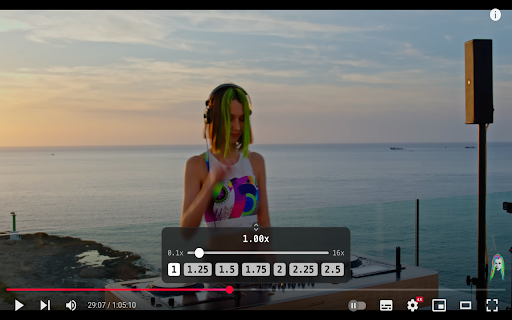


Control the playback speed of YouTube videos for a comfortable viewing experience. Speed Controller for YouTube™ Accelerate or slow down videos on YouTube with our convenient speed controller! Our extension allows you to adjust playback speed from 0.1x to 16x directly within the YouTube player. Double-clicking the slider will instantly reset the speed to the standard. Features: - Wide Range of Speeds: Adjust speed from 0.1x to 16x. - Ease of Use: Reset speed with a double-click for quick return to normal playback. - Convenient Viewing: The controller hides when hovering over the scroll bar for time code viewing, ensuring nothing obstructs your view. - Personalization: Speed settings for each channel are saved in the extension's storage and automatically applied when launching a video. (Available in the next version) Keyboard Shortcuts - Toggle Controller: Press V to show or hide the controller. - Decrease Speed: Press S to decrease the speed by 0.1. - Increase Speed: Press D to increase the speed by 0.1. - Reset Speed: Press R to reset the speed to 1. - Preferred Speed: Press G to set the speed to your preferred value of 2.0. At the moment, keyboard shortcuts cannot be customized. Control video speed with ease and comfort, making your YouTube viewing experience even more convenient and personalized!

HyperTube - YouTube Accelerator
HyperTube accelerate your connection to YouTube to hyperspeed! 🚀 HyperTube: Supercharge Your YouTube Experience! HyperTube is a browser extension that enhances your YouTube experience by ensuring fast, smooth, and high-quality video playback! 🎯 Key Features: ⚡ Instant video loading with minimal delay. 🎥 Watch YouTube videos in high definition. 🙅♂️ Enjoy an ad-free experience. 💻 Why Do You Need This Extension? With HyperTube, slow loading and buffering are a thing of the past. 💨 Enjoy improved video quality and a smoother YouTube experience. Whether your internet connection is slow 🌐 or you’re experiencing performance issues, HyperTube ensures you can watch YouTube without delays, in crisp, high quality. ❓ FAQ: 📌 How do I install HyperTube? 💡 Simply download the extension from the Chrome Web Store and follow the installation instructions. 📌 Is HyperTube safe to use? 💡 Yes! The extension runs entirely in your browser and does not collect any personal data. It’s a great tool to improve your YouTube viewing experience. 📌 What should I do if the extension isn’t working? 💡 Try refreshing the YouTube page 🔄 or updating the extension to the latest version. 🔥 Detailed Description: HyperTube is the ultimate solution for anyone who wants to enjoy videos without interruptions or slow loading times. Once installed, you’ll be able to watch platform videos instantly, in high definition, and without ads. Our extension works seamlessly across all versions of YouTube and is easy to set up in your browser. With HyperTube, watching YouTube is a breeze! 🌈 We continuously update the extension to improve performance and add new features, ensuring the best and fastest video experience, no matter the conditions you’re dealing with.

Video Speed Controller – Speed Up & Increase Video speed!
Easily adjust the playback speed with a user-friendly interface. Easily adjust the playback speed with a user-friendly interface. Transform your viewing experience with the ultimate Video Speed Controller! This powerful extension lets you effortlessly speed up video playback and increase video speed to match your pace. Enjoy a seamless, customizable video experience on all your favorite platforms with features such as: - Versatile Performance: Perfect for online lectures, movies, tutorials, and more. - Seamless Integration: Works flawlessly on YouTube, Netflix, and countless other video sites. - Upgrade your browser today and take full control of your video playback speed—watch more, wait less, and enjoy every moment faster!

YouTubeFast
YouTube playback speed controller that lets you experience more in less time. YouTubeFast, your time is valuable. Save time while you enjoy your favourite YouTube content with YouTubeFast, the easy-to-use tool that pushes YouTube beyond its 2x speed limit. Enjoy fine-tuned control over video speed using the on-screen panel or keyboard hotkeys. Features: • Suit YouTubeFast to your needs with fully customisable speed, hotkey and visual settings featuring multi-key hotkey support and default video speed options. • Keep your privacy! YouTubeFast collects zero data and requires no permissions. • Seamlessly integrated into YouTube's interface with a modern, minimalist design which takes nothing away from your viewing experience. Notes: • To apply changes in settings, refresh the page. • Open the settings page via: - While on YouTube, click the YouTubeFast icon or press Shift + S. - Click options in the extensions menu. If you have gained any value from YouTubeFast and would like to support my work, you can do so at https://buymeacoffee.com/youtubefast or leave a review! Disclaimer: YouTubeFast is not affiliated with YouTube in any way. As such, any changes made to YouTube may result in the extension not working as expected. In any case, please report the issue.

Video playback rate control for YouTube™
Take full control of YouTube video playback speed. Adjust the rate more extensively. Take full control of your YouTube viewing experience with powerful keyboard shortcuts! 🔹 This is a third-party extension and is not officially affiliated with YouTube™. 🔸Extended Speed Control: Adjust playback speed with greater precision and a wider range (up to 16x). It uses the same standard YouTube shortcuts (). 🔸Custom Time Seeking: Rewind or fast-forward by a custom amount of time (1-4 seconds) using SHIFT + ← and SHIFT + →. On-Screen Display: Instantly see the current playback speed right on the player's control bar. 🔸When playing at speeds above 2x (or 4x for Premium users), YouTube's native closed captions (CC) may occasionally lag and then appear in a batch. 🔸⚠️ The custom seek shortcut has been changed to SHIFT + Arrow to avoid conflicting with YouTube's default shortcut for chapter navigation (CTRL + Arrow on Windows, ⌘ + Arrow on Mac). - Wider Compatibility: The extension now fully works on videos embedded with "privacy-enhanced mode" (youtube-nocookie.com). - Instant Option Updates: Changes made in the options page now apply instantly, no page reload required. - Optimized for YouTube Premium: Full support for YouTube Premium's new high-speed playback features, providing a stable viewing experience at higher rates.
