
hkckiflbaedpdigcjoeiacmfnlncpeoj
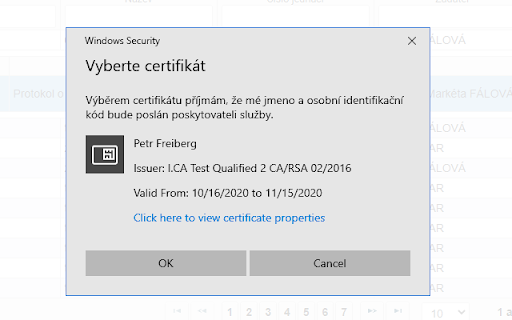
Kvalifikovaný prostředek pro vytváření elektronických podpisů Slouží pro elektronické podepisování dokumentů. Rozšíření vyžaduje instalaci ID-Software. Rozšíření je fork open-source projektu (https://github.com/open-eid/chrome-token-signing).

AI Garage - Toolbox extension
AI Garage is a browser extension that provides quick access to a collection of NLP & AI powered tools and utilities. Upgrade &… AI Garage is a browser extension that provides quick access to a collection of NLP & AI powered tools and utilities. Upgrade & optimise your browsing experience! The extension includes tools for research paper exploration, resume and cover letter auto-reviewing, task planning, meme generation, smart contract code generation, chat history analysis, travel planner assistant, and more... With the v1.5 of the AI Garage extension, users can improve their productivity and access a variety of new AI solutions directly on top of their browser.

TYPO3 Workbench
Usefull tools around your work with TYPO3. Presented by VisionConnect Based on our first "Add-on" experience with "TYPO3 Backend" we had the idea to add more comfort to the every day work with TYPO3 and Chrome. So we added some desired moduls and called it "TYPO3 Workbench". 1. TYPO3 Backend We integrated the TYPO3 Backend function into the new TYPO3 Workbench. 2. References Because of the HTML availability of the two most important references (TSREF and TSConfig) we added them to the TYPO3 Workbench. Here you can use the index or the integrated search to find help. You can copy th desired part and past it into your template. 3. Find extension Just add you search criteria and it will be send to the Extension Repository on TYPO3.org. 4. Search Forums Tired of using google for your search at any TYPO3 problem? Just use the forum search in TYPO3 Workbench. You can customize in wich forums you want to search. And if you find a forum thats missing just send the url to us (use the form below!) and we'll might add it with the next release. 5. Condition Builder (Since version 2.0) The Condition Builder allows you to easily create conditions using a guided interface. 6. Fluid Converter (Since version 2.0) Easily convert Fluid tags to inline notation. We thank "StatiX" (https://github.com/stat1x) for allowing us to integrate his application.

MedPro
MedPro Extension: Simplify Your Content Integration Effortlessly integrate essential product information — online labels, guidelines, and more — into MedPro in real time with the MedPro Extension. Key Features: Real-Time Content Capture: Add relevant content directly from websites or PDFs with just a click. AI-Powered Tagging: Automatically pre-fills tags for product-related content, saving you time and effort. Seamless Integration: Transfers captured data to the appropriate sections in MedPro, such as My Docs or Evidence. How to Use: Download the MedPro Extension. Pin it to your Chrome browser for quick access. Log out and back into your MedPro account to activate the connection. Click the extension whenever you find content to add. Accept the automated product and content type tagging or manual entry to organize the data and transfer it to MedPro. Pro Tip: For the best results, upload PDFs whenever possible. If not available, website content works seamlessly too. Streamline your workflow and stay organized with the MedPro Extension—your go-to tool for efficient content management. Please get in touch with the AVAYL team if you have questions, feedback or suggestions for further improvements! Team AVAYL

Signer.Digital Digital Signature, PKI
This extension does not require Java Runtime (JRE) on Windows, Linux or Mac. Digital Signature Chrome Extension: Signer.Digital Chrome Extension by Chartered Information Systems Pvt. Ltd., India is chrome extension for Digitally Signing Returns, XML, Hash, Content, Document, PDF, Data Encryption/Decryption, etc from Browser using Certificate in Smart Cards, USB Tokens, PFX file on User's System, User's Local Certificate Store or Hardware Security Modules (HSM), Signer.Digital Signing Web APIs. Also has API for Certificate Enrollment/Download on Smartcard or USB Token directly form the modern browsers. API for list of connected Smartcard may be used to detect connected Smartcard or USB Token. JULY 2022 - Added support for ICP-Brazil and ITIDA Egypt. Windows Host application used by this extension may be Downloaded from: https://downloads.signer.digital/Signer.Digital.Browser.Extension.Setup.zip User has full control on Allowed Origins. Before every action (operation), Extension Host shows dialog and user can choose 'Deny', 'Allow Once', 'Always Allow' and 'Manage Origins'. To check working of this extension visit https://web.signer.digital Contact us for Linux and Mac Host application. Most of the JavaScript API in Signer.Digital Browser Extension is completely FREE to use (Only API GenerateCSR and ImportCert - which are mainly used by Certifying Authorities for Certificate Issuance is not free.) Certifying authorities are requested to contact info@signer.digital to enable their 'Issuer Name' in the Signer.Digital Browser Extension. Chartered Information Systems also provides secure Slots in HSM hosted in Multi Tenant mode, for digital signing. This extension is widely used for Digitally Signing PDF Documents from Browser, Web Authentication using Digital Certificate, Signing eReturns, AuthTokens, Data Encryption/Decryption using Smartcard or USB Token connected to user's browser. Works on Chrome and Chromium base Edge browsers. Sample Code, Walk-through, and Source code of Windows Integration project is available at https://help.signer.digital/digital_signing_and_authentication_from_web_browser.htm Signer.Digital.Weblib is free for single page signing from .NET web application
