
hjmdcpifdhaimfoecieedpecgeoglkgi
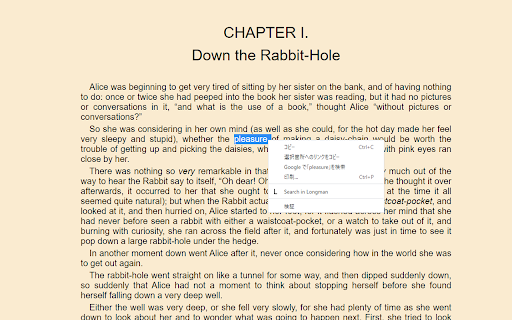
Searching a word in Longman. 選択した単語をlongman.comで検索します。英語学習用です。

Merriam Webster Vocab Search
Search Vocab Words On Merriam Webster With 2 clicks Instantly Unleash the Power of Words with Our Merriam-Webster Two-Click Vocabulary Search

Longman Dictionary Bubble
English should be learned in English. This is a suitable app for those who believe that. This extension shows a bubble-type popup for the selected word's definition in Longman Dictionary. It can show a clickable icon for the popup, or clicking a word displays the bubble immediately. By default, it adopts American English pronunciation, but you can enable "Prefer British pronunciation" in the options to use British pronunciation instead. If you would like to comment, please leave any here. For your information, this extension uses Pearson Dictionary API (http://developer.pearson.com/apis/dictionaries). It was supposed to become unavailable at the end of 2017 but still available up until today (May, 2019). Recent updates (v2.3.0): - Smart word recognition: automatically finds dictionary entries for inflected words - When a word isn't found, tries the root form (e.g., "swimming" → "swim") - Works with verb forms, plural nouns, and adjective forms Previous updates (v2.2.0): - Anki integration: Save words directly to your Anki flashcards via AnkiConnect - New option to show/hide the "Add to Anki" button Previous updates (v2.1.0): - British pronunciation icon now displayed next to American - Auto-pronounce: hear the word automatically when popup shows - Option to prefer British pronunciation for auto-pronounce

Collocation Dictionary Lookup
⚡ Instant Lookup: Simply select any word (or group of up to 3 words) on any webpage. A discreet floating icon will appear—click it to view results immediately in a beautiful overlay popup. 📚 Comprehensive Database: Access a vast library of collocations (adjective + noun, verb + noun, etc.) along with clear examples. 🚀 100% Offline & Private: The entire dictionary is bundled with the extension. It works lightning-fast with zero latency and requires no internet connection. Your browsing data stays on your device. 🎨 Modern & Clean UI: Enjoy a distraction-free reading experience with a polished interface, gradient headers, and organized definition grouping. 📝 Smart History: Automatically saves your successful searches so you can review and memorize new vocabulary later. ⚙️ Fully Customizable: Tailor the experience to your needs via the Options page. Toggle the floating icon, adjust the popup size, and more. 🌟 How to use: - Highlight a word on any website. - Click the small "book" icon that appears below the text (or right-click and choose "Collocation Dictionary Lookup"). - Instantly see how to use that word naturally in sentences. 🌟 Notes: - After installing, remember to pin Collocation Dictionary Lookup to your toolbar for easier access.

Merriam's Webpage
Allows you to easily look up words on webpages in Merriam-Webster's dictionary. Highlight a word and click the book icon to begin. Highlight a word on a website, and a book icon will pop up next to it. Click that to search the word on Merriam Webster. Alternatively, use the icon on the browser dock to manually search.
