
himihjdamjmpalooglekmkbngidcjpja
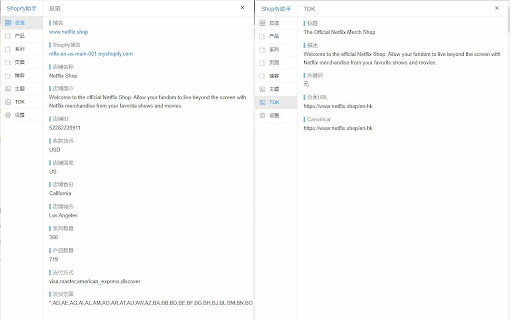
检测shopify站点信息,更好了解同行店铺,批量采集Shopify产品,导出CSV格式,快速导入Shopify店铺。 Shopify数据助手 ,可以一键检测Shopify店铺的信息,查看店铺产品,系列等列表和数据,一键采集店铺产品导入Shopify店铺,是基于Shopify建站的外贸从业者的必备运维工具。 插件主要功能 - 检测店铺基础信息 - 批量采集店铺产品 - 检测店铺的模板主题 - 获取所有产品链接 - 获取所有系列的链接 - 获取所有博客链接 - 获取所有页面链接 - 读取产品详细信息 - 导出产品为CSV格式 - 查看页面TDK信息 - 批量通过产品链接采集导出CSV ...... 功能不断新增中,欢迎体验

Shopify App Detector by ShopScan
Easily know what shopify apps and themes are being used on a shopify website Free Shopify App & Inspector — see what apps, themes, analytics, and payment methods any Shopify store is using. 🛍️ 🕵️ Ever wondered what Shopify apps, theme, or payment gateway a store is using? ShopScan's free Shopify App Detector reveals it in one click. 🎯 Perfect for competitor research, dropshipping, agencies, and anyone curious about a Shopify store's tech stack. ====== WHAT IT DETECTS ====== 1️⃣ Shopify Theme — name + Theme Store URL 2️⃣ Shopify Apps — with direct App Store links 3️⃣ Analytics & Tracking Tools — Google Analytics, Meta Pixel, TikTok, Klaviyo, and more 4️⃣ Payment Gateways — Shop Pay, Stripe, PayPal, Afterpay, Klarna, and more 5️⃣ Third-party tools & integrations powering the store ====== HOW IT WORKS ====== 1️⃣ Visit any Shopify store 2️⃣ Click the ShopScan icon 3️⃣ Instantly see the full tech stack — apps, theme, analytics, payments ====== WHO IT'S FOR ====== 1️⃣ Dropshippers researching winning stores and product strategies 2️⃣ Agencies auditing client sites or scouting competitors 3️⃣ Shopify merchants looking for proven apps that work 4️⃣ Developers and marketers analyzing tech stacks 5️⃣ Anyone curious how a Shopify store is built ====== WHY SHOPSCAN ====== 1️⃣ Free — no account, no paywall, unlimited scans 2️⃣ Fast — results in under 2 seconds 3️⃣ Accurate — actively maintained app database 4️⃣ Private — we don't collect your browsing data ✔️ You can also visit www.shopscan.app to get more details about all the apps, and may request to add missing apps or new apps. Try Shopscan Shopify App and Theme Detector today! 📌 Version 1.2.1 - Updates (April 2026) ➜ New in-app announcement banner for product updates & news ➜ Cleaner "No apps detected" empty state ➜ Accurate app count ➜ Performance & stability improvements 📌 Affiliate Disclosure: This extension has affiliate links. If you start your store through our link, you’ll be supporting us too—at no extra cost to you.

Shopify Scraper & Parser - Shopify Spy
Shopify Spy extract product listing from Shopify stores to CSV and Excel Shopify Spy scrapes products from Shopify powered stores and saves as an Excel document or CSV file. 2024 Q2 changes: - Highly requested feature: Downloading images. - Slow mode: Extract more fields but slower: Variant Barcode, Image Alt Text, Variant Tax Code, Variant Weight Unit - Old "Excel" format has been renamed to "Excel (Legacy)" and will be removed in further releases - Option to manually specify a collection handle if the list of collections is too large. - Enhanced error handling with clearer explanations 2024 Q1 changes: - Resolved "Out of memory" error for large stores; now, CSV/Excel files are automatically split for efficient data handling. - Improved status messages for enhanced clarity and precision. 2023 Q3-Q4 changes: - Undock popup: you can use browser while the scraping is in progress and even scrape several store simultaneously - Renewed login flow Shopify Spy features: ✓ Can extract thousands of products within minutes ✓ Filter by a specific collection ✓ All fields from Shopify product listing are included (see below) ✓ All product images are added to the CSV ✓ Download images along with CSV ✓ Export to CSV format compatible with Shopify import format (https://help.shopify.com/en/manual/products/import-export/import-products) ✓ Save as XLSX (Excel document) with proper data types - dates, prices ✓ Does not require excessive permissions For e-commerce store owners, Shopify Spy allows you to keep track of your competitors' products, pricing, and promotions. With this tool, you can quickly and easily extract thousands of products from Shopify-powered stores and filter them by specific collections. For digital marketers, Shopify Spy provides accurate and reliable product data to help you analyze market trends and identify potential opportunities for your clients. For product researchers, Shopify Spy makes it easy to gather data on a large number of products quickly and efficiently. This means you can identify trends and insights in your field of research with ease. For dropshippers, Shopify Spy is an essential tool for finding new products to add to your store, and monitor pricing and product availability for your existing products. For data analysts, Shopify Spy's ability to extract product data from Shopify stores and save it in a CSV or Excel format makes it an attractive tool for processing large amounts of data quickly and efficiently. So, whether you're an e-commerce store owner, digital marketer, product researcher, dropshipper, or data analyst, Shopify Spy has everything you need to stay on top of the latest product trends and insights. Try it out today and take your business to the next level! Supported Fields: - Handle: The unique identifier for the product. - Title: The name of the product. - Body (HTML): The HTML description of the product. - Vendor: The name of the product's vendor. - Product Type: The category or type of the product. - Tags: Keywords associated with the product. - Published: Indicates whether the product is published or unpublished. Variants: - Variant SKU: The stock keeping unit for the variant. - Variant Grams: The weight of the variant in grams. - Variant Price: The price of the variant. - Variant Compare At Price: The original price of the variant, used for comparison. - Variant Inventory Qty: Inventory quantity, where 0 indicates out of stock and 1 indicates in stock. Slow Mode Additional Fields for Variants: - Variant Barcode: The barcode for the variant. - Variant Tax Code: The tax code associated with the variant. - Variant Weight Unit: The unit of weight measurement for the variant. Images: - Image Src: The source URL of the image. Slow Mode Additional Fields for Images: - Image Alt Text: The alternative text for the image.

Zopi - Dropshipping Sidekick for AliExpress & Shopify
Enhance dropshipping with AI insights. Find trending AliExpress products, analyze store public data with predictive analytics. Zopi Extension is your all-in-one tool for product research, store insights, and seamless product imports. Using AI-powered analysis and historical trends, Zopi helps you discover winning AliExpress & Temu products and gain valuable insights into publicly available Shopify store data—without accessing private user information. Key Features of Zopi Extension: ◾️ Import Products from AliExpress, Temu & eBay Easily add products from AliExpress, Temu & eBay to your Shopify store in just a few clicks, streamlining your sourcing and fulfillment process. ◾️ AliExpress Product Discovery Find trending AliExpress products with supplier ratings, sales estimates, and advanced filters to make data-driven sourcing decisions. ◾️ Store Insights Analyze top-performing stores using publicly available data. Identify product trends, marketing strategies, and pricing tactics to refine your approach—without extracting private store information. ◾️ Sales & Trend Analysis Leverage AI-based trend detection to monitor market shifts and optimize your product listings and pricing strategies. ◾️ Price History Monitoring Track AliExpress price fluctuations in one place and receive alerts for significant drops, helping you maximize profit margins effortlessly. How to Get Started with Zopi Extension: 1. Install the Zopi Chrome extension for easy access. 2. Click the Zopi Extension icon in your browser to open the sidebar. 3. Import products from AliExpress, Temu & eBay to your Shopify store with ease. 4. Explore AliExpress products and analyze Shopify store trends using public insights. 5. Use AI-powered tools to streamline your dropshipping business and improve decision-making. Support & Feedback Need assistance or have suggestions? We’d love to hear from you! Contact us at support@zopi.io and let us help you succeed.

Shopify Export Data
This extension allows the user to export shopify data in csv,excel format. Export product listing data with just one tap, no setup, no sign-up, Free to start. Download the export file automatically into two formats Excel and CSV. Shopify Export Data is a complete product data exporter extension, download all product details with a single click and import them quickly into the Shopify store. Simple and easy to use. There is no limit to product listing download. You can export an unlimited number of collection pages. With Shopify Export Data, you can • Easy to operate • Free to start • All language website data exporters • Easy export and download automatically • With just one click, you can export thousand of products data • The extension supports all screen resolutions of your desktop • Use CSV files format to import products to or export products from your Shopify store • Information may contain Handle, Title, Body (HTML), Vendor, Type, Tags, etc... How Extension Work • Tab the extension icon. • Go to the Shopify website and click on that collection page for the product listing data you have to download. • Select the export file format and click on the Export/Download button. In extension, you can export all collection data by choose to all collections. • When you choose the collection, the number indicates how many products are in that collection. • It will redirect automatically after the download is over. You can save your data in your selected folder. • The data that will download will be in Excel and CSV files. • You can easily import the data on your Shopify website. Shopify Export Data is an easy to operate extension to facilitate the best user experience while dealing with the export product data. Note: Some time extension can take long time to download due to larger product details, so be patient until the download is over.
