
hillidkidahkkchnaiikkoafeaojkjip


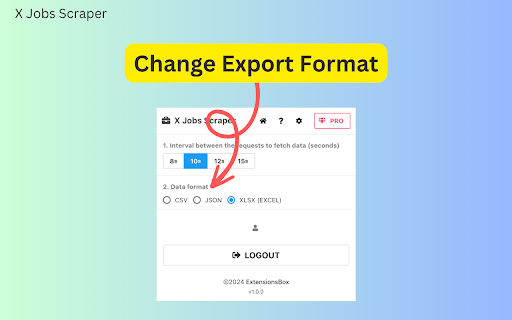
X Jobs Scraper - a browser extension that streamlines job search on the x.com. Effortlessly exports data in preferred formats. Unleash Your Job Search Potential with X Jobs Scraper - a browser extension designed to make your job search more efficient and less time-consuming. This innovative tool is a game-changer for anyone seeking new job opportunities on the X platform (formerly known as Twitter). Effortlessly Aggregate Crucial Job Information Built with advanced search technology, the X Jobs Scraper allows users to compile job information from X's job search results page, effectively transforming your job search into a streamlined and manageable process. Whether you're hunting for a position in tech, finance, arts, healthcare, or any industry in between, simply navigate to https://x.com/jobs to commence your search. How to use simply navigate to https://twitter.com/jobs to search. Upon loading the search results, you'll find a "Download Jobs" button. Click this button and watch as X Jobs Exporter immediately begins gathering data. It provides real-time updates on its progress through the dialogue box. Customize Your Data Format With a focus on user experience, the X Jobs Scraper boasts an exceptional feature where it enables users to export job data in three different formats – CSV, JSON, or XLSX (Excel). Whether you prefer to analyze your data in a spreadsheet or require JSON format for a more specific use, the choice is at your fingertips. Real-time Results X Jobs Extracter understands that your time is valuable. It begins the extraction process as soon as you make a request, offering a prompt and efficient service suitable for the fast-paced nature of job hunting. The timeframe of this process varies depending on your data requirements. The X Jobs Scraper extension is more than a tool; it's a revolution in the job search process. By expediting your research and collation process whilst ensuring data privacy and security, it empowers you on your journey to landing your dream job. Embrace the future of job hunting with X Jobs Downloader. Data Privacy Your data stays on your device and is not stored or transmitted to our servers. We prioritize keeping your information secure and confidential. Disclaimer This extension is an independently developed product by ExtensionsBox and has no association with X Crop.

JOB DATA SCRAPER
A Chrome extension to save job designation, company name, and location from Indeed and LinkedIn in excel format. Supports saving the copied data locally in Chrome storage. Users can download the saved data as a CSV file. Automatically distinguishes between data copied from Indeed and LinkedIn.

Twitter List Search Extractor
Extract twitter list search data from Twitter's list search result page as Excel/CSV/JSON file 🚀 Effortlessly export Twitter lists data from the list search page to a Excel/CSV/JSON file. 🔧 How it Works: 1️⃣ Go to the Twitter List Search Page. 2️⃣ Perform a search, then right-click anywhere on the page. 3️⃣ Select "Extract Twitter List Search" from the menu. 🔥 Key Features: 1️⃣ Run in twitter list search result page. 2️⃣ Running solely on your local machine. 3️⃣ Export twitter list data to a Excel/CSV/JSON file, include infos of list, author etc. ✨ Why use this: 👩🔬 Obtain data for research and social listening experiments 🦠 Analyze trends, viral campaigns and content of specific creators 🥸 Identify unverified content and inaccurate information with high public value 📚 Prepare for or analyze a Twitter marketing campaign Note: This extension is an independent creation and is not affiliated with or endorsed by Twitter❗️🔒

Jobs Scraper for Indeed
Scrape, extract jobs from Indeed and export to CSV/Excel Extract jobs, salaries, locations from Indeed and exporting them to CSV, Excel or JSON file. Our scraper simplifies the process of searching and extracting detailed job data, requiring no coding expertise. # Features ✓ Extract jobs search results and all pages automatically ✓ Extract full descriptions of jobs ✓ Export as Excel, CSV, and JSON # Supported fields: - Position Name - Salary - JobType - Shift And Schedule - Rating - Company - Location - URL - PostedAt - Description Text - Description HTML - External Apply Link - etc. With the Pro version and settings activated, you can get additional fields such as: Description Text, Description HTML. # How to get started? 1. Open indeed.com and conduct a search with some info like job title, company name, and location. 2. Click the Download button next to the “Search” button. Then just wait to scrape complete. 3. Once extraction is done, click 'Export'. In the popup, we offer these extra features: Relevant-Ext: Brief recommendations and introductions to related extensions. # Data Privacy Your data's security is our top priority. Rest assured, all data remains on your device, ensuring 100% privacy and trustworthiness. # Statement Indeed is a trademark of Indeed Inc. Jobs Scraper for Indeed is not affiliated with, endorsed, sponsored, or otherwise related to Indeed, Inc. or any of its affiliates or subsidiaries. # About Pro Jobs Scraper for Indeed is a paid extension, you can get basic functionality and upgrade to get more functionality.

Web Scrapper for Twitter™
Web Scrapper for Twitter™ or X™. Extract Tweet text, like Counts, view counts, image/video URLs, retweet numbers. Web Scrapper for Twitter chrome extension enables you to find tweet text, like counts, views, image or video URLs, and retweet numbers with ease. Whether you're a social media enthusiast, market researcher, or just a curious Twitter user, this extension helps you for in-depth Twitter analysis. >> Installation: Install the extension by clicking on “Add To Chrome” >> Authentication: Sign into your Twitter account. >> Start Scrapping: While browsing Twitter, simply click on the extension icon in your Chrome toolbar. >> Select Tweets: Extension will automatically fetch data like tweet text, likes, views, image or video URLs, and retweets. >> Export Data: You can save the collected data in CSV or excel format. Tweet Text: Extract the content of tweets for comprehensive analysis. Like Counts: Discover the number of likes and user engagement. View Counts: Get insights into tweet visibility and popularity. Image/Video URLs: Access the media content links for further examination. Retweet Numbers: Gauge the viral reach and influence of tweets. Export Function: Save the data you've collected in CSV or other formats for your records.
