
hiibppmbkamnhkahghfaappbbggibfko
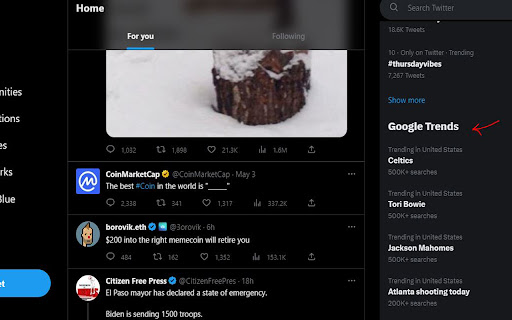
A simple and convenient tool that display Google Trends on the X (Twitter) page. Do you want to know what's trending on Google and Twitter at the same time? Do you want to search and explore the popular topics and keywords on both platforms with one click? Do you want to discover new insights and opportunities from the data and analytics of both sources? If you answered yes to any of these questions, then this chrome extension is for you. This chrome extension is a simple and convenient tool that shows you the Google trends on the Twitter page. It adds a section below the Twitter trends that displays the top 10-20 trending searches on Google for your selected country and category. Data will automatically refreshed every 30 minutes. With this chrome extension, you can easily access and search the Google trends and the Twitter trends on the same page. You can see what people are searching for on Google and what they are talking about on Twitter. You can also click on any trend and see the results on Twitter, just like a Twitter hashtag search. You can also explore the links and hashtags associated with each trend and see how they relate to each other. You can also use this information to create engaging and relevant content for your audience, or to find new niches and markets for your business. This chrome extension is easy to install and use. Just download it from the Chrome Web Store and enable it on your browser. Then go to any Twitter page and enjoy the Google trends below the Twitter trends. You can also adjust the settings and preferences according to your needs and preferences.

Trending Google Searches
Trending Google searches, delivered right to your browser. Trending Google Searches is the easiest way to keep up with what's trending on the internet. - Hottest search phrases of the past 24 hours - Total number of searches - Top related news articles - Trends update hourly! Add to Chrome now and never miss a thing!

Google Trends Everywhere
Compare search trends with your keywords right next to Google search results, and quickly open Google Trends via right-click menu Why Install Google Trends Everywhere? In today's fast-paced digital world, understanding search trends can provide valuable insights into public interest and market dynamics. Google Trends Everywhere is a powerful Chrome extension designed to seamlessly integrate trend analysis into your daily browsing experience. Here's why you should consider installing it: Key Benefits: 1. Instant Trend Comparison: With a simple right-click, you can instantly compare selected text with predefined keywords on Google Trends. This feature is perfect for marketers, researchers, and anyone interested in tracking the popularity of specific terms. 2. Seamless Integration with Google Search: The extension embeds a trends widget directly on your Google search results page, allowing you to view trend data without leaving the page. This integration saves time and enhances your search experience. 3. Customizable Settings: Tailor the extension to your needs by adding up to four comparison terms and selecting a time range for analysis. Your settings are saved, ensuring a personalized experience every time you use the extension. 4. Global Accessibility: Whether you're in the US, Japan, or Brazil, Google Trends Everywhere supports multiple Google domains, making it accessible to users worldwide. 5. User-Friendly Interface: The extension features an intuitive popup interface for managing your settings and a draggable trends widget for easy viewing and interaction. Who Can Benefit? Marketers: Quickly assess the popularity of products, brands, or campaigns. Researchers: Analyze trends in public interest for academic or professional projects. Content Creators: Identify trending topics to tailor content for maximum engagement. General Users: Stay informed about what's popular and relevant in your areas of interest. How to Get Started: 1. Install the Extension: Download Google Trends Everywhere from the Chrome Web Store. 2. Use the Context Menu: Select text on any webpage, right-click, and choose "Compare in Google Trends" to open a new tab with trend data. Explore Trends on Google Search: Perform a Google search to see the embedded trends widget and explore data directly from the search results page. Privacy Assurance: Google Trends Everywhere is committed to user privacy. The extension only processes data necessary for its functionality, and no personal data is collected or stored beyond your settings.

Trenred - Google Trends Enhancement
Display weekday information and high-precision estimated search volume in Google Trends chart tooltips ### **🧩 Trenred | Real Search Volumes & Seasonal Trend Insights for Google Trends** > Unlock deeper insight into what people search — powered by real volume data, weekday patterns, and cultural moment detection. Most tools only show vague 0–100 indexes. Trenred goes further — providing data with clarity, time precision, and market relevance. * **Time-Aware Analysis** Track hourly or weekly cycles. Example: *“Searches for ‘gift ideas’ spike 22% every Wednesday around 10 AM.”* * **Strategic Edge** Find untapped opportunities with our Golden Ratio Filter™ and avoid trend cliffs. * See actual numbers (e.g., "8,421 searches today → 11,203 tomorrow") * Cross-validated estimates with 93%+ consistency * Automatically label data points with weekdays * Identify recurring weekday trends (e.g., “Tuesdays have 15–18% more B2B searches”) * Over 200+ events detected: from Christmas to Prime Day * Minimal UI with toggleable trend overlays * Links to help, privacy policy, and feedback at [trenred.com](https://trenred.com) * Requires `tabs` permission only to open official pages ### 🌟 Who Is It For? * **E-commerce sellers** → Time product drops with search-based demand * **Content teams & SEOs** → Spot breakouts *before* they peak * **Startup founders** → Validate real demand in real-time * **Analysts & researchers** → Add “when” and “why” to search curves 1. Install the extension 2. Open [Google Trends](https://trends.google.com) or search any keyword 3. See real search volume + weekday labels + holiday impact * Redesigned popup with quick-access links (Help, Privacy, Feedback) * Added support for tab-based navigation to trenred.com * Improved icon rendering for higher DPI displays * Minor performance optimizations and style polish 📌 *Note: Trenred does not collect personal data. All processing happens locally in your browser.* Privacy policy: [https://trenred.com/privacy](https://trenred.com/privacy)

Twitter Trends
Provides Twitter Trend Topic instant lists on a global and local basis. Powered by twitter-trending.com. Shows the Twitter Trending Topic list of the world or a country you choose.
