
hihlnkggmbabmpimnjglgiimdcempbbf


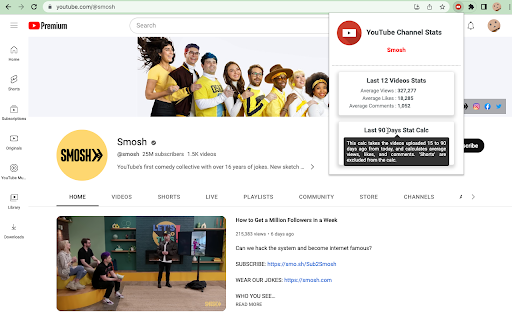
This extension calculates various stats about the current YouTube channel. Navigate to the channel page, or video of a channel that you are looking for the statistics of, and click the extension icon to load the channel stats popup! There are currently two different calculations for this extension. First is the "Last 12 Videos Stats" calculation. This pulls the last 12 uploaded videos, excluding "shorts", removes the videos with the highest and lowest view count, and then calculates the average views, likes, and comments for the remaining 10 videos. The second calculation is the "Last 90 Days Stat Calc". This grabs all the uploaded videos, excluding "shorts", that are between 15 and 90 days old, and then calculates the average views, likes, and comments.

YouTube Monetization & RPM Checker by TubeLab
Adds an icon to YouTube's UI informing if the channel, video or short is monetized. Adds RPM estimations for channels & videos. Adds Revenue estimations for videos. How does the monetization checker work? - It checks that the channel or video has traces of a monetized content such as: videos with custom ads, enough subscribers and sponsored content, and more. How does the RPM & Revenue prediction work? The extension matches the video title with a source of 100+ RPM Estimations. Then the the RPM is calculated based on that niche RPM, the video duration and audience. The revenue is the RPM*Views / 1000. This is by far the most accurate YouTube revenue prediction available! Notes: - This does NOT check monetization with 100% accuracy. - Revenue estimation is NOT 100% accurate. - Shorts only channels are less accurate but should work. - Sometimes it will require a page refresh due to YouTube's UI layout shifts. - Best results for english based content & with YouTube english UI. If you see any issues please contact@tubelab.net. 1.5.0 Updates: - New Features Onboarding page for initial setup and local model warmup with visible progress - Bug Fixes Improved sponsor detection for monetization analysis Monetization badge now shows “Sponsored” when appropriate - Improvements Better progress feedback and graceful handling on unsupported devices Adjusted badge spacing and dark-mode styling 1.4.8 Updates: - Fixed multi-language support for Deutch, French, Italian & Others.

YouTube money calculator
The tool allows you to easily calculate the estimated earnings from a Youtube Video and is based on video view count and engagement. The tool has been developed to allow you to easily calculate the estimated earnings from a Youtube Video or Channel and is based on your video view count, engagement and various other factors. How to Use the YouTube Money Calculator : 1. Drag the YouTube View Count slider up or down based on your daily video views 2. Set your Estimated CTR based on your channel's historic performance 3. View your estimated daily, weekly and yearly earnings potential

SimilarTube - Find Similar YouTube Channels
AI Scanner & Analytics for Finding Niche YouTube Channels SimilarTube is a tool powered by AI (LLM) to scan and find similar channels on YouTube based on a given channel. Unlike searching through third-party influencer databases, which often lag updating information about nano and micro influencers. Our AI bot scans YouTube directly to deliver real-time results in just seconds. FOR MARKETERS SimilarTube helps you find similar influencers using a "look-alike" algorithm, displaying key metrics such as ER(engagement rate) and VVR(video view rate) for quick screening and targeting. AI automatically extracts public email addresses and other social media accounts (Facebook, Instagram, TikTok, etc.), enabling you to find their contact information quickly. With automatic email matching and template filling, you can get the outreach job done 10x faster. FOR SALES Enrich your database with new leads and get more sales. With automatic email match and outreach mail merge, you can get the outreach job done 10x faster. FOR YOUTUBERS SimilarTube helps you find competitors. If you are a new YouTuber hoping to identify ideas or niches, it can help you analyze the competitive landscape and determine if it's worth investing in. If you are a marketer looking to find influencers, you can use it to expand your targets. FOR ANALYSTS The AI Insight feature automatically assesses the value of the niche and highlights differences in core metrics among YouTubers of various tiers. Its filtering and sorting capabilities facilitate convenient analysis.

Channel Find - YouTube Stats Viewer
Provides YouTube channel insights, including average views, monthly income, and sponsorship estimates, directly on the video page ChannelFind Analytics is a powerful Chrome extension designed for YouTube creators, viewers, and marketers. It seamlessly integrates with YouTube and displays detailed insights about the channel you're watching in real-time. Whether you're a content creator looking to track your channel’s performance or a viewer interested in understanding more about the creators you follow, ChannelFind offers valuable data at your fingertips. This extension shows: - Channel Overview: Display the average video views, monthly income, and channel rank to help you understand the scale and performance of the channel. - Sponsorship Estimate: Learn the estimated sponsorship cost for the channel, giving you a sense of how much it could cost to collaborate with the creator. - Key Metrics: Receive data on growth trends, video performance, and more. - For YouTube Creators: Improve your channel strategy by understanding how other creators are performing, and estimate potential revenue and sponsorship opportunities. - For Viewers: Get deeper insights into the channels you enjoy watching, including understanding their reach and monetization. = For Marketers and Sponsors: Gain easy access to detailed channel metrics to make informed decisions when looking for YouTube collaborations. ChannelFind Analytics makes YouTube more transparent, empowering creators, viewers, and marketers with the data they need to succeed. With an easy-to-use interface and real-time updates, ChannelFind Analytics ensures that you always have the most up-to-date information on your favorite YouTube channels.
