
hieccpkaackigafdakcakpkfopanlmoh
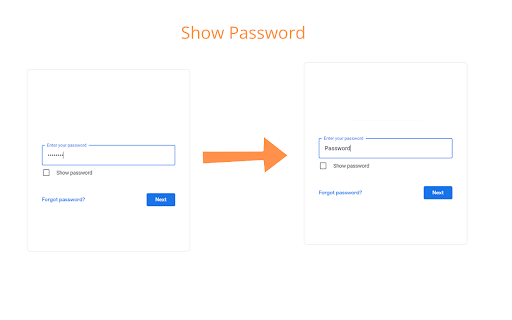
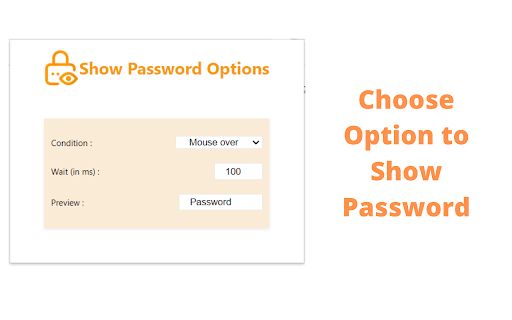
Show the password you are entering! Show Password - Safe and Secure is the FREE extension that allows you to view and hide password in any form. Using this extension is completely safe and secure. Show Password - Safe and Secure extension does not store any of your form data or password. Features of Show Password- Safe and Secure : >>>This extension is safe and secure. We do not collect or store users' data. So feel free to use it. >>> After installing this extension, you can view passwords from any website. >>> It allows multiple conditions to show a password on any web page. >>> It is available world wide. So you can use it anywhere in the world. >>> When you select the Press Ctrl key from the popup window of the extension, you can view and hide the password field on any website. >>> Pin the extension to your toolbar after installing it. >>> Click the extension icon to open the popup window. >>> Select one of the following options :- Mouse Over Double Click On Focus Press Ctrl Key >>> After selecting one option you view and hide the password on any web page on the basis of the selected option. >>> Light weight - This extension is of minimal size, so it will consume negligible disk of your system and will not affect system's performance. >>> Simple layout - It is built based on simplicity so that you don't have to follow complex steps. >>> Secure - Using this extension is completely safe. We don't store user credentials on our server. Your data is stored in your browser. So it is secure. User's data is the most precious thing. While keeping this mind, we built the extension safe and secure for our users, so they can use it without any hesitation. We don't fetch users' data to our server. No one can check a user's data except the user. We don't use any tracking or analytics tools. Your privacy is private. Show Password - Safe and Secure is a safe and secure extension.

Show me my Password
Shows the masked password when you hover or choose on any control actions Tired of struggling to remember the password you've hidden behind those asterisks? Introducing "Show me my Password" - a Chrome extension designed to make your life easier by revealing your hidden passwords whenever you need them. Key features: 1. Customizable reveal triggers: Choose from multiple triggers such as hover, double click, or pressing the Ctrl key to reveal your password. 2. User-friendly interface: Enjoy a seamless experience with a clean and straightforward design. 3. Quick access to options: Easily access and modify your settings with a simple click in the extension's popup. 4. Rate us button: Love our extension? Show your support by leaving a review on the Chrome Web Store. How to use "Show me my Password": 1. Install the extension from the Chrome Web Store. 2. Click on the extension icon in your browser's toolbar to access the popup. 3. Choose your preferred password reveal trigger from the dropdown menu. 4. Navigate to any website with a password input field, and reveal your password using the selected trigger. With "Show me my Password", you'll never have to worry about forgetting your password again. Download the extension today and experience the convenience of quickly revealing your hidden passwords! Disclaimer: Please use this extension responsibly and only on websites and accounts you have permission to access. The developer is not responsible for any misuse or unauthorized access resulting from the use of this extension.

ShowPassword
Instantly reveal password fields by simply hovering your cursor. No clicks, no toggles, no hassle. Fast, minimal, and secure. 🔍 See What You're Typing, Instantly Have you ever deleted your entire password just because you couldn't tell where the typo was? Or pasted the wrong password and had to start over? ShowPassword eliminates that frustration entirely. Just hover your cursor over any password field, and it instantly becomes readable — no clicks, no eye-icons, no extra steps. ✨ Why You'll Love It ⚡ Lightning Fast — Hover to reveal, move away to hide. That's it. Zero friction. 🟢 Visual Feedback — A subtle green outline gently highlights the active field so you always know when your password is visible. 🌐 Works Everywhere — Engineered for modern web apps. Fully compatible with dynamic SPAs (React, Vue, Angular), Shadow DOM, and legacy websites alike. 🔒 Privacy First — No data collection. No tracking. No external requests. Your passwords never leave your browser. 🪶 Ultra Lightweight — Pure vanilla JavaScript with zero dependencies. Won't slow down your browsing. 🎯 Smart Detection — Automatically identifies password fields even when websites try to disguise them. 🖱️ How It Works Navigate to any website with a password field. Hover your mouse over the password input. The password becomes instantly readable with a soft green highlight. Move your cursor away — it reverts back to hidden. No toggles. No context menus. No learning curve. Just move your mouse. ❓ Frequently Asked Questions Q: Is this safe to use? A: Absolutely. ShowPassword only modifies how the password field appears visually in your browser. It never stores, reads, or transmits your passwords anywhere. The change is purely cosmetic and client-side. Q: Does it work on the Chrome Web Store login? A: Unfortunately, Chrome prohibits extensions from running on the Chrome Web Store and Chrome settings pages for security reasons. But it works on virtually every other website. Q: Will this break website styling? A: No. The green outline is applied using CSS outline — which sits outside borders and doesn't affect the page layout at all. Q: Does it work with password managers? A: Yes! Works seamlessly alongside Bitwarden, LastPass, 1Password, Apple Keychain, and Google Password Manager. 📦 Version 1.1.0 — What's New ✨ Complete rewrite for better performance and reliability 🟢 New green visual indicator for password visibility state 🌐 Full Shadow DOM support for modern web components ⚛️ Enhanced SPA support (React, Vue, Angular) 🎯 Smarter password field detection heuristics 🪶 Optimized MutationObserver for reduced CPU usage 🛡️ Privacy & Security ShowPassword does not collect, store, or transmit any personal data. It operates entirely offline within your browser. No network requests. No analytics. No cookies. Your data belongs to you, always.

ShowPassword
Have you ever deleted whole password just because you typed a single letter wrong ? Now you can get rid of it. This extension will show you the password in plain text when cursor is over password fields. You can also change when to show password in options. Because many people doubt the security of this extension, I upload it's source code to GitHub. https://github.com/a161803398/ShowPassword What's new in 1.2.1: Fix extension don't work on some websites that change input type What's new in 1.1.4: Fix the bug that google account password don't show.

Show Password on Double Click
Introducing "Show Password on Double Click" Chrome Extension Tired of struggling to remember and type your passwords accurately? Do you often find yourself frustrated by hidden password fields while trying to log in? Our new Chrome extension, "Show Password on Double Click," is here to help! Key Features: Seamless Visibility Toggle: Simply double-click on any password input field, and it will instantly change from hidden (password) to visible (text). Double-click again to hide it back. Safety First: The extension only affects input fields that were originally of type "password." Fields initially set to "text" will remain unchanged, ensuring that your non-password fields are not inadvertently hidden. User-Friendly: No more copying and pasting passwords to check them. Just a quick double-click and you can see what you’re typing. How It Works: Initial State Tracking: When you load a webpage, the extension automatically identifies and remembers all input fields that are of type "password." Double-Click Activation: When you double-click on a password field, the extension toggles the input type between "password" and "text," allowing you to see or hide your password as needed. Installation and Usage: Install the Extension: Go to the Chrome Web Store, search for "Show Password on Double Click," and add the extension to your browser. Activate: The extension runs in the background. Simply navigate to any website with a login form, and you're ready to go. Double-Click: Double-click on any password field to reveal the password. Double-click again to hide it. Privacy and Security: Your security is our priority. This extension does not collect, store, or transmit any data. It operates entirely within your browser, ensuring your sensitive information remains private. Upgrade your browsing experience with the "Show Password on Double Click" extension and take the hassle out of managing your passwords. Download now and enjoy a smoother, more efficient way to handle password fields!
