
hianlgkeeckjocbkdbegoeaokdmjlkap
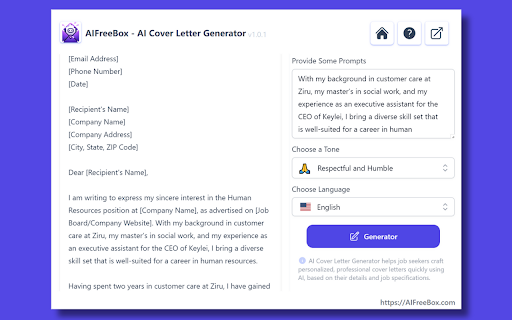

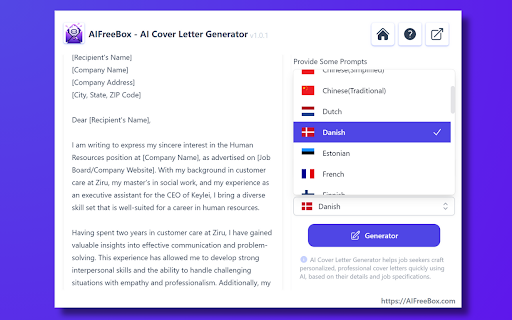
AIFreeBox: Free Best AI Cover Letter Generator. Create unique, job-winning letters quickly to stand out in your job search. Are you struggling to craft the perfect cover letter? 😓 How do you balance professionalism with personality, and stand out among countless applicants while still fitting into a potential employer's expectations?Crafting the perfect cover letter can often be a daunting task even for the most experienced job seekers. 😞 Introduce AIFreeBox Free AI Cover Letter Generator! 🌟 Customize cover letters based on your unique profile to help you stand out in job hunts. 💼✨ What is AIFreeBox AI Cover Letter Generator? 🤖 The AI Cover Letter Generator is an innovative ai cover letter writer tool. It leverages artificial intelligence to assist job seekers in crafting cover letters. Utilizing advanced natural language processing algorithms, it understands a user’s job-seeking needs, professional background, and the specific requirements of the job they are applying for. Users input basic information such as their skills and experience, educational background, and desired job type. The cover letter AI then uses this information to generate a customized cover letter, designed to make the letters more professional and personalized while saving time. 👩💼📄 How To Use Cover Letter AI Generator: A Step-by-Step Guide 📌 1. Install from the Chrome Web Store with one click. 👈 2. Open the AIFreeBox extension. 🔍 3. Provide details for your cover letter. ✍️ 4. Select a tone for your cover letter. 🎨 5. Customize the creativity level. 🌈 6. Generate your cover letter. 🚀 7. Edit and use your cover letter. ✅ Key Features of Free AI Cover Letter Generator 🔑 ● Personalized Content Generation: Cover letter AI uses the information provided by the user, such as their skills, experiences, and job preferences, to create a cover letter that is tailored specifically to them and the job they are applying for. ● Advanced Natural Language Processing (NLP): The cover letter generator ai tool employs sophisticated NLP algorithms to ensure the cover letter reads naturally, professionally, and is relevant to the job sector and role. ● Time-Saving Convenience: It streamlines the cover letter writing process, significantly reducing the time and effort required to produce a high-quality letter. ● Customization Options: While the initial draft is generated by AI, users have the flexibility to tweak and customize the letter to add a personal touch or specific details, ensuring the final product truly represents them. ● User-Friendly Interface: The cover letter writer ai tool is designed to be easy to use, guiding users through the process of inputting their information and generating the letter. What kind of information do I need to provide to generate a cover letter? ● You should provide details about your professional background, including work experience, education, skills, and the specific job title and industry you are applying to. The more detailed and accurate the information, the more personalized and effective your cover letter will be. 👌 How can I choose the right tone for my cover letter? ● The tone should match the company culture and the nature of the job you're applying for. If you’re unsure, “Professional and Polite” is generally a safe choice. 🏢💼 Can I write a cover letter in a language other than English? ● You can select your preferred language from the dropdown menu. Make sure to use the same language throughout your job application for consistency. 🌐 What should I do if the generated cover letter doesn't fully reflect my skills and experience or personality? ● The generated cover letter is a starting point. You are encouraged to customize and add personal touches to the letter to better reflect your individuality and to address specific points that are unique to your professional journey. 🛠️✨ Is the cover letter generated by the AI writer tool unique? ● Yes, the AI uses the details you provide to create a customized cover letter. However, it's always a good idea to review the content and make any necessary adjustments to ensure originality and that it speaks accurately to your experience and the job description. 🔍📝

Jobright Autofill – Instant Job Applications, Job Match, AI Tailor Resume
1-click to autofill millions of job applications. The best way to manage job hunt and tailor resumes — Trusted by 500K+ job seekers Instantly completes every field on thousands of ATS sites, so you can submit an application in seconds. ✦ Mission: We’re on a mission to level the playing field in hiring—so that every professional has a fair shot at landing their dream job. ✦ Proven Trust: The only job-search tool featured in the ChatGPT Plugin Store and Named #1 Product of the Month on Product Hunt ✦ Built by Experts: Founded by Eric Cheng (early Box employee, serial founder) and Ethan Zheng, PhD (former AI lead at Twitter & NewsBreak), Jobright brings together AI and real-world hiring insight from top tech companies including Google, Amazon, Twitter, and Box. ✦ One-Click Autofill – Apply to jobs up to 10× faster, no manual entry needed. ✦ Resume Matching – Instantly highlight missing keywords and improve your ATS score. ✦ AI Resume Builder – Generate tailored, recruiter-optimized resumes in seconds. ✦ Smart Job Match & Tracker – Get AI-curated job suggestions and track every application in one place. 🔒 Privacy First We only collect what’s necessary to help you apply faster—and never sell your data. Everything is encrypted, secured, and fully under your control. Install for free to start applying smarter today. By installing this extension, you are agreeing to our Terms of Service here: https://jobright.ai/legal/service. Please also take a moment to review our Privacy Policy here: https://jobright.ai/legal/privacy. Need help? Email us at support@jobright.ai

AI Answer Generator
Use AI Answer Generator: Chat instantly, get quick result. Your go-to question AI, answer AI assistant! 🚀 Meet AI Answer Generator, a Chrome extension that turns prompts into polished results in one click. It streamlines your work, study, and daily research. With Answer Generator, you get crisp output fast, ready to copy or export without fuss. Capture any region of your screen with a quick drag Paste a prompt or attach an image for instant context Let the AI answer generator shape tone, language, and length to match your need Tweak creativity to suit formal reports or imaginative drafts Export results to TXT, RTF, or PDF in one step Right-click anywhere to open the Screenshot tool for rapid capture 💬 You know the struggle: tight deadlines, scattered sources, and unclear wording. When you need to ask AI for help, speed and clarity matter. Answer Generator reduces rework and confusion. It also serves as an AI homework helper for learners who need guidance and clean structure. ➤ Create structured content for emails, briefs, and study outlines ➤ Use AI response generator to convert ideas into clear, usable text ➤ Turn rough notes into summaries with AI question answer generator for smoother workflows ➤ Remove friction from research by producing concise explanations on demand 🤖 Generator keeps your flow simple and direct. Add text, drop in visuals, and refine outputs with controls that stay out of the way. When you must phrase a complex prompt or include a figure, AI question support ensures context lands cleanly. ▸ Click the toolbar icon to open a tidy workspace ▸ Type your prompt or add a screenshot; get an AI-generated answer tailored to your settings ▸ Adjust sliders for tone, creativity, and length before you run ▸ Review the draft, then copy to clipboard or save locally ▸ Reuse your favorite settings so the generator stays consistent session after session 🌟 Use it for daily tasks, briefs, and academic work. The answer generator helps turn messy inputs into clear takeaways. It also assists with quick explanations for concepts, giving you a fast path from idea to shareable text with answer AI when speed matters. 1️⃣ Students and educators shaping study guides or rubrics 2️⃣ Professionals preparing proposals, tickets, and handoffs with question AI in the loop 3️⃣ Creators outlining scripts and posts, plus rapid ideation with AI ask for fresh angles 📚 Perfect AI Homework Helper 📘 Quickly find explanations 📘 Get homework answers instantly 📘 Learn efficiently through smart, relevant ai-generated answers 📘 Ask ai for help anytime you're stuck 🧠 Your work stays yours. AI Answer Generator operates with minimal footprint, favoring local actions where possible. It avoids storing personal content beyond what is required for processing. You remain in control of exports, history, and cleanup. Capture any part of the screen without extra tools Paste or upload visuals to add instant context Set tone, language, and length with simple controls Export clean files in TXT, RTF, or PDF formats Keep drafts consistent across projects and teams Reduce editing time through clear, structured output Start fast, then refine with lightweight adjustments using the answer generator 🔒 Secure and Private 🛡️ No data tracking 🛡️ Full compliance with privacy standards 🌈 User-Centric by Design 🎨 Clean interface 🎨 No distractions, just pure functionality 🔍 FAQs ❓ How do I use the Generator? 🔹 Install it, highlight any question, and get instant ai generated answers. ❓ Can I use it for multiple subjects? 🔹 Yes! From science to history, the ai question answer generator works across all fields. ❓ Is the Generator safe to use? 🔹 Absolutely. It’s secure, private, and browser-optimized. ❓ What makes it better than others? 🔹 The answer generator gpt model, speed, and flexibility make it the best in class. ❓ What if I need shorter answers? 🔹 Use the ai short answer generator for quick responses. 📥 Ready to upgrade your daily productivity? Download AI Answer Generator today and unlock the smartest way to generate answers and handle questions with confidence. Perfect for school, work, and curiosity-driven browsing. 🚀

AutoTailor - AI Resume Tailoring & Cover Letter Generator
AI Chrome extension for tailoring resumes to job descriptions and generating personalized cover letters. AutoTailor - Resume Tailoring Chrome Extension for ATS Optimization AutoTailor is an AI-powered resume tailoring Chrome extension that helps job seekers tailor their CVs to specific job descriptions and optimize ATS keywords while applying for jobs online. Designed for speed and simplicity, AutoTailor works directly inside your browser so you can tailor your resume to any job description in seconds - without rewriting your CV every time. Key features • Resume tailoring Chrome extension for job applications • Optimize ATS keywords based on job descriptions • Generate role-specific CV versions • Create personalized cover letters automatically • Works on LinkedIn, Indeed, and other job boards • Export tailored resumes as DOCX How it works 1. Upload your CV once (DOCX format) 2. Open any job posting on LinkedIn, Indeed, or similar sites 3. Click Analyze to compare your CV with the job description 4. Generate a tailored resume and matching cover letter 5. Export the optimized CV or copy suggested changes 6. Everything happens inside your browser - no switching tabs or copying text between tools. Free & paid usage AutoTailor offers free usage so you can try the core resume tailoring features. Optional paid plans are available for extended usage and advanced optimizations. Why job seekers use AutoTailor Applying to many jobs often means rewriting the same resume again and again. AutoTailor helps you apply faster, optimize for ATS systems, and focus on more opportunities instead of repetitive edits. If you’re looking for a resume tailoring app that works as a Chrome extension, AutoTailor gives you a faster and smarter way to tailor your Resume for every role.

Compose AI: AI-powered Writing Tool
Accelerate your writing with AI Generate any text using AI. Autocomplete your sentences where you type. With Compose AI, you can write emails, create documents, and chat faster. We use artificial intelligence to automate the writing process. Prompt AI to generate any text, where you already write. Get suggestions for new ways to say something. Draft entire emails from a few words. You can do all that with just one tool. Compose AI is a holistic, AI-first writing solution: ⚡ Type // to generate text using AI 🏄 Autocomplete sentences across different websites ✍️ Rephrase sentences to make them friendlier, more professional, shorter, or longer 🎯 Reply to emails with a click 📄 Generate full-length emails from short phrases ➤ Compose Anything Type // to generate any text. Prompt our AI to write blog posts, marketing copy, paragraphs, sentences, headlines, topical information, research and more. ➤ Autocomplete Our extension’s core feature is Autocomplete. Just hit Tab to take a completion and save time typing. ➤ Compose Email Compose Now is an AI assistant for writing messages. It's great for drafting quick replies or generating ideas you can edit to make your own. To open, press Option+G (or Alt+G). ➤ Easy Email Reply Professionally reply to emails with a single click! Like magic, generated responses will reference the context from the original email. ➤ Rephrase With Rephrase, you can change how you word your sentences without having to rewrite anything. Highlight a text to shorten, expand, reword, or make something sound more friendly or formal. We’re always working to improve your experience with Compose AI. If you have any questions or feedback, we’d love to hear about them at support@compose.ai
