
hhlggfopbcchakonofkaceakbooplgnb
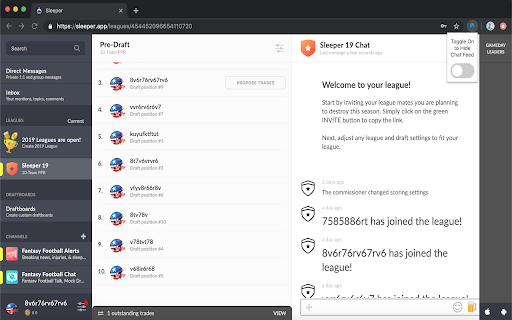
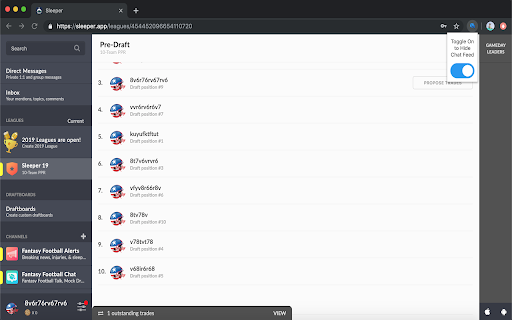
Hides the sleeper chat feed While I appreciate the idea Sleeper has about being always connected with your league and league-mates, sometimes I want a full screen display for only my team. This extension will hide and unhide the chat feed, but you wont miss too much since every reload of the page starts with the feed showing.

No Bookmarklets
A simple chrome extension to disable bookmarklets. Bookmarklets are bookmarks that execute JavaScript on a webpage. Like Chrome Extensions and developer tools, they can provide useful functionality. But also like Chrome Extensions and developer tools, they can be used to modify webpages locally. ❓ Why is this extension needed to disable bookmarklets? Currently, the only way to disable bookmarklets without using this extension is to disable all bookmarks. This extension allows users to continue using bookmarks, but disables bookmarklets. This extension automatically deletes all bookmarklets when it is installed and prevents new ones from being created by deleting them on the spot. If using this extension to disable bookmarklets, it should be force-installed. If you are not a Google workspace administrator, then the answer is no! If you are a Google workspace administrator worried about the use of bookmarklets, then you should whitelist and force-install it. ❗ Why can't I remove this extension? Your Google workspace admin has force-installed this extension to prevent the use of bookmarklets. Talk to your Google workspace administrators. 🤝 No Bookmarklets is licensed under the AGPL-3.0 License. 📁 Source Code: https://github.com/3webs-org/NoBookmarklets

Snap Environment Switcher
Switch between environments and modes in complex solutions like AEM. The Snap Environment Switcher Extension, also known as Exadel Environment Switcher for AEM, allows you to add projects with their corresponding environments (like DEV, QA, STG, PROD) and modes (like Publish, Edit, Admin). You can also specify relationships between environments and modes so that the environments will change alongside the modes. With Snap Environment Switcher/Exadel Environment Switcher for AEM, you can: - create an unlimited number of projects - configure several modes and environments - easily switch back and forth between your modes and environments - switch between environment domains - create several sub-environments (an environment with the same name that corresponds to another mode) - set up a relationship between your sub-environments and modes, so when you change the mode, the sub-environment and domain will change automatically, too - switch to a new mode or environment in a new tab - share plugin configurations between team members through the Import and Export operations - keep track of your current operating state—you’ll never be confused about which project, environment, and mode you’re in

Movie Tracker List
• add movies you want to watch in the future. • the extension automatically checks popular torrent sources like FileList to see if your saved movies are available in HD quality (720p or higher). • when a movie becomes available, you’ll receive a notification.

KeepTradeCut Sleeper Values
Add KeepTradeCut player values to the Sleeper website. KeepTradeCut player values are added to the following sections of Sleeper: -Player popups -Matchup tab and popups -Team tab -Trend tab -Trades tab and popups -League Chat Individual sections can be enabled/disabled in the extension options. The extension makes a call to the Sleeper API with the league's id to check if it's dynasty or superflex, which is used to determine which KeepTradeCut values should show. Version 1.1 changes: -Fixed issue with values not displaying -Cache KTC player values in browser session storage
