
hhijphnagbmcdggfeoagnpkecifdcbdo
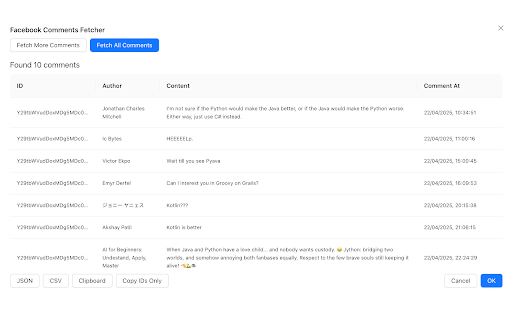


Facebook Comments Export is the fastest and easiest way to download comments from any Facebook post, directly to your computer. Built for marketers, researchers, influencers, and anyone who needs to analyze or store Facebook engagement data, this powerful Chrome extension gets the job done in seconds. No more copy-pasting or endless scrolling. With a single click, you can bulk export all comments — including the commenter's name, timestamp, comment etc — to clean CSV or JSON files. Perfect for data analysis, sentiment tracking, lead generation, or reporting. ✅ Top Features: 1) Bulk Export Facebook Comments – Supports both posts and ads. 2) Clean CSV/JSON Format – Ready for analysis in Excel, Google Sheets, or any tool. 3) Includes Timestamps & User Info 4) Fast & Easy to Use – One-click export with no coding or API setup. 5) No Facebook Login Required (unless accessing private posts you can view) 🧑💼 Ideal for: 1) Social Media Managers analyzing engagement. 2) Performance Marketers collecting feedback on ad campaigns. 3) Researchers & Analysts mining user insights. 4) Business Owners & Brands responding to customer questions or concerns. 🔒 Privacy & Security First We respect your privacy. No data is ever stored or shared. All comment exports happen locally in your browser, and nothing is sent to our servers. Compatible with all Facebook post types: timeline posts, public pages, and sponsored ads. Get started in seconds. Download Facebook Comments Export and take full control of your comment data today. Disclaimer: Facebook™ is a registered trademark of Meta Platforms, Inc. This extension is not affiliated with, endorsed, or sponsored by Facebook™.

Comment Exporter - Extract Comments
Scrape, extract comments including Nested Comments from facebook and export to CSV/Excel with one click With Comment Exporter, you can extract comments from Facebook Post Page and export them to CSV, Excel, JSON or Google Sheet. If there are replies to the comment, you can export nested comments. Comment Exporter provides user-friendly interface and simplifies the process of extracting comments, requiring no coding expertise. # Features ✓ EXPORT COMMENTS from Facebook Post Page ✓ Export Nesting Comments ✓ Copy to Clipboard (Paste to Google Sheet) ✓ Export as Excel, CSV, and JSON # Supported fields: - User Id - Username - Comment Id - Comment Text - Comment attachment (photo、video) - Reply Count - Reply Count Total - Reactions Count - Comment Depth - Created Date - Permalink URL (Link to the comment) - Profile URL - etc. With the Pro version and Check 'Includes Nesting Comments', you can get additional fields for Replied Comment such as: Parent Comment Id and Parent Comment Author. # How to get started? 1. Visit the Facebook post page, click on the download icon next to the number of comments. 2. Click Fetch button, then just wait to scrape complete. 3. Once extraction is done, click 'Export'. If it keeps failing, please send us the corresponding link, and we will do some troubleshooting and compatibility. For perfect use, it is recommended to set the Facebook language to English. In the popup, we offer these extra features: Relevant-Ext: Brief recommendations and introductions to related extensions. # Data Privacy Your data's security is our top priority. Rest assured, all data remains on your device, ensuring 100% privacy and trustworthiness. # About Pro Comment Exporter is a paid extension, you can get basic functionality and upgrade to get more functionality.

Enigma
Enigma - a revolutionary message encryption extension based on the principles of the legendary Enigma machine. Protect your… Enigma - a revolutionary message encryption extension based on the principles of the legendary Enigma machine. Protect your confidential data with advanced client-side encryption technology. Key Features: • One-click encryption of any text • Client-side encryption - keys never leave your device • Ability to revoke access to messages even after sending • Message categorization for flexible access management • Double-layer protection in the premium version • Zero-knowledge principle - we physically cannot read your messages Why Enigma: • No special knowledge required - works in any messenger or email client • Maximum protection without compromising convenience • Complete control over your data • Protection against interception, leaks, and unauthorized access • Suitable for both personal and corporate use Security: • Encryption occurs directly on your device • Use of modern cryptographic algorithms • Protection against internal and external threats • Remote access revocation capability • Categorization and access control for different types of correspondence Perfect for: • Business communications • Personal messaging • Confidential information exchange • Corporate data protection • Regulatory compliance Start using Enigma today and get impenetrable message protection with minimal effort. Available in a free version with basic functionality and an extended premium version with additional security features.

FaceC - Facebook comment export tool
FaceC is a must-have Chrome extension for anyone who needs to export, organize, or analyze comments from Facebook posts, ads, or discussions. With just one click, save all comments—including replies—to a structured CSV file for deeper insights or engagement tracking. Key Features: ✅ One-Click Export – Instantly download all comments (usernames, timestamps, text, and reactions) in CSV format. ✅ Full Thread Capture – Exports nested replies and reactions for complete conversation analysis. ✅ No Data Limits – Works on posts with hundreds or thousands of comments. ✅ 100% Local Processing – Your data never leaves your browser—privacy guaranteed. ✅ Time-Saving Analytics – Perfect for sentiment analysis, customer feedback, or community engagement tracking. Ideal for social media managers, marketers, researchers, or businesses looking to streamline comment moderation or audience insights. Download FaceC today and unlock the power of Facebook comment data! (Free and available now on the Chrome Web Store.)

Post Scraper
Effortlessly export Facebook posts to CSV, Excel, or JSON for seamless social media management and research analysis. Posts Scraper for FB - A powerful extension that helps you export Facebook posts to CSV, Excel, or JSON format with just one click. Perfect for social media managers, researchers, and anyone needing to archive Facebook posts. Key Features This extension simplifies Facebook post collection. It exports comprehensive post data, including content, engagement metrics, media attachments, and timestamps. To suit your needs, you can choose between CSV, Excel, or JSON formats. Whether you're conducting research, analyzing social media performance, or creating content backups, Posts Scraper for FB streamlines your workflow. How to Use - Visit any Facebook profile page - Click "Download Posts" or paste the profile URL - Wait for the extraction to complete - Download in your preferred format Data & Customization Posts Scraper for FB captures all essential information from Facebook posts, including post content, engagement metrics, media attachments, and temporal data. You can customize your export format through the settings panel (gear icon) and select specific data fields to include in your download. Technical Details The extension captures comprehensive post data including Post ID, Feedback ID, actor information, post text and HTML, attachments, engagement metrics (comments, likes, shares), video view counts, URLs, and timestamps. All this information is organized neatly in your chosen export format. This tool is ideal for social media analytics, content archiving, research projects, and performance tracking. Its straightforward interface and robust functionality make it an essential tool for anyone working with Facebook content. Privacy & Performance The extension is designed to be lightweight and efficient, ensuring smooth performance during data extraction. No data is stored on external servers, maintaining your privacy and security. In-App Purchases Our Extension is a freemium product with a nominal subscription fee. With a paid subscription, you can export up to 3,000 items at a time and receive premium support. The exact cost is displayed in the extension's interface, ensuring transparency and ease of understanding. Disclaimer This extension is an independently developed product by ExtensionsBox and is not affiliated with Facebook.
