
hhddcfhbobkbccigannkfacjdoebinbm

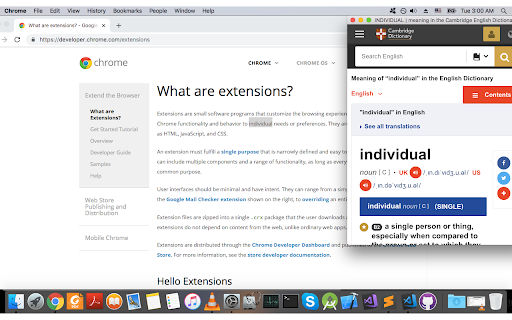

Looks up the selected text on Cambridge Dictionary Look up the selected text on https://dictionary.cambridge.org. Simply right-click on the selected text and choose "Cambridge Lookup..." Automatically close old popups. Maintain a history of 15 words you've looked up. Full privacy protection, no data collection.

eJOY AI Dictionary
Your ultimate knowledge and English learning tool to discover the world and upskill yourself. Translate video, websites and PDF. 💧 FEATURES HIGHLIGHTS for LIFELONG LEARNERS 1️⃣ UNDERSTAND EVERYTHING INSTANTLY • Watch videos with bilingual subtitles. • Translate PDF, image-based documents. • Get translation of words, phrases in videos with just one click. • Understand specialized vocabularies with AI dictionary. • Get all details about words: definitions, pronunciation, synonyms, collocations, examples, slang, video context, etc. • Quick search via GIFs, Google, or Wikipedia and other commonly used dictionaries without opening new tabs. • Display translations next to the original text (Inline Translation). 2️⃣ CAPTURE KNOWLEDGE & VOCABULARIES IN VARIOUS FORMATS • Save words, phrases, or paragraphs while surfing content on platforms like YTube, Nflix, Course, PDFs,... • Organize and categorize vocabulary and knowledge based on topics. • Integrate into any favorite websites for lookup and capturing knowledge. 3️⃣ REVIEW - REMEMBER VOCABULARY FOREVER • Review words with 10+ games • Get reminders by spaced repetition algorithms • Track learning progress and word's fluency. • Synchronize data and learning progress with the app on your phone. • Have various game options to improve 4 English skills: Mix Games, Flash Card, Multiple Choice, Rearrangement, Fill in the Blank, Speak, Listening Flash Card.(Some including Youtube videos in the gameplay) • Import your vocabulary list or flashcard sets. 4️⃣ AI ASSISTANT • EXPLAIN: Explain specialized vocabulary, idioms, grammar, or complex sentences. • SUMMARIZE: Summarize videos and texts, even lengthy one-hour videos. • DEEP DIVE: Dig deeper into a concept from the content you are watching or reading the help of AI, giving you suggested questions to fuel your curiosity • REWRITE: Edit your writing according to the tone and style you aim for. • REPLY: Summarize email content and suggest reply content. • GRAMMAR: Explain advanced grammar structures used in the selected paragraph. • DETECT PHRASES: Identify phrases and idioms in the selected text. ----- 💧HOW TO USE • Download the extension from the Chrome Store (Works on Chrome, Cốc Cốc, Microsoft Edge, Brave) • Click on a new word or select a phrase, press the green water droplet icon to look up related information. • Add words to your vocabulary notebook. • Visit the Game Center to review words. • Subscribe to the our YouTube channel for more tutorials: https://www.youtube.com/c/eJOYEnglish/ With only one account, you can get access to all products. Your data and learning progress are synced across all platforms. • The extension to watch bilingual videos, translate and save vocab on any websites. • The mobile app to learn English communication with daily short videos and review vocab with interactive games. https://ejo.bz/ejoy-app2. • Web app to practice English skills and learn vocabulary. https://ejoy-english.com/go. ----- 💧ABOUT US Fueled by the belief that learning should be joyful and impactful, eJOY was built to empower us and many learners to unlock our potential through engaging and personalized experiences. Recognized for excellence, we proudly claimed the first prize at the STARTUP Vietnam contest in 2022 the 3rd prize in the TECHFEST National Startup contest in 2019, a testament to our commitment to delivering exceptional learning outcomes for everyone. ----- 💧CONTACT US • Contact: support@ejoylearning.com • Connect with eJOY developers in our community: https://discord.gg/8Y5eUZq8BE

Mochi Dictionary Extension
Tra từ siêu tốc, lưu 70.000+ từ vựng để ôn tập cùng MochiMochi Extension Mochi Dictionary Extension

English Picture Dictionary | PicVoca.com
Make the English Dictionary visual through pictures, by PicVoca.com. Memorizing words from plain text can be frustrating. That’s why we created PicVoca—your ultimate English Picture Dictionary, a smarter alternative to the Oxford Picture Dictionary extension. Why Visual Learning? Studies show that visual vocabulary learning can boost retention by up to 65%. The Picture Superiority Effect explains why images stick in our memory better than words alone. Think in English, Don’t Translate! Stop relying on translations—immerse yourself in a monolingual dictionary to accelerate learning. The first rule to fluency? Think in English! Think through Pictures! With PicVoca, reading articles, understanding podcast subtitles, and even feeling the lyrics in songs becomes easier. Make it a habit, and let PicVoca simplify your learning journey! 🚀 PicVoca Features 📌 Instant Visual Popup Highlight any word to instantly see an image and its definition. ✔ Privacy First – PicVoca only activates when you click the extension icon. ✔ Smart Redirection – On a blank Chrome page, PicVoca redirects you to Oxford Learner’s Dictionaries. ✔ Adaptive Mode – On an Oxford Learner’s Dictionaries page, Instant Visual Popup is disabled, and the Resizable Picture Box is enabled instead. ⌨️ Shortcut Guide ✔ Highlight or double-click a word to open the Visual Meaning Popup. ✔ Click the speaker icon or press ‘R’ to hear the pronunciation. ✔ Press Esc to close the popup. 🖼 Resizable Picture Box ✔ Fully integrated with Oxford Learner’s Dictionaries for deeper learning. ✔ Try it out! Go to: 🔗 Oxford Learner’s Dictionary Example ✅ Install PicVoca → Refresh the page → Watch the magic happen! 📢 What’s New? (Changelog) Version 1.0.0 ✔ Resizable Picture Box for Oxford Learner’s Dictionaries Version 2.0.1 (2025-03-12) ✔ New Feature: On a blank Chrome page, PicVoca redirects to Oxford Learner’s Dictionaries. ✔ Improved UI: Styled credit text in the Instant Visual Popup. ✔ Bug Fix: Removed unintended pronunciation trigger on Oxford Learner’s Dictionaries when pressing ‘R’. Version 2.0.2 (2025-07-15) ✔ Bug Fix: Change URL query data ✔ Improved UI: Change credit text in the Instant Visual Popup.

Laban Dictionary (by Laban.vn)
*Lưu ý: Extension sẽ không hoạt động trên các trang mà bạn đã tải trước khi cài đặt hoặc kích hoạt lại extension. Để extension hoạt động trên các trang này, hãy tải lại trang web. Laban dictionary provides an useful tool for looking up definitions as you browse the webs: - Supported dictionaries: English-Vietnamese, Vietnamese-English and English-English. - View definition easily by double-clicking or selecting a word. - Display options: showing balloon for selection or showing popup instantly. - Option to quickly disable extension functions in page. *Note: Extension will not work in tabs that were open prior to installation. After installing this extension, either reload your open tabs or restart Chrome.
