
hgpenkebfhaklfcjfgfickcjcpbeiidl
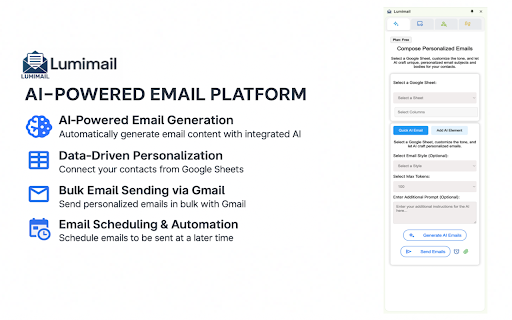


Send personalized bulk emails with AI, Google Sheets, and Gmail. Automate follow-ups, track opens, and boost reply rates. 🔹 Lumimail – Mail Merge & AI-Powered Email Marketing for Gmail Reach more leads, close more deals – right from your Gmail inbox. Lumimail is a powerful Chrome extension that supercharges your email outreach by combining AI-generated content, personalized bulk sending, and Google Sheets integration—all seamlessly embedded in Gmail. Whether you're in sales, marketing, recruiting, or running a small business, Lumimail helps you send smarter, faster, and more effectively with personalized email campaigns, automated follow-ups, and performance tracking—all in one tool. ✅ What You Can Do with Lumimail: 📩 Send Bulk Emails with Personalization Mail merge made simple. Connect a Google Sheet and personalize emails with names, companies, or custom data for each contact. 🧠 Generate Emails with AI (Fast & Tailored) Use built-in AI to write engaging subject lines and email body content. Create personalized messages in seconds. ⏰ Automate Follow-Ups & Scheduling Build multi-step email sequences and schedule sends at optimal times. Set it and forget it—Lumimail handles the rest. 🎯 Find New Leads (Built-In Prospecting Tool) Search by industry or company and discover verified contacts to fill your pipeline. Export directly to Sheets. 🛠️ Design Beautiful HTML Email Templates Drag-and-drop email editor with A/B testing to create polished newsletters, marketing emails, or cold outreach. Saves hours by combining email automation, AI content, and contact management in one simple Chrome extension. Boosts your open rates, reply rates, and productivity with personalized, well-timed, and trackable emails. Designed for startup teams, freelancers, SDRs, marketers, and business pros who need big results on a lean budget. 💡 Ideal For: Sales Teams sending personalized cold emails and follow-ups Marketers running Gmail-based campaigns and newsletters Startups & SMBs wanting enterprise-level tools without the price 💬 “Lumimail turned my Gmail into a sales machine. I replaced 3 tools with 1 extension and doubled my outreach in a week.” 🚀 Ready to scale your email outreach? Install Lumimail and start sending smarter emails in minutes — no learning curve, just better results.

Tactiq: AI note taker for Google Meet, Zoom and MS Teams
Meeting note taker and AI transcription for Google Meet, Zoom, and MS Teams. No more taking notes or missing details—Tactiq transcribes and summarizes meetings for you! From team standups to sales calls, masterclasses to product research sessions - never miss a beat. Capture every valuable insight with Tactiq's powerful note taking AI. Powered by the groundbreaking GPT-4, Tactiq provides ultra-accurate AI meeting summaries, preserving every detail. Seamlessly integrate ChatGPT meeting summaries and let Generative AI auto-detect action items, key takeaways, and more. Connect Tactiq with Google Meet, Zoom, or Microsoft Teams. In just one click, go beyond transcription: highlight key insights, tag crucial tasks, save chat conversations, and snap screenshots. Then, watch as Tactiq consolidates everything into one sleek, shareable AI meeting summary. 700,000+ PEOPLE ACROSS 20,000+ COMPANIES * Trust Tactiq as their go-to AI note taking app to transcribe their meeting notes. * Join the league of efficient teams, leaders at Fortune 500s, engineers, freelancers, salespeople, and marketers who rely on Tactiq. * Dive into the future of meetings with Tactiq’s ai meeting note taker. Whether it's Google Meet, MS Teams, or Zoom, let Tactiq transform how you capture meeting transcripts, insights, and action items. How It Works: * Install the Tactiq AI transcript Chrome extension. (Absolutely FREE). * Join your Google Meet, Zoom, and MS Teams meetings. * Tactiq gets to work - transcribing, summarizing, and generating AI-powered meeting notes in real time! * Use advanced ChatGPT capabilities for one-click AI meeting summaries and insights. Main Features: * Transcribe meetings in real-time and never miss a word with our accurate AI note taker. * Generate insightful summaries powered by GPT-4 and an advanced AI meeting summarizer. * Search, review, and categorize transcripts with ease using a powerful transcript extension. * Draft emails and action items with an intelligent AI for meeting minutes tool. * AI Meeting Assistant - Answer questions, extract key takeaways, and generate reports in seconds. * Record and save chat history directly within your meeting transcription * Take screenshots in Google Meet, Zoom, and Microsoft Teams for easy reference. * Save transcripts directly to Google Docs, Notion, Dropbox, or export as PDF. * Search spoken text across all transcripts, making your meeting notes AI more organized and accessible. * Summarize YouTube videos - Upload transcripts and get seamless AI-generated notes. * Extract key insights effortlessly using Generative AI for structured, actionable AI meeting summaries. Get These 10 Features in Just One AI Chrome Extension for AI note taking and meeting summaries: * FREE AI GPT-4 Meeting Summary for Google Meet, Zoom, and MS Teams - Transcribe meetings and access ChatGPT powered summaries for free. * AI Meeting Assistant powered by GPT-4 answers queries, saves meeting prompts, and writes follow-up emails. * No-bot meeting transcripts to make sure no unsolicited bots interrupt your meetings. * Save prompts and queries as AI meeting templates - reuse them at any time. * Export transcripts to PDF or TXT for easy sharing. Automatically save the transcript to your Google Drive, Notion, Pipedrive, Linear or HubSpot. * Share AI meeting summaries with your team via Slack and Microsoft Teams * Extract and share meeting insights effortlessly using Tactiq’s AI workflow automations. * Save in-call messages, links, and comments automatically within transcripts. * Automatically update your leads and contacts in your CRM and meeting notes using AI workflows. * Youtube AI Summary - Upload the YouTube transcript and get the summary with one click Tactiq’s Main Advantages & Capabilities: * Real-time, AI meeting transcription with instant meeting summaries for Google Meet, Zoom, and MS Teams. * Access the most advanced GPT-4o, GPT-4 Turbo, ChatGPT Enterprise and Claude models. * Built-in AI meeting templates to help generate summaries, action items, and accelerate your workflow. * Translate, paraphrase, and explain meeting details with ChatGPT. * Search for spoken text across all transcripts and never lose an important discussion. * Chat with your meeting transcript AI assistant anytime for quick insights * Personalized prompts to make ChatGPT meetings summary your way. Secure Transcripts: * Dive deep into AI-driven insights without data privacy concerns. We use OpenAI’s API to ensure your data remains secure and private at all times. * SOC 2 Type II and GDPR compliant. * OpenAI does not use data submitted via API to train models. * All transcriptions are securely stored and private by default. * Read our privacy policy here: https://tactiq.io/privacy-center * ChatGPT Enterprise Settings Available Need Help? * Visit https://tactiq.io for more info. * Explore our help center at https://help.tactiq.io * Contact us at https://tactiq.io/contact-us Join Tactiq and experience the power of AI-driven note taking! Your meetings, redefined.

SimplyMail - AI Email Assistant for Gmail
AI-powered Gmail assistant. Get instant email summaries, smart categories, task extraction, and AI replies. Save hours on email. Transform Your Gmail Experience with AI-Powered Email Intelligence SimplyMail is your intelligent email assistant that helps you work smarter, not harder. Analyse, summarize, and manage your Gmail inbox with advanced AI—all with your explicit consent and complete privacy control. Smart Email Analysis Instant Summaries: Get the key points of any email in seconds Thread Summarization: Understand long email conversations at a glance Auto-Categorization: Automatically classify emails by type and priority Task Extraction: Pull action items from emails automatically AI Writing Assistant Smart Replies: Generate professional email responses with customizable tone Draft New Emails: Create emails from simple prompts Email Shortening: Condense lengthy emails while preserving key information Tone Control: Choose from Professional, Friendly, Direct, Confident, Formal, or Warm tones Privacy-First Design No Automatic Processing: All AI features require your explicit click—we never analyze emails without permission User Consent Required: Full control over when and how your emails are processed Secure Authentication: Protected by enterprise-grade Supabase authentication No Data Storage: Your email content is never stored on our servers How It Works Install SimplyMail and open Gmail Click the SimplyMail icon when viewing any email Choose your action: summarize, categorize, extract tasks, or generate a reply Get instant AI-powered results Free & Pro Plans Free Plan: Daily usage limits All core features included Perfect for light email users Perfect For Busy professionals managing high email volumes Teams who need to respond quickly and professionally Anyone who wants to save time on email management Remote workers juggling multiple conversations Executives who need email summaries fast Requirements Works exclusively with Gmail (mail.google.com) Chrome browser Free account registration

Mailbutler for Gmail
Improves your inbox with productivity-boosting features such as an AI-powered assistant, email tracking, and smart email scheduling. ⧓ Mailbutler: Your inbox, smarter. ⧓ Meet Mailbutler, the email extension that makes your Gmail inbox smarter. Mailbutler offers four powerful solutions designed to meet your dynamic email needs: Write professional, mistake-free emails with Mailbutler’s customizable AI. Personalize your messages and reach each recipient at the best time to maximize your chances of getting a reply. Build and maintain strong customer relationships in the increasingly competitive inbox environment. Get valuable insights into how your recipients engage with your messages, including when, where, how many times, and on which devices they have opened your emails and clicked your links. Use this data to eliminate guesswork and make informed business decisions. Turn your team inbox into a collaboration hub with live status indicators, email assignments, and real-time updates. Stay on top of your emails and make sure nothing slips through the cracks with private and shared notes and tasks, reminders, and colored tags. Unlock the full potential of your email signatures and promote your limited-time offers, products or services, and special events with customizable marketing messages and banners, videos, and call-to-action buttons. ⧓ Who is Mailbutler for? ⧓ Freelancers, independent professionals, and marketers Businesses, marketing teams, and sales teams that prioritize direct client communication Teams that need clear, easy, and productive internal communication Our members guide the development of our extension – we’re constantly upgrading and revamping features based on customer feedback Cross-platform compatibility means if other members of your team are using other email clients, Mailbutler still works perfectly Most importantly, Mailbutler helps you improve your customer communication and get new prospects, clients, and contacts All new Mailbutler members get a 14-day free trial so they can try out all our features and decide which plan suits their needs best. We don’t require any credit card details until you subscribe to a plan, so you can opt out at any time! Terms of Service: https://www.mailbutler.io/terms-and-conditions/

Mailflame for Gmail: Merge, Send, Followup & Track emails
Boost your email marketing with Mailflame. Easily send, schedule, and track email campaigns directly from Gmail. Mailflame for Gmail (By cresstudio.com) – Powerful Email Marketing Without Leaving Gmail Boost your Gmail with advanced email marketing features using Mailflame. Whether you're sending newsletters, running cold email outreach - Mailflame lets you do it all seamlessly inside Gmail. Mailflame is now in its v2.0 with new features and more consistency. You get a Free Trail of 7 days and you can cancel anytime. No questions asked! ✨ Key Features: ➤ Send Newsletters from Gmail: Craft, personalize, and send newsletters directly from your Gmail account. ➤ Mail Merge & Cold Emailing: Easily import contacts from Google Sheets and send personalized bulk emails. ➤ Email Tracking: Track email opens and unsubscribes to measure campaign performance. You can also track individual Emails from Compose box. ➤ Email Scheduling: Choose the perfect time to deliver your emails for maximum engagement. ➤ Template Management: Create and reuse email templates to save time and ensure consistency. ➤ Rich Text Editor: Add images, links, and formatting to build professional-looking emails. ➤ Automated Follow-Ups (NEW): Never miss a reply again. Schedule upto 10 smart follow-up emails directly from Gmail and keep your outreach flowing automatically upto 15 days. 🔥 Benefits at a Glance: ✅ All-in-one Gmail marketing tool - no third-party software ✅ Designed for solopreneurs, small businesses & marketers ✅ Super easy to use - no learning curve or complex setup ✅ Free to get started - send up to 25 emails/day ✅ Affordable paid plans to scale as you grow 📩 How to Send an Email with Mailflame for Gmail: 1. Open Gmail and click Mailflame in the sidebar. 2. Click New Campaign. 3. Write your email and select recipients (Google Sheets supported). 4. Preview and test the email if needed. 5. Click Send - your email gets delivered just like any other Gmail message. ⏰ How to Schedule Emails in Gmail Using Mailflame: 1. Draft your email inside Mailflame. 2. Click Schedule Time in settings. 3. Choose your desired date and time. 4. Click Send - Mailflame takes care of the rest. 📶 How to track Emails: 1. Click on the EYE button beside "Send Button" to Enable. 2. Goto "Sent" tab and hover on th EYE Icon to See the Tracking details. 3. Click on the "Link" or "File" button of Compose Modal to track Links or File as well. ↩️ How to Followup: 1. Goto "Sent" tab. 2. You willl find an backward icon. Click on it. 3. On the opened Dialog, add your followup time and body. 4. Click "Send + Followup" and Boom! Mailflame is fast, intuitive, and constantly improving. Start for free and upgrade as your email marketing needs grow. Help us build the best Gmail email marketing tool by sharing your feedback! SUPPORT AND DOCUMENTATION: Need help? Visit our support center: https://mailflame.cresstudio.com or Email us at support@cresstudio.com WHY CHOOSE MAILFLAME OVER OTHER EMAIL TOOLS? Mailflame is designed to maximize your Gmail productivity while respecting your privacy. Unlike other tools, it integrates directly into your inbox, eliminating the need for external platforms. It comes with free trial and much more reasonable price than others offer. Mailflame is ideal for: ➤ Sales & Marketing - Nurture leads and drive conversions ➤ Customer Support - Follow up on inquiries and tickets ➤ HR & Recruitment - Engage with candidates and employees ➤ Event Management - Send invites and reminders for webinars, conferences, and meetups ➤ Finance - Automate payment reminders and follow-ups ➤ Public Relations - Reach out to journalists, influencers, and business partners UPDATE v.1.4.7 improve send quality v.1.4.4 Fix to Open, Link, PDF tracking. Add From Name to Sent Email v.1.4.3 Adding Link & PDF Tracking with Detailed Analytics + Push Notification v.1.3.2 Adding Individual Email Tracking. Update in Payment Integartion v.1.2.3: Add responsiveness in templates modal v.1.2.2: Includes Click Tracking. Improves performance v1.1.2 : Solves the bugs related to Texteditor, Adds HTML Upload feature v2.0.0: Follow up on each email, upto 75 Emails in Bulk + Unlimited Tracking. 7 days Trail PRIVACY & SECURITY Mailflame prioritizes user privacy and complies with industry standards. We never store your contacts. Learn more in our Privacy Policy: https://mailflame.cresstudio.com/privacy/ Gmail and Google are trademarks of Google Inc. Use of these trademarks is subject to Google Permissions.
