
hgonjfihajbhmolnkphpmmbinjckjljl
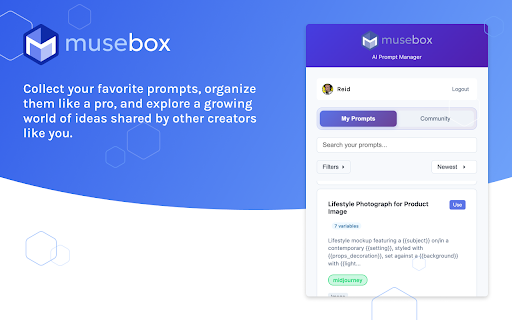


Access your Musebox.io prompts from any AI service. Paste your prompts into ChatGPT, Claude, Midjourney, and more. The Internet’s Favorite Prompt Organizer (Probably.) Musebox is your creative sidekick for working smarter with AI. Whether you’re a prompt-hoarding power user or just tired of scrolling through chat history, this Chrome extension brings search, filter, and organization magic straight to your fingertips. 🧠 Filter. Search. Save. Repeat. No more “Where did I see that prompt?” moments. With Musebox, you can instantly: • Filter prompts by category or tag • Search by keyword across community and saved prompts • Save your favorite prompts like a digital squirrel stockpiling brilliance Install Musebox to turn your browser into a prompt-finding machine. ⚡ Works with most major AI platforms — ChatGPT, Claude, Gemini, and the next hot thing your friend swears is “the future.” → Join for free: https://musebox.io 🎯 Powerful Prompt Filters Slice and dice your prompt library by tags and categories. Find creative gold in seconds, not hours. 🔍 Built-in Search No more guesswork or Google Docs spelunking. Search across public and saved prompts directly from your browser. 🌐 Community Inspiration Explore top prompts from fellow creators, builders, marketers, and over-caffeinated AI whisperers. Remix, reuse, and make them your own. ⚙️ Seamless AI Compatibility Musebox plays nice with all the big AI platforms. If it runs prompts, you’re golden. 🧘 Zero-Friction UX No clunky dashboards or onboarding hell. Just a fast, clean interface that stays out of your way — and makes you look like a productivity god. We don’t peek. Musebox only stores what you choose to save, and your data stays yours. No AI prompt spying, selling, or creepy side hustles. Ever. By installing the Musebox Chrome Extension, you agree to our Terms of Service and Privacy Policy. What's New in 2.0.4: • Pro and admin users can now create private prompts • Category selection is now optional when creating prompts

Capsule Hub by Tilantra
Capture AI conversations as capsules and reuse context instantly across ChatGPT, Claude, Gemini and other Tools. Capsule Hub by Tilantra is the context-transfer layer for modern AI workflows. Capture once, reuse everywhere. ✨ Whether you brainstorm in ChatGPT, build in Claude, research in Gemini, or explore in DeepSeek, Capsule Hub turns your conversations into reusable “Capsules” 💊 so you never have to restate goals, constraints, or project background again. Why Capsule Hub? Most teams lose time switching AI tools and rebuilding context from scratch. Capsule Hub gives you a portable, searchable context system that moves with you across platforms. 1. ✅ Capture Your Context: When you are in a chat on AI tool - click the capture button to save the core details of that conversation into a Capsule. 2. ✉️ Save Emails as Capsules: Open an important email in Gmail and click once to turn the project details into a Capsule. 3. 👥 Organize for Your Team: Save your Capsules into team folders (like Engineering, Marketing, or Product) so your whole team can stay on the same page. 4. 🪄 Drag & Drop to Inject: To use a saved Capsule, simply drag it from your library into any AI chat box. The AI will instantly understand all the background, goals, constraints and even attachments! 5. 🔄 Keep Context Updated: If a conversation changes, you can choose to add a "New Version" to an existing Capsule or create a brand new one to keep your history organized. You can also rollback and diverge from a current version 6. 📁 Transfer attachments: Apart from context, drag and drop the attchments you added or generated across fragmented tools. Unlock more with paid tiers built for power users and teams - Multiple integrations across more AI and work tools - Split workflows for better context management - One-click package installer to set up Capsule Hub across tools on your system - Mobile app: Your Capsule library, anywhere Download Capsule Hub today and never start a chat from zero again

Maskara - AI Prompt Optimizer for ChatGPT, Claude, Loveable and more
Transform questions into expert prompts. Works with ChatGPT, Claude, & all AI platforms. Better prompts. Better answers. Stop wrestling with prompts. Get expert-level AI responses automatically. Maskara transforms your simple questions into optimized prompts that unlock the full potential of AI tools. No prompt engineering knowledge needed—just type naturally and get comprehensive, accurate answers every time. ⚡ How It Works Type your question like you normally would. Press Ctrl/Cmd+. Maskara automatically enhances your prompt with: Expert role-based context Latest documentation and best practices Structured output formatting Tool-specific instructions (web search, code execution, file analysis) Get dramatically better AI responses in seconds! 🎯 Works With All Major AI Platforms Fully compatible with ChatGPT, Claude, Lovable, and any AI interface in your browser—including development tools, AI assistants, and chatbots. ✨ Key Features Cross-Platform Memory Your conversation context follows you. Start a discussion in one AI tool, continue in another—Maskara remembers everything. Role-Based Prompting Automatically creates expert personas (developer, data scientist, legal analyst) tailored to your query for specialist-level responses. Latest Documentation Pulls real-time best practices and current documentation so your prompts always reflect the newest AI capabilities and techniques. Tool-Aware Intelligence Automatically prompts AI models to use their best tools—web search for current info, code interpreter for calculations, file analysis for documents. One-Click Optimization Simple keyboard shortcut (Ctrl/Cmd+) transforms any prompt instantly. No copying, pasting, or context switching. 💎 Perfect For Developers building with AI tools Content creators getting better outputs Researchers needing comprehensive analysis Business professionals automating workflows Anyone tired of rewriting prompts Install the extension Visit any AI platform Type your question Press Ctrl/Cmd+ Get expert-level responses Pricing: $10/month or $100/year Stop overthinking prompts. Let Maskara do the work.

Prompter AI: Generate personalized AI prompts everywhere you chat
Generate personalized prompts in ChatGPT, Claude, Gemini, Perplexity, Grok, and more. AI works best when it understands your work. Prompter makes sure it does. 🧠 Prompter is a lightweight Chrome extension that helps professionals get better results from ChatGPT, Claude, Perplexity, Lovable and more by transforming messy inputs into clear, effective prompts—with built-in workspace context. Your AI prompts automatically carry the context of your projects, so AI responses stay relevant, personalized, and on-point without extra explaining. It's not just an AI prompt generator - it's your personal prompt assistant. Why Prompter? 🎯 Most AI tools start every conversation from scratch. Prompter doesn’t. It keeps your work in mind so you can move faster and think less about how to phrase things. With Prompter, you can: Ask better questions that reflect your current project or workflow Get more accurate, useful AI responses with less back-and-forth Eliminate repetitive context-setting in every prompt Key Features 🗂️ Workspace-aware prompting: Attach project context once and let Prompter automatically apply it across all AI interactions. ⚡Real-time prompt transformation: Convert rough notes and partial thoughts into clear, structured prompts instantly. 🧩 Lightweight in-extension UI: Works directly inside ChatGPT and Claude—no switching tabs or learning new tools. 🧠 Context-driven outputs: Prompts adapt to what you’re working on, helping AI respond with greater relevance and clarity. Built for Busy Professionals Prompter is designed for people who use AI every day and want consistent, high-quality outputs—without prompt engineering, templates, or complexity. Stop re-explaining your work. Start getting better AI results. 🚀 👉 Install Prompter and turn context-aware prompting into your daily advantage.

SpacePrompts: AI Prompt Manager for ChatGPT, Claude, Gemini & More
Organize and manage your AI prompts. Store, search, and access your favorite prompts for ChatGPT, Claude, and other AI assistants. Your AI Prompt Manager — Built Right Into Your Favorite AI Tools SpacePrompts lives where you work. Instead of switching tabs or digging through notes, save and enhance prompts directly from your favorite AI tools without ever leaving the page. Works Inside Your AI Tools A floating toolbar is injected into supported AI platforms, giving you: • Save as Prompt — capture any prompt you write with one click • Enhance — let AI polish your prompt before you send it • Apply — paste your saved prompt back into the editor instantly Your Personal Prompt Library • Guest mode — unlimited prompts, no account required • Cloud sync — access your library on any device when signed in • Search & filter — find any prompt instantly by title or tag • Organize — categorize prompts with custom tags • Privacy control — keep prompts private or share them publicly • Quick copy — one click to clipboard, always ready Built For Teams Work together without losing your best prompts in scattered docs and chat threads. - Shared team libraries — see prompts your team has shared, right in the extension - Apply team prompts anywhere — use shared prompts inside your AI tools just like your own - Stay in sync — new team prompts show up automatically, no manual syncing - One workspace, everyone aligned — keep brand voice, workflows, and best practices consistent Sign In With Perfect For • Content creators building writing templates • Developers storing code generation prompts • Marketers organizing campaign copy • Researchers cataloging AI queries • Students building study prompt libraries • Teams keeping prompts and workflows aligned • Anyone tired of rewriting the same prompts Your best prompts took time to craft. SpacePrompts makes sure you never lose them, and helps you make them even better.
