
hgfogfefocfabnfjmjijfcjogeghmocn
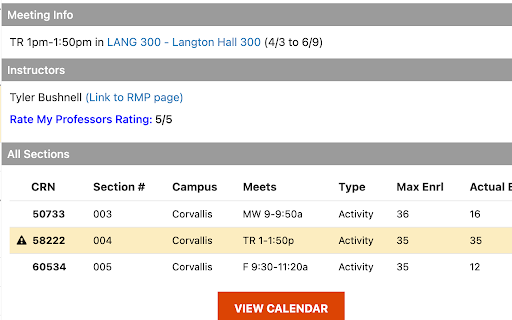
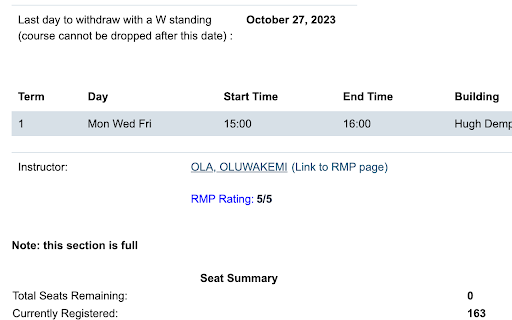
Displays the reviews for professors from Rate My Professors on the class registration page. This extension seamlessly displays professor ratings from Rate My Professors under their names on the class registration pages for several universities. We cut down the time you spend looking up professors by providing the average review rating directly on the class registration page along with a direct link to the professor's Rate My Professors page.

Rate My Professors Extension (Any University, Any Website)
Instantly view professor ratings and reviews from RateMyProfessors—any university, any website, right in your browser. Picking the right professor can make or break your semester, but researching them takes forever. Whether you’re scrambling to choose classes or just curious about a professor you saw online, this extension makes it simple to get trusted ratings, reviews, and more, fast and hassle-free. We pull real-time data directly from RateMyProfessors and are actively adding more sources to deliver richer insights—helping you make the most informed decisions, faster. Right-Click Search: Highlight any professor’s name anywhere on the web, right-click, and choose “Search This Professor” to instantly see ratings, tags, reviews, and more—no typing needed. Search Inside the Extension: Enter a professor’s name and select your school to quickly pull up detailed ratings, student comments, and helpful tags. 📝Detailed Reviews Read full student comments to understand teaching style, difficulty, and expectations. ⚡Smart, Fast & Refreshable Results Our fuzzy search algorithm and Go + Redis backend deliver fast, accurate results — even if your spelling isn’t perfect. We cache frequently searched data to keep things quick, and each result clearly shows when it was last updated. Need the latest info? Just click one button to refresh and fetch real-time data instantly. 🌎Works Everywhere Supports all U.S. colleges and universities so you can research professors no matter where you study. Stop wasting time juggling tabs and sifting through messy search results. Get the info you need to make smarter course choices—right from your browser.

Rate My GMU Professors
Display the ratings of each George Mason University professor for GMU Patriot Web! 🤔 What is it? Rate My GMU Professors will automatically parse professors' reviews data from Rate My Professors and display the user-friendly data on the Patriot pages. 🕹️ How to use 1. Download Rate My GMU Professors from Chrome Web Store 2. Make sure Rate My GMU Professors is active. 3. Go to the Patriot web page. 4. Browse any classes with professors’ name 5. Now, under the professors’ names, you are able to see their Rate My Professors score. 6. If you click the score number, you will be redirected to the professor’s Rate My Professors web page. 7. If you hover your mouse, you will be a pop-over showing the professor’s name, school, department, overall score, would-take-again percentage, level of difficulty, the total number of reviews. 🏷️ Features 1. Lightweight– Since it is made of pure javascript, css3, html5, the total of its size is only 215KB. 3. Support Classes with more than one professor- Some science classes such as chemistry and biology have two or three professors in one class. Thus, the extension tracks all professors in each class. ❓ Q&A Q: Is it working on other websites? A: No, it will only activate on the GMU Patriot web. Q: Is there any risk in using this? A: No, this extension does not communicate with the GMU Patriot web. It only displays information on the Patriot web data grids. Q: It is burdening for the server of Rate My Professors? A: Most likely, No. Theoretically, it actually uses less data than regular users. My extension saves the data for later uses, but regular users will request new data every time they use Rate My Professors. Q: Your codes suck A: I did my best. It is my first time making a Chrome extension. 📖 A little bit of the back story Old version: I have been thinking this idea for a while, but I hadn't been motivated enough to work on the idea until one of my teammates from PatriotHacks 2021 (which our team won! YAY! 💪) had the same idea during the brainstorming. Although our team has chosen another idea over this idea, I thought that if I had some free time in the future, I should definitely make this. Before the starting of the Fall 2021 semester, I had some free time. While I could just sit back again enjoy the summer break, I decided to make something as a side project that helps other students. Hence, this idea perfectly fits the categories. New version: Since the old version has been taken down due to the usage of manifest v3, I have not paid attention much. However, some of GMU students have contacted me to get me working this one, again. I was lazy to do it, but here I am. I had to create the extension from the scratch due to Rate My Professor has taken down their old API and replaced to GraphQL. There were some hiccups, but I managed to create a new one. 🔒 Privacy Policy We are not interested in collecting any personal information. We believe such information is yours and yours alone. We do not store or transmit your personal details. We do not include any advertising or analytics software that talks to third parties. ❗ Rate My GMU Professors DOES NOT Collect, Transmit, Distribute or Sell your data ❗ 📋 Changelogs Version 1.0.0 - Initial Release: * Introduced the Rate My GMU Professors extension. Version 1.0.1: * Removed unnecessary user permissions to enhance security and privacy. * Improved error handling to provide a smoother user experience. Version 1.0.2: * Addressed a reviewer request by adding a link to the Privacy Policy on the popup page in the Google Web Store. Version 1.0.3: * Added support for "Search for Classes - Classic" on the GMU Patriot web platform. * Removed unused commented code to streamline the extension. * Included a specific GMU patriot URL for "content_script" to support the classic search. * Implemented a CSS for the classic search to facilitate future development. Version 1.0.4: * Resolved an issue where the extension failed to load due to the removal of the GMU classic search. Version 2.0.0 - Major Update: * Completely revamped the extension to comply with manifest v3 and utilize GraphQL for Rate My Professor data retrieval. Version 2.1.0: * Fixed minor issues and optimized code to ensure compatibility across different browsers. Version 2.2.0: * Added support for Firefox, expanding the extension's compatibility. * Extended support to include the Edge browser. Version 2.3.0: * Updated the privacy policy URL to a new address. * Implemented scripts to build production versions of the extension for Chrome, Firefox, and Edge browsers.

Rutgers JudgeMyProfessor
Seamlessly integrates with the Rutgers course registration system to provide valuable information about your professors - Instantly access professor ratings and data while browsing course offerings - Hover over rating bubbles to see detailed information about your potential professors - Professor matching algorithm identifies related courses, subjects and departments for increased accuracy - Easy and automatic installation - only runs when you access a Rutgers course registration page - Course views in CSP provide quick registration links, automatically populating your selected course on WebReg - Optionally remove "books" links on SOC-like sites - Github: https://github.com/TekRekon/rutgers-judgemyprof-extension By Lukas Siernos and Praney Hirpara --Fixed-- - Fixed handling of middle initial on non-soc websites - Fixed professor names clipping into the magnifying glass search button - Fixed search strings associated with clicking the magnifying glass and N/A rating bubbles - Reduced the max size of bubbles - The search magnifying glass now searches Google with the raw professor text in the event that the wrong professor is found - Handle null cases when accessing cache Version 2.3.0 --Added-- - Inject quick registration buttons into CSP course views by @Kyrillos-I - Add professor search buttons within the onHover cards Version 2.1.0 --Added-- - Modified professor matching algorithm for accuracy Version 2.0.0 ---Added--- - Implemented pulsing animation for rating elements while loading professor ratings - Introduced a button in the extension popup to reset caches if the extension is misbehaving - Utilized Chrome's local storage for storing cached data, enhancing cross-session performance - Injected elements with error messages are now clickable, revealing their stack trace ---Fixed--- - Revised backend and content scripts for better overall performance, reliability, and readability - Ratings are now displayed in decimal format across the extension for consistency - Updated formatting for professor names in popup cards to ensure correct capitalization - Extended permissions to work with the new Rutgers SOC URL - Fixed styling for rating bubbles that result in an error - Fixed bug where professors with middle initials occasionally weren't found - Fixed visual bug where long department names would be cut off in the rating bubble popup - Fixed click to search popup formatting in CSP - Support for all tabs in CSP - Bubbles in CSP now more reliably match the professors the course offers - Fixed styling for the onHover error/click to search elements of a rating bubble in CSP

ProfPreview: Rate My Professors for Tufts SIS
Easily access your professors' Rate My Professors stats on SIS This extension helps Tufts students easily access their professors' Rate My Professors statistics directly on SIS. It provides quick access to professor ratings, tags, and other helpful information directly from the SIS website. Features: - Hover Popup: View ratings, average difficulty, and top tags by hovering over a professor's name - Quick Links: Access the professor's full Rate My Professors profile with a single click - Search Ambiguity: Handles multiple matches for similar names by offering alternative selections - Class Filtering: Update the stats displayed for each individual class - Toggle Extension: Enable or disable the extension easily from the popup menu Usage: 1. Navigate to Tufts' SIS search results page or your enrollment cart. 2. Hover over a professor's name to view their RMP stats in a popup. 3. Use the extension popup menu to: - Enable/disable the extension. - Send feedback or report issues.
