
hgdgcnfkeafaaaamakcndflaeplneogk
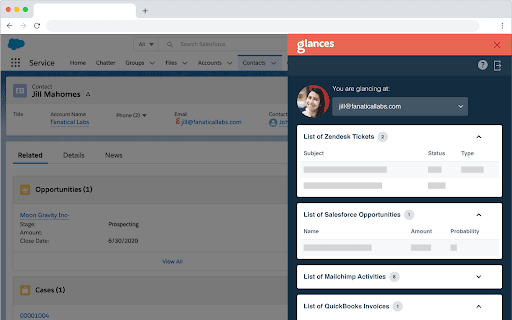


Unify your apps with a simplified customer view The single customer view you have always wanted is here. Glances unifies your apps in a simplified, easy-to-use customer view that provides real-time data from within any app that you are using. In minutes, securely connect your apps and eliminate tab switching, searching, and clicking around to find important information. Do the hustle without the hassle Finding customer information within multiple programs is the hassle that ruins your workflow hustle. Glances brings your favorite online apps together, securely showing your customer data in a single view from whatever app you are using. An integration the way it should be It’s like iPaaS, but without the pain. Not time consuming, expensive, or untrustworthy. Glances is a new way to do integrations with a true no-code approach; no data syncing or scheduling jobs. See how it takes just minutes to connect your apps and start using a simplified customer view with Glances. Glances is designed to support any application that provides an industry standard API, including custom applications. Our list of supported apps includes most of the top CRMs, Accounting, and productivity software. Stay in your main work application. In whichever role you are in, sales, support, marketing, etc, stay in the application you need the most and use Glances to view the data you need from other applications.. For example: before up-selling, stay in your CRM and check for any open support cases or recent marketing campaign engagements in Glances without having to open up those other applications. Stop Tab Switching Stay focused on whatever you are working on with a single customer view. Need to know something important about what you are working on, but it is in another system? Use Glances to view it right now to avoid painful app switching. See What Matters See what matters to you right here, right now. Whether working on a support case, a new lead, or anything else, glance at any emails, invoices, notes, etc residing in some other app when you need it, in a unified view. Just Minutes To Set Up Glances greatly simplifies what integrations are well known for: complexity and time consuming configuration. Set up is as easy as 1...2...3. 1) Connect your apps 2) Install the browser extension 3) Enjoy your new unified customer view Reduce License Costs Not every user in your company needs to log into each and every one of your applications. Save on licensing costs by giving them just the insights they need with Glances. Some quests that you might have: Do I need to write code? Thank heavens, no! All you do is log into your apps to connect them and we handle the rest. It’s what the hipsters are calling a “no code” solution to your integration needs. How is our data stored? We do not store data from your apps. When a Glance is displayed it is pulling information in real-time directly from your applications and displaying it in the Glance view. Only the minimally required information to connect to your applications is encrypted and stored. Which ways can Glances be used? Through browsers such as Chrome, Firefox, Microsoft Edge, and Brave or through standalone apps such as Slack. Is it as complicated to set up like other integrations? It takes just minutes to set up. Why? Glances greatly simplifies what integrations are well known for: complexity and time consuming configuration. Since we are not moving data back and forth between multiple systems we avoid all of the error prone failure points that give integrations a bad name. Do I need to pay or use a credit card to try it out? No credit card is needed to start a trial. We want you to see for yourself how this is a game changer for how you work.

Humantelligence
Communicate more effectively with your coworkers and contacts using the Humantelligence Chrome Extension. Humantelligence for Gmail and Google Calendar allows you to connect, communicate and collaborate better with your workers, colleagues, and anyone when writing emails or in meetings. Well, the first step to communicating and collaborating better is "understanding someone". HT is the quickest (12 min) and most advanced personality test to help you understand someone's behaviors, motivators, values and work styles. Difference with competitors? - We get a more crystal-clear view of understanding anyone's personality, given our competitors use 'public data' and not a scientifically based and validated tool like ours, so their results are about 40% accurate vs ours which are 85%+. They also only measure 1/3 of what we do – behaviors, and subjectively. So, we give you MORE understanding and better tips and recommendations on how to communicate, motivate, and influence someone, based on that understanding to truly "connect" people. - They also only do individual understanding. We get to Team Culture understanding, so leaders and managers can be better leaders, and can run calls and meetings more effectively. - Better understanding, so then better connection, communication, and collaboration. - Tips on leadership, asking for things in email, or on calls, running team calls, and team management through "Team Culture" tips. - Enhanced EQ – social-awareness, self-management, social awareness and relationship management. Leveraging AI, the Ask Aura feature provides: - Personalized answers to questions on topics like effective communication, conflict resolution, and leadership - AI-generated insights based on users' personality profiles - Seamless integration with the Humantelligence user experience Install the Humantelligence Chrome Extension today and begin to harness the power of improved EQ!

SalesPrompter for LinkedIn
Create hyper-personalized LinkedIn messages with AI Designed for all frequent LinkedIn users, SalesPrompter harnesses the power of OpenAI's GPT-4 model to automate the creation of personalized outreach messages. This powerful tool elevates your networking efficiency, regardless of your professional role or industry. Amplify Your Outreach With SalesPrompter: ✓ Automated Messaging: Whether you're a sales executive, recruiter, freelancer, or a growth hacker, save time drafting messages and spend more time building valuable professional relationships. ✓ AI-Driven Personalization: Improve your networking success rates with outreach messages tailored to each recipient's job title and professional background. ✓ Smart Connection Requests: Automatically generates personalized connection request notes or messages depending on the connection degree, enhancing your first point of contact. Maximize Your Networking Potential: ✓ LinkedIn Integration: Seamlessly integrates a 'SalesPrompter' section into LinkedIn profiles for a user-friendly experience. ✓ Editable Messaging Workflow: Allows full control over AI-generated messages with an editable field for instant customizations. ✓ Multi-Lingual Support: Break language barriers with auto-detection and use of the recipient's preferred language. ✓ Enhanced Profile Analysis: Uses AI to quickly understand a person's career trajectory, current role, and potential value to your network. ✓ Flexible Subscription Management: Tailors your subscription directly from the browser popup, aligning with your networking needs. Experience the Power of SalesPrompter Today: Join the AI revolution in professional networking. Begin your free trial today, and witness firsthand how SalesPrompter can supercharge your outreach strategy, foster meaningful professional relationships, and save valuable time. Try SalesPrompter now!

Offsite - Save to monday.com
monday.com Productivity and CRM Extension Capture and integrate the web into your monday.com workflows - Tasks, Screenshots, Gmail and LinkedIn prospects and leads and much more! Offsite monday.com chrome extension let you access your monday.com work OS directly from your browser and helps you get things done faster and smarter. Create tasks, assign team members, upload files, and much more. Work effectively offsite, save time, never lose focus. ✔️ Create tasks directly from your browser Access your monday.com work OS directly from any browser window to get things done faster and smarter. Create tasks, assign team members, upload files, and much more. Work effectively offsite, save time, never lose focus. 🤝 Save leads from your Gmail. Streamline your work and automate your sales and marketing processes. Effortlessly integrate your leads and contacts by one click saving leads from Gmail to monday.com CRM. Save time and effort and focus on closing deals and growing your business. 📸 Screenshot, Annotate and share for better communication and collaboration Seamlessly provide feedback or instructions directly from your browser by creating and sharing a screenshot with your team members of clients. 💼 Coming Soon! Quickly collect prospects on LinkedIn without having to manually copy and paste information. Enrich your monday.com CRM sales data, save time, collect accurate data and up-to-date information at scale, to ensure that your prospects are high-quality.

CrecenTech Utilities
It's a simple chrome extension which will hide password showing method.It will also hide code inspection with all ways like short cut keys etc.
