
hgcfiedlifphndjalijbccglopbpclaj

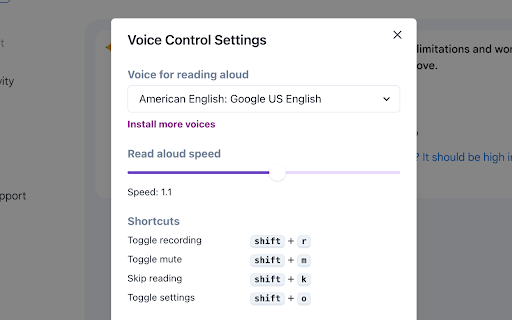
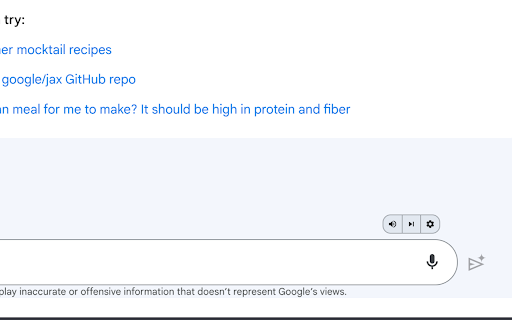
Expands Gemini with voice control and read aloud. Voice Control for Gemini enhances the voice control features of Google Gemini. This lightweight extension is designed to make your experience with Google Gemini more interactive and accessible, including continuous read-aloud functionality and keyboard shortcuts for the built-in voice recognition. Feature highlights: 📣 Read responses aloud 🐇 Set read aloud speed 🎤 Control the built-in voice recognition with the keyboard 🌎 Supports multiple languages Usage guide: 1. Install Voice Control for Gemini to activate voice commands for Gemini 2. Go to gemini.google.com 3. Login with your Google account 4. The extension adds a mute, a skip and a settings button 5. Bard already supports voice input, but the extension lets you activate it by pressing spacebar 5. Accept access to the microphone when prompted 6. Start talking 7. Hear Gemini response read aloud In the extension settings, you may change the voice and language. 🛟 Need help or found an issue? Should you need any assistance or encounter an issue, the support team is readily available at support@voicecontrol.chat

Voice Control for ChatGPT
Expands ChatGPT with fast voice control in multiple languages, read aloud, and more! Voice Control for ChatGPT gives you a smoother, faster way to interact: use speech input, hands-free replies, keyboard shortcuts, and custom voice commands with a personal dictionary. Ideal for power users who want speed, flexibility, and automation. Key Features: 🎤 Fast speech recognition in multiple languages ⌨️ Push-to-talk: hold spacebar or click mic to speak 👐 Hands-free mode: auto-submit + auto-read (if enabled) 🌍 Pre-select speech input language ⚡️ Custom Dictionary: Define your own voice actions and word replacements — perfect for fixing misheard words or triggering full prompts with short phrases 📣 Automatic read-aloud with shortcut to skip (if enabled) 🤖 Voice input also works on Claude AI (enable via popup) How to use: 1. Install the extension 2. Go to chat.openai.com 3. Log in or create a free ChatGPT account 4. Click the mic or hold spacebar to speak 5. Allow microphone access when prompted To use with Claude AI, open the extension popup and click “Enable Claude.” Accept the permission when asked. 🛟 Need help or found an issue? Contact us via the support section or email us directly at support@voicecontrol.chat. About: This extension is made by the creators of Talkio and TalkaType — tools that help you practice pronunciation, improve fluency, and type with your voice. Explore more: 🔗 Voice Control Pro — AI-powered dictation for your computer 🔗 Talkio — AI-powered speaking practice 🔗 TalkaType — Dictation for productivity

Voice control for chatGPT
Revolutionary browser extension enables voice chat with ChatGPT, enhancing AI interactions. Upgrade your experience now! Enhance ChatGPT with voice commands and speech output. Voice Control lets you converse vocally, aided by a recording button for sending voice queries to ChatGPT, replacing typing. AI's spoken responses offer seamless interaction, simplifying engagement with advanced AI's capabilities.

Two Way Voice for Gemini ™
This extension for Google Gemini ™ allows you to ask using voice and listen to response. Discover the convenience of voice interactions with Google Gemini™. This extension for Gemini™ website allows you to have conversations using your voice. Ask questions using your voice and you can listen to response, making it easy and convenient to get the information you need hands-free. Perfect for anyone who prefers to talk to Gemini™ using their voice. It can be your voice assistant. Get answers, discuss ideas, and explore topics with ease. Simply start the conversation mode. The extension will automatically manage turns between asking question and listening to the response once you've started the conversation mode. There are three conversation modes available: 1. Two-way conversation (Default) - You can ask question using voice and Gemini™ will respond with voice. 2. You talk & Gemini™ text response - You can ask question using voice and it will respond with text. Useful if you want to just read. 3. You type & Gemini™ voice response - You can ask question using typing and it will respond with voice. Useful if you want to listen on headphone and cannot speak out loud in quite place. The extension enables voice-based questions in various languages like Chinese, Korean. For instance, speaking in Chinese or Korean generates the respective characters. Our extension utilizes your browser's built-in voice-to-text API, which may automatically download additional voices for text-to-speech. Download times vary based on your system and network conditions. Voice-to-text accuracy and performance rely on your machine's resources, which can decrease during high CPU usage. Please contact us if you've any questions or feedback. Disclaimer: This extension is developed independently and is not affiliated with or endorsed by Google Inc in any way. "Google Gemini™" is a trademark of Google Inc, and its use is subject to Google's permission. Any references are solely for the purpose of describing the functionality of this extension. For official information, please visit Google's website.

Two Way Voice for ChatGPT
This extension for ChatGPT allows you to ask using voice and listen to response. Discover the convenience of voice interactions with ChatGPT. This extension for ChatGPT website allows you to have conversations using your voice. Ask questions using your voice and you can listen to response, making it easy and convenient to get the information you need hands-free. Perfect for anyone who prefers to talk to ChatGPT using their voice. It can be your voice assistant. Get answers, discuss ideas, and explore topics with ease. Simply start the conversation mode. The extension will automatically manage turns between asking question and listening to the response once you've started the conversation mode. There are three conversation modes available: 1. Two-way conversation (Default) - You can ask question using voice and ChatGPT will respond with voice. 2. You talk & ChatGPT text response - You can ask question using voice and it will respond with text. Useful if you want to just read. 3. You type & ChatGPT voice response - You can ask question using typing and it will respond with voice. Useful if you want to listen on headphone and cannot speak out loud in quite place. The extension enables voice-based questions in various languages like Nepali, Chinese, and Korean. For instance, speaking in Nepali or Chinese generates the respective characters. Our extension utilizes your browser's built-in voice-to-text API, which may automatically download additional voices for text-to-speech. Download times vary based on your system and network conditions. Voice-to-text accuracy and performance rely on your machine's resources, which can decrease during high CPU usage. Please contact us if you've any questions or feedback. Note: The popup displayed for the extension has link. The link is https://linktr.ee/dhunju. This is link to similar extension that is created by us for similar AI site. The link is to the page that has list of extensions created by us for Edge and Chrome browser. Disclaimer: This extension is developed independently and is not affiliated with or endorsed by OpenAI in any way. "ChatGPT" is a trademark of OpenAI, and its use is subject to OpenAI's permission. Any references are solely for the purpose of describing the functionality of this extension. For official information, please visit OpenAI's website.
