
hgceopemmcmigbmhphbcgkeffommpjfc
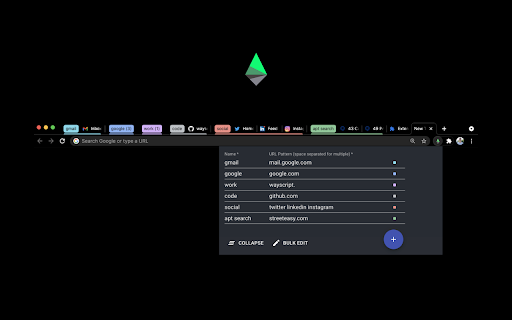
Auto-Grouping Magic for your Tabs ⚡ Live updating = Instant feedback ✳ Simple but powerful patterns for tab names 🌈 Customizable group colors 🔀 Rule based ordering of tab group layout 📁 Easy "Collapse All" groups button (or Alt + Shift + C) 📝 Bulk Edit Mode Note: Acid Tabs is an open source extension. Github repo: https://github.com/jdhayford/acid-tabs-extension IMPORTANT: If you are using an old version of chrome you will need to update your Chrome to version ~89 (check chrome://settings/help). If you have any issues, requests or questions contact me at jdhayford@gmail.com or ping me on twitter: https://twitter.com/hayford_jack

Group Tabs
This is a Chrome extension that sorts and groups tabs. * Feature: Not group for domain or sub-domain that has only 1 tab. # Access to data This extension access all tabs, but uses only the URL of the site open in the tab. Use this information when sorting or grouping tabs.

G-calize
On Google Calendar... Sunday, Saturday, Today, and other weekdays, You can select the text color and background color. 1. Click the extension icon or select "G-calize" from the context menu to open the settings screen. 2. Set your preferred colors for each day of the week. 3. Optional: Select a holiday calendar and set holiday colors. * You must reload the calendar page once after installation. * Works with the URL calendar.google.com/calendar. Does not work if you use a Google Workspace custom address. ### 🆕 2024.12.05 Version 2.3.0 - Supports schedule display. - Added a function to display the settings screen in a smaller size only in month view. - Other fine-tuning. ### 2023.11.27 Version 2.1.0 - Added background color and border color to today's color. - Fixed an issue where colors were misaligned in week view. ### 2023.08.20 Version 2.0.0 - Changed the way to open the settings screen. - Renewed the settings screen. - Removed today's text color and background color, changed to accent color selection. - Fixed an issue where the holiday calendar could not be selected. ### 2018.02.02 Version 1.4.0 - Supports the new Google Calendar design.

grt memo
simple memopad simple memo pad !!! note pad !!! grt memoは、ブラウザ利用中に簡単にメモれる拡張機能です。 ■ 無限シンプルタブ、数字ボタンでメモ内容を切り替えられます。 ■ TIMEボタンで時間挿入 ■ URLボタンで現在のタブのURL挿入 ■ 自動保存!編集中にもりもり保存します。徒然なるままにメモしてください。 付箋のように気軽にメモしてください。 simple notpad ! simple tag, auto save ! very easy to use ! * TIME : insert time string. * URL : insert url by active tab. this icon is a japanese character "メ". 0.2.7 リンク修正 0.2.5 アイコン修正 0.2.4 バグ修正 0.2.2 デザイン修正 0.2.0 削除ボタンを追加しました。 0.1.4 mail, twitter を修正.

Close duplicate tab
At work, I get a lot of notifications from GitHub, Redmine, Backlog, and so on. If you keep opening them in a new tab to read them later, you will have too many tabs in no time. This Extension allows you to organize them in an instant and reload the remaining tabs to make them up-to-date! * Chrome Extension does not work on some Google pages and on opened web pages before installing this tool. Please reload the page you want to use this tool once after installation. - When targeting all windows, modified to prioritize closing tabs that are not in the current window. - Improved the tab closing logic to handle duplicates correctly. - Added a flag to forcibly update the URL when clicking on intra-page links, such as those in the table of contents. - Update function "Divide all tabs for each hostname" - Option added to group tabs into the same window according to the number of sheets when there are only a few tabs with the same hostname.
