
hfoacjhacepifajiodikdoilegcilfpp
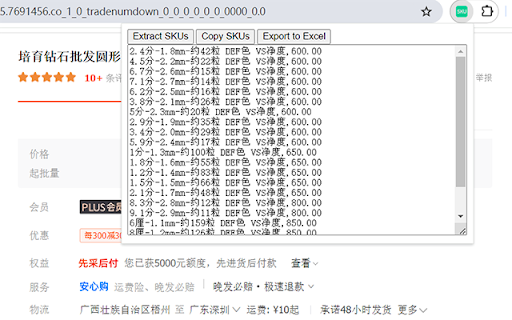
Maximize your sourcing efficiency with the 1688.com SKU Extractor, the indispensable tool tailored for swift extraction of SKU data… Maximize your sourcing efficiency with the 1688.com SKU Extractor, the indispensable tool tailored for swift extraction of SKU data from 1688.com's vast marketplace. Designed with e-commerce professionals in mind, this powerful plugin streamlines the process of obtaining SKU numbers, product names, and prices, and allows for easy export to Excel for organized, columnar display.

1688 Chat Tuesday API Extension
1688 Chat Tuesday API - Product, Sales: 1688 Chat Tuesday API - 1688 Chat Tuesday Chrome Extension, integrated with the Chat Tuesday API, is an intuitive and powerful tool for extracting detailed product, price, sales rank, and review data from 1688. With its seamless integration into Chat Tuesday’s generative AI platform, users can effortlessly organize and modify 1688 data to meet their unique requirements. The extension allows users to insert extracted data directly into Chat Tuesday, where the AI assists in arranging, analyzing, and customizing the data based on individual preferences. Whether you need tailored reports, dynamic reorganization of data, or insights for decision-making, this combined solution offers a streamlined approach to handling 1688 data with precision and ease. This extension is completely FREE, making web scraping and data downloading effortless and accessible. With our tool, you can extract valuable information with ease while ensuring your data security and privacy. All scraped data stays within your browser, guaranteeing complete control and protection of your information. *Using the Chrome browser, use our unique point-and-click feature to retrieve data from trusted sources. For the first time, you can scrap and organize data from many sources without download any learning programs. Download and use our web scraper for free. The difference between our extension and other 1688 scrapers is not only extracted the ASIN and Price. Comprehensive Data Retrieval and Integration with Chat Tuesday Generative AI - The extension retrieves almost all page data from 1688, including pricing, product specifications, sales, ASIN, product features, client reviews, and even services offered by consumers who purchased the item. - By selecting the Synchronized button, you can sync scraped product data—such as Product Title, Price, and Brand—with the Chat Tuesday Generative AI platform. Once the data is inserted, a new chat is generated containing the imported data. You can then interact with the AI to reorganize the data, ask questions, or gain insights, with the AI providing accurate and helpful guidance. - The Bulk URL functionality allows you to add up to 100 product URLs, including single product URLs, category URLs, or a mix of both, separated by commas. The data can be saved directly to an Excel spreadsheet for easy access and management. - In case the Data Scraper closes unexpectedly during a task, you can click the Restart button to quickly resume operations. Mandatory Step : Go to ChatTuesday.com to set up the free account and start the below steps in the same browser session. 2. Search for Products - Enter any keywords in the search bar, such as a brand name or product-specific keywords. - Use 1688's filtering options to refine the search results as needed, then press Enter. 3. Activate the Chrome Extension - Once the search results are displayed, open the Chat Tuesday Chrome Extension. - A new tab will open, prompting you to either create a Chat Tuesday account or log in if you already have one. - After verifying your login details, the system will confirm your plan status as Active. Click Start, and the data will begin extracting in Excel format. 4. Sync Data with Chat Tuesday AI - After the desired data has been extracted, click the Sync button. The extracted data will be inserted into the Chat Tuesday Generative AI platform, creating a new chat. - You can now interact with the AI to ask questions, organize the data, or gain insights based on the data you’ve imported. 5. Add More Data with a Bot ID - If you want to insert additional extracted data into the same session, retrieve the UID from your Chat Tuesday profile (visible upon login) and use it to sync the new data. This product has the following advantages: 1. Competitor Analysis - Extract the entire product list, sales rank, and pricing information in Excel format. - Conduct in-depth competitor comparisons to refine your business strategies and stay ahead of the competition. 2. Get to Know Your Clients - Access customer feedback and reviews on specific products. - Gain valuable insights into client preferences to improve offerings and boost customer satisfaction. 3. Market Research - Identify the number of resellers and competitors offering the same products in your target market. - Understand market trends and saturation for more informed decision-making. 4. Unauthorized Sales Channel Monitoring - Detect merchants listing products below the reseller pricing by analyzing extracted data. - Identify potential parallel importers or imitation resellers to maintain control over your distribution channels. 5. Seamless Integration with Chat Tuesday Generative AI - Insert extracted 1688 data directly into Chat Tuesday AI to organize and analyze it effortlessly. - Generate tailored chats where you can ask the AI to arrange, customize, or provide insights based on the data. 6. Data Customization and Reporting - Utilize Chat Tuesday’s AI to create dynamic reports and reorganize data to meet your specific requirements. - Simplify workflows by automating tasks like data categorization, visualization, and detailed analysis. What data you can extract : - Product specification - Price - Seller price and details - Sales rank - Inventory - Product image - Customer review Technical support : We welcome any comments or ideas to enhance the products. Please contact:

1688 Purchasing Assistant Plugin
Official 1688 Plugin for screenshots, product searches, sales trends, downloads, and Wangwang notifications. The 1688 Procurement Assistant Plugin is a free extension developed by the official 1688 platform, aimed at helping users improve their e-commerce purchasing and operational efficiency. It supports one-click screenshot search for similar products across the web, sales and price trend queries, downloading of product materials from 1688, notifications for Wangwang messages and order updates, AI-powered keyword splitting and combination, downloading and analysis of reviews, exporting of entire store products, and more. We hope it becomes your trusted business partner. 🥳 Current plugin features include: 1. One-Click Screenshot Search for Similar Products – Take screenshots on any website to search for similar products via image, such as 1688, Taobao, Douyin Shop, Amazon, OZON, JD.com, Pinduoduo, etc. Multiple convenient screenshot methods are supported, including right-click with mouse or using keyboard shortcuts. 2. Multi-Platform Price Comparison – Image-based price comparison supports 1688, Taobao, Amazon, AliExpress, Alibaba, and will continue to expand to more platforms, making it easy to compare prices across platforms and find the best sourcing options. 3. Image Search Result Filtering & Sorting – Image search results support various filtering conditions, such as “Show Factories Only”, “Supports Sample Orders”, “Free Shipping”, “Private Delivery”, etc. You can also sort results based on your needs by price, sales volume, fulfillment quantity, and more, to efficiently locate the desired 1688 products. 4. Export Product Images & Materials – Batch download images and video materials for comparing similar products. Customize filtering of 1688 product information and export to Excel files, facilitating procurement and inventory operations. 5. View Sales / Price Trends – On 1688 product detail pages, view data such as listing date, update date, transaction trends, price trends, and quantity vs. price relationships. Help with business decisions and insights, powered directly by official 1688 data—efficient, accurate, and real. 6. Distribute Products – Distribution users can switch to distribution mode from image search results, view more 1688 product distribution data and information, select multiple items, and distribute with one click. 7. Wangwang & Order Notifications – Receive push notifications for 1688 Wangwang messages and logistics/order updates to avoid missing business opportunities. 8. Search for Suppliers Across the Web – By searching product titles across the web, quickly find similar products for comprehensive comparisons, making it easier to choose the most cost-effective suppliers and maximize procurement efficiency. 9. Keyword Splitting & Combination – On 1688 product detail pages, easily split and combine any title into new product titles. Our AI assistant will help you select the best titles to increase exposure in search engines and boost product visibility and appeal! 10. Freight Cost Inquiry – Easily check shipping costs directly on 1688 product detail pages to assist in accurate cost estimation and help develop more reasonable procurement strategies. 11. Review Analysis – On 1688 product detail pages, gain deep insights from user feedback through review analysis. The AI system summarizes comment content and provides multi-dimensional evaluations to help identify issues and opportunities. 12. Export Entire Store Products – One-click export of all product information within a 1688 store, enabling centralized management and follow-up data analysis to improve operational efficiency. 13. Order Logistics Tracking – On the 1688 order list page, directly view detailed logistics status for all orders, allowing efficient order management and improved operational performance. 👉 We are continuously improving the official 1688 Procurement Assistant Plugin to meet the needs of professional buyers, including AI-powered product comparison, AI-driven business opportunity analytics, cross-border procurement, and more. If you have any questions or suggestions, please feel free to contact us. 💬 Visit: https://chajian.1688.com Scan the QR code at the top right corner to join the official Alibaba DingTalk group 📨 Email: 1688extension@alibaba-inc.com

1688 商品采集助手
This extension has one purpose only: read the products currently shown on a 1688 shop page and export them as a CSV file for the user to download and use locally.”

T-Bazaar Scraper: Export Products, Reviews, SKUs & More
Extract product information, pricing, SKU variants, and customer reviews directly from Taobao with this browser extension. This tool simplifies gathering data from search results, category pages, and individual product listings. All processing runs locally in your browser for speed and privacy. Built-in monitoring lets you track price changes and listing updates over time with automatic alerts. ✓ Monitor Taobao listings for price changes and stock updates with alerts ✓ All scraping and data processing performed locally in your browser ✓ Export to CSV, Excel (XLSX), JSON, HTML Table, and Raw JSON ✓ Automatic pagination to capture entire search result sets ✓ Batch processing for scraping multiple product pages at once ✓ Customizable field selection and conditional formatting What Data You Can Extract Product Lists: Title, URL, price, currency, shop name, shop URL, images, sales count, location, and SKU IDs. Product Details: Full description, price after coupons, all images and videos, shop scores (quality, logistics, service), seller type, credit level, delivery origin and time, guarantees, and product parameters. SKU Variants: Product ID, specific SKU properties, stock quantity, and variant-specific pricing. Customer Reviews: User nicknames, credit levels, review dates, content, images, videos, and seller replies. Monitoring and Alerts Use the Page Watcher to track changes on any Taobao listing or search page over time. Set conditions on specific fields such as price, stock quantity, or sales count. Receive notifications via webhook or ntfy.sh whenever your defined conditions are met, so you never miss a price drop or restocking event. The Batch URL Opener lets you queue multiple Taobao product URLs for automated scraping. Add URLs manually or auto-collect them from search results and category pages. The extension processes each page sequentially, gathering data and compiling results into a single export file. Perfect For This extension is ideal for sourcing agents, dropshippers, and market researchers who need to collect bulk product information from Taobao. It streamlines price tracking, product cataloging, and competitive analysis across the marketplace. This extension supports Taobao.com and Tmall.com, covering the primary marketplaces serving mainland China and international shoppers. Privacy and Security All scraping and data exports are performed locally on your machine. General usage metrics are collected to improve the extension, but no scraped content is transmitted to external servers. This extension provides tools for extracting publicly available data. Users are responsible for ensuring their use complies with applicable terms of service and local regulations. The developer provides the tool and is not liable for how it is used. For assistance or questions, contact hello@nifty.codes. Taobao is a registered trademark of Alibaba Group Holding Ltd. This extension is an independent tool and is not affiliated with, endorsed by, authorized, maintained, or sponsored by Alibaba Group Holding Ltd.
