
hfgdlijddhheifjeophjceaognljfdjn
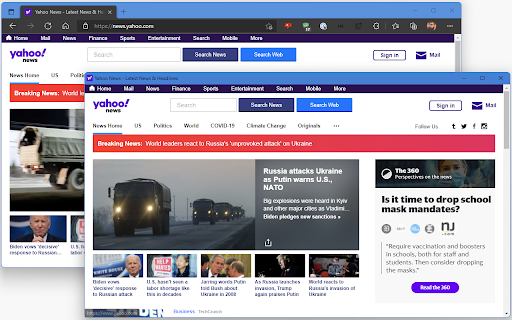
A simple extension that opens a new tap in App mode. Open repository: https://github.com/andr3marra/window-popup. With this extension you can open the current tab in a new window with app mode. App mode is just a browser windows without address bar or navigation buttons, reducing cluster and improving focus.

Popout
A simple extension that allows tabs to be opened in a separate minimal window. Popout is a simple extension that allows tabs and web apps to be opened in a separate window with minimal controls. This is different from dragging tabs to a new window because Popup windows do not have to tab view, the address bar, or any buttons. This saves screen space and allows easier navigation to commonly used website and apps.

anyPiP - Picture-in-Picture anything
Picture-in-Picture (PiP) is no longer restricted to video. You can now create a floating window out of any part of a website. Create your own floating widgets, which always stay on top of other windows. After installing the extension, simply click on the extension icon, and select the part of the page you want to open in a floating window. Notes: - Might not work correctly some parts of some webpages, as this depends on implementation of source webpage - This extension is not affiliated in any way with webpages in screenshots - Some pages work better when first viewed in mobile view (https://developer.chrome.com/docs/devtools/device-mode) This extension is open source, and its source code can be found on GitHub (https://github.com/MKaandorp/anyPiP).

Page to Popup
See your desired website in the toolbar popup. With the Page to Popup extension, you can easily see your desired website in the browser's toolbar popup (mobile or desktop views). Once the addon is installed, please open the options page and add the desired website (the complete URL). One desktop view and five different mobile views are available to choose from (iOS, Android, Windows Phone, Tizen, and Firefox OS). You can also adjust the popup size (width and height) and block ads within the popup. To report bugs, please fill out the bug report form on the addon's homepage (https://mybrowseraddon.com/site-to-panel.html).

Popup window
Move tab to standalone window, without tabs bar, navigation bar and bookmark bar UI. Move tab to standalone window, without tabs bar, navigation bar and bookmark bar UI. Usage: 1. Right click on link, click [Open this link in pop-up window] => po-pup link to standalone window. 2. Right click on page, click [pop-up/merge current page] => move current page to standalone window. 3. Click on toolbar button => move current page to standalone window.
